Manual PCAP reporting is the hidden bottleneck in modern security operations. When a breach occurs, the gap between detection and remediation — often measured in hours — determines the total cost of the incident. Yet despite millions invested in telemetry, many teams are still slowed by a decades-old workflow: an analyst opens Wireshark, spends hours parsing evidence, and manually formats findings into a PDF. For security leaders, shifting to automated PCAP reporting is no longer a luxury — it is a strategic necessity.
Manual vs Automated: The Numbers
The most compelling argument for automation is found in the time data. A typical manual PCAP investigation consumes 3–5 hours of skilled analyst time — AI automation compresses that to under 5 minutes.
| Task Stage |
Manual Analysis |
AI-Automated (PcapAI) |
Gain |
| Data Parsing | 30–60 min | <1 min | 60× faster |
| Threat Correlation | 60–120 min | 1–2 min | 90× faster |
| Drafting Summary | 45–60 min | 30 sec | 120× faster |
| Executive PDF | 30 min | Instant | 100% auto |
| Total | ~3–5 hours | ~4 minutes | 98% reduction |
Accuracy and the Human Fatigue Factor
Network forensics is a game of needles in haystacks. In a large PCAP, a single unauthorized DNS query or a slightly irregular TLS heartbeat can be the only indicator of a sophisticated threat. When an analyst is three hours into a manual investigation, fatigue sets in. Eye fatigue leads to missed indicators, and copy-paste errors can compromise the integrity of a legal or compliance audit.
Automated reporting eliminates human variance. AI models scan every packet with the same level of scrutiny at 4 PM as at 9 AM — ensuring every PDF report is consistent, comprehensive, and objective.
The Friday 5 PM Breach: A Tale of Two SOCs
SOC A — Manual Workflow
The lead responder opens Wireshark. Two hours in, they have enough to justify action — but the CISO has gone offline for the weekend. Documentation finishes Monday, leaving a 48-hour gap in the incident trail.
SOC B — AI-Automated
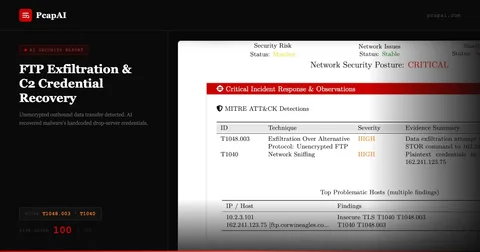
The responder uploads the PCAP. Within four minutes they have a PDF with exfiltration volume, destination country, and a specific port-blocking recommendation. The CISO approves host isolation before 5:15 PM.
SOC B prevented 90% of the targeted data from being exfiltrated. SOC A spent the weekend in a state of uncertainty.
Standardization for GDPR, SOC2, and NIS2 Compliance
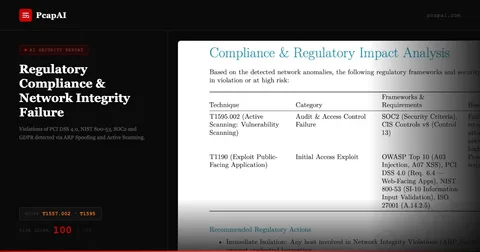
Regulatory frameworks like NIS2 in Europe and SEC disclosure rules in the US demand faster, more accurate reporting of cyber incidents. Automated PCAP reports provide an immutable audit trail. When a regulator asks for evidence of your response process, providing a folder of messy Wireshark screenshots is a liability. Providing automated compliance evidence in a standardized, AI-validated PDF demonstrates the level of maturity that can significantly reduce legal and financial exposure.
Empowering Non-Technical Stakeholders
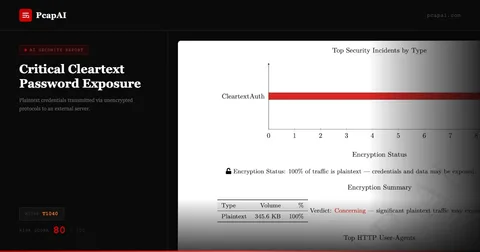
A CISO or board member does not need to see a TCP stream — they need a risk assessment. Automated reporting acts as a technical translator. It distills binary network reality into: an executive summary in plain English, an impact analysis identifying which assets were touched, and strategic recommendations to prevent recurrence. This transparency transforms the SOC from a black box into a transparent, value-driven department.
Calculating Your True Per-Investigation Cost
Most security teams calculate tool cost but not analysis cost. The formula for manual PCAP analysis cost per investigation is: (analyst hourly loaded rate) × (hours per investigation) × (investigations per month). For a mid-size SOC with five analysts at a $75/hour loaded rate, each spending 4 hours on a PCAP investigation, that is $300 per investigation — before accounting for the opportunity cost of threat hunting work that did not happen while the analyst was formatting Word documents.
At 20 investigations per month, that is $6,000 in analysis labor — $72,000 annually for one team. Enterprise SOCs processing hundreds of captures per month see proportionally larger numbers. The business case for automation is rarely about replacing analysts; it is about redirecting their hours from mechanical formatting to expert judgment, which is both higher-value and more defensible in a compliance audit.
The Hidden Cost of Context Loss
There is a cost that never appears in budget spreadsheets: the analyst who finishes a 4-hour investigation, starts writing the report, and gets pulled to an urgent incident before completing it. When they return two hours later, their mental model of the PCAP has degraded. They re-read their own notes, re-filter some flows to verify conclusions, and add cautious hedging to findings they were confident about earlier.
Memory decay is real and measurable in complex technical work. In a busy SOC where context switches are constant, a "4-hour analysis" routinely becomes a 6-hour process with lower output quality. AI-generated reports have no context loss: the system processes the full PCAP in one pass and captures every finding simultaneously, with zero degradation between detection and documentation.
The Scale Inflection Point
Manual PCAP analysis has a fundamental scaling constraint: investigation throughput is strictly proportional to headcount. To double capacity, you need to roughly double the number of senior analysts — expensive, slow to hire, and difficult to retain in a tight security labor market. AI-automated analysis breaks this constraint. PcapAI's pipeline handles parallel uploads; the bottleneck shifts from analysis time to human review time, which runs 10–15 minutes per report rather than 3–5 hours per investigation.
This inflection point is especially significant for MSSPs growing their client base. Adding an enterprise client who generates 50 PCAP files per month should not require hiring two new analysts. With AI-powered reporting, the same team absorbs the additional volume — with review time, not processing time, as the gating factor. The cost per investigation drops from hundreds of dollars to tens of dollars at scale, transforming PCAP analysis from a cost center into a competitive differentiator.
The Compliance Cost of Undocumented Analysis
Manual PCAP analysis generates a hidden compliance liability: the undocumented analysis. When an analyst investigates a capture without producing a structured record of what was examined, what was found, and what was not found, the organization has performed security work with no audit trail. For regulated industries operating under PCI-DSS, HIPAA, or SOC2, this is not a minor oversight — it is a gap in the incident response documentation that auditors will surface during the next review cycle. Automated reporting closes this gap structurally: every PcapAI analysis produces a timestamped, methodology-documented report as a byproduct of the analysis itself, requiring no additional documentation effort from the analyst. The compliance record is generated at zero marginal cost above the analysis cost.
Frequently Asked Questions
How long does manual PCAP analysis take compared to automated?
Manual PCAP analysis of a large capture takes hours of skilled analyst time: parsing, filtering, correlating, and writing the report. AI-automated analysis delivers the same coverage — with MITRE ATT&CK mapping and executive PDF — in under 5 minutes, a 98% time reduction.
What is automated PCAP reporting?
Automated PCAP reporting uses AI to parse packet captures, detect anomalies, map findings to MITRE ATT&CK, and generate executive-ready PDF reports without manual analyst intervention. Tools like PcapAI process the full lifecycle from upload to report delivery in under five minutes.
Does automated PCAP reporting help with GDPR and NIS2 compliance?
Yes. Automated reports create a consistent, immutable audit trail that satisfies GDPR data-minimization requirements and NIS2 incident reporting obligations. Unlike manual screenshot-and-Word workflows, AI-generated PDFs provide standardized, defensible documentation that holds up to regulatory and legal scrutiny.
Eliminate Manual PCAP Reporting Today
Join SOC teams that have reduced analysis time by 98%. Upload a capture and get your first AI report in under five minutes.