
macOS ClickFix Stealer: A PCAP Walkthrough
Published: June 9, 2026
On 11 May 2026, malware-traffic-analysis.net published a capture from a macOS infection that started the way a lot of them do now: a Google ad. Someone searching for Homebrew clicked a sponsored result, landed on a page impersonating the Claude download site, and followed ClickFix instructions — copy one line, paste it into Terminal, press Return. The payload that line installed asked for the login password, then Finder and folder access, and got all three. By the time the packet capture starts, the social engineering is over. What is left on the wire is the part the attacker cannot hide: the malware has to call home and ship the stolen data out. This is a walk through the 38-minute capture 2026-05-11-macOS-malware-infection-traffic.pcap the way we would triage it in an incident — and what PcapAI flagged from it automatically.
The lure: ClickFix from a fake Claude page
ClickFix is the delivery technique, not the malware. A fake page tells the victim to “fix” a problem — a broken install, a CAPTCHA, a missing dependency — by running a command the page has conveniently copied to their clipboard. On macOS that command is almost always a curl … | bash one-liner that pulls a second stage. The clever part and the weak part are the same: the victim runs it themselves, so there is no exploit and no download-time dropper to catch — but every step after that touches the network.
That framing matters for packet work. The capture will not show you the ad or the clipboard; it shows you what the installed stealer does next. macOS stealers of the AMOS/Atomic lineage that these campaigns deliver do a predictable set of things: read the Keychain, browser cookies and logins, crypto-wallet files and Notes, archive the loot, POST the archive to a collection server, and run a separate channel that beacons for tasking. The last two are loud on the wire. Let us find them.
What is in the capture
One host does effectively everything: 10.5.11.101, an Apple device (MAC 1c:f6:4c:57:46:99), with no DHCP hostname, sitting behind a Netgear SOHO gateway at 10.5.11.1. It accounts for about 18.8 MB of the roughly 18.9 MB total — the rest of the LAN is background noise. 92% of packets are TCP, and 80% of external bytes leave for the United States with a smaller slice to the Netherlands.
Capture
38.3 minutes · 42 assets · 92% TCP. SHA-256 3f4c4187…ad1ff1ea.
Findings
T1071.001 scripted HTTP polling · T1048.003 file upload over cleartext HTTP · overall risk 83/100, Severe.
PcapAI lays its three findings on one timeline, and that is the first thing worth looking at: a short upload window near the start, a polling channel running for 17 minutes after it, and a late low-severity indicator for Apple’s push service.
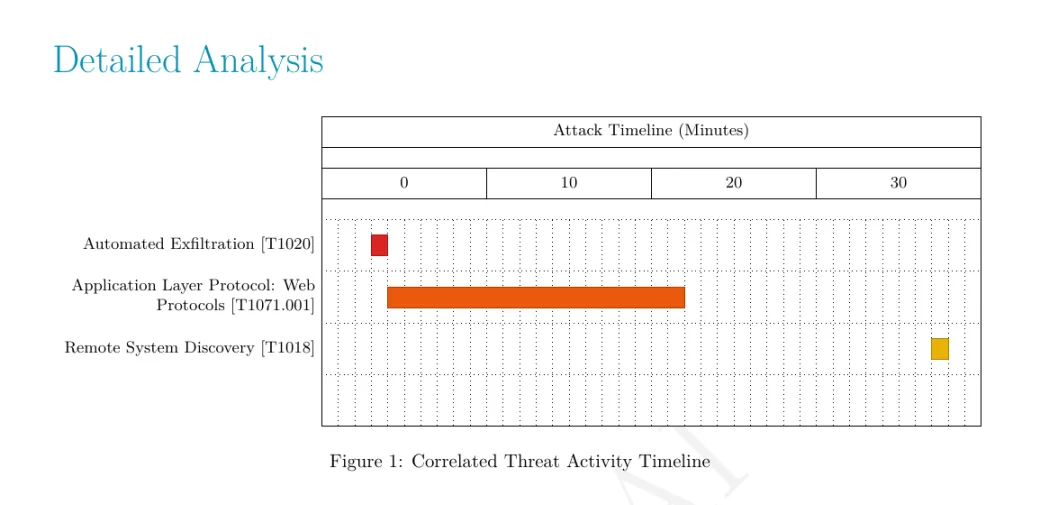
PcapAI’s finding windows: one concentrated upload window early in the capture (F01), the polling channel that follows it (F02), and a late low-severity indicator (F03).
The shape already tells the story — persistent control plus one concentrated theft window. Now the evidence for each.
Sign 1 — C2 beaconing over plain HTTP (T1071.001)
The host sends 21 requests to 94.232.249.129 (Netherlands, Psb Hosting, AS214927) over HTTP on port 80, 19 of them the same GET at a near-constant 56-second interval. Three things make this unambiguous beaconing rather than ordinary traffic:
The cadence
Real software does not poll a bare IP every 56 seconds for 17 minutes. In Wireshark, set the time column to “Seconds since previously displayed packet,” filter ip.addr == 94.232.249.129 && http.request, and the deltas stack into a column of ~56s. That regularity is the signature — a heartbeat, not a human.
The User-Agent
Every HTTP request in the capture carries curl/8.7.1 — 32 of them. A real macOS app talks to its backend through NSURLSession, which sends a Darwin/CFNetwork User-Agent, not curl. A curl client looping to an external IP is the malware’s own HTTP stack, copied straight out of the curl | bash install.
The endpoints
The requested paths are an API, not a website: /api/tasks/MWkklsTD/Z4Z/lZhac8H4Q==, /api/metrics/run, /api/tasks/ack, /api/join/. Check in, pull a task, acknowledge — a control protocol. The opaque token in the tasks path is the bot or campaign identifier.
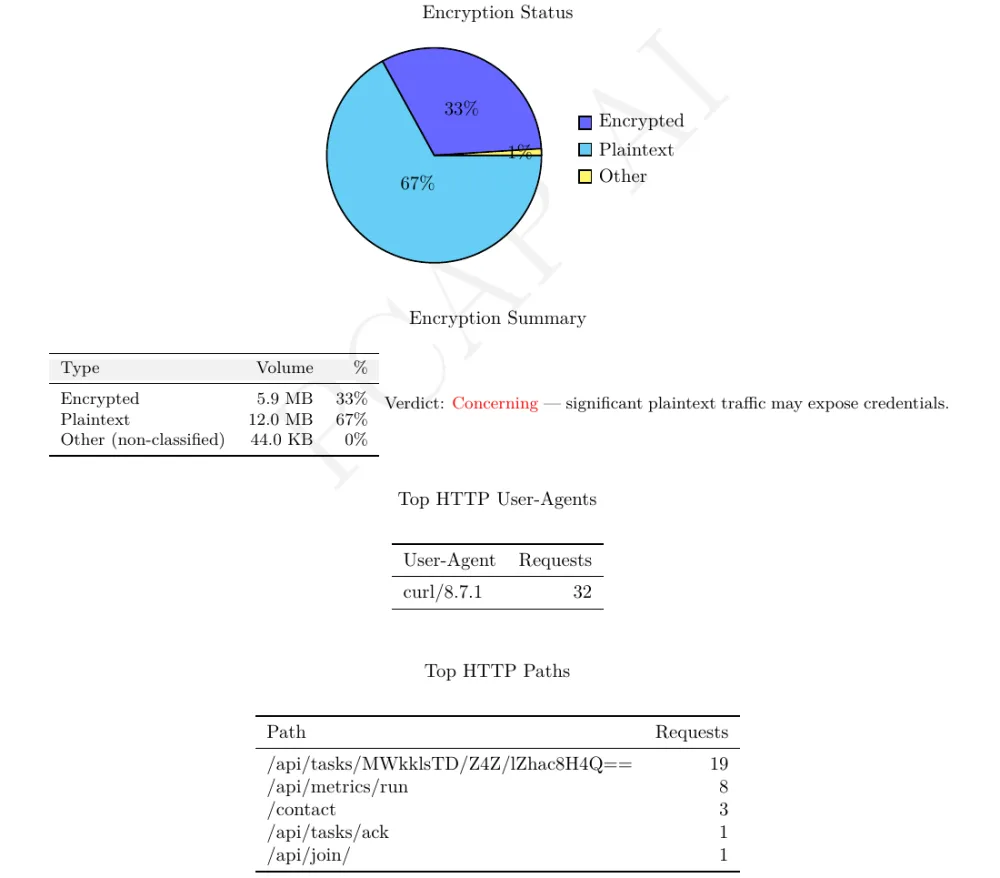
The smoking gun, straight from the report: one curl/8.7.1 client polling the same /api/tasks path on a bare IP, raised as a High-severity C2 threat (T1071.001).
None of it is encrypted. Cleartext HTTP carries 66.6% of the captured bytes, about 12 MB; TLS and QUIC carry most of the rest. For the analyst that is a gift — request and response bodies are right there in the capture — and for the victim it is a second exposure stacked on top of the theft.
Sign 2 — 11 MB of HTTP exfiltration in 10-second bursts (T1048.003)
The C2 channel is small and slow. The exfiltration is the opposite. The same host uploads 11.58 MB to a different IP — 165.245.215.18 (US) — in four sessions spaced about 10 seconds apart, again over plain HTTP/80. The traffic-volume graph spikes hard here: a peak of ~448 KB/s at T+230s, with the burst window packed into the first minutes of the capture (T+140s–T+240s). PcapAI reports the file uploads as finding F01 — three requests carrying a ZIP archive, 11.0 MB in total, sent by a script to a bare IP — a High-severity threat mapped to T1048.003, because this server is not the one the malware polls.
Two tells separate exfiltration from an ordinary upload:
- Direction. The byte ratio is overwhelmingly outbound — the host pushes a large body up and gets tiny acknowledgements back. A software update or a cloud backup has the same shape, so direction alone is not proof — but paired with the destination it is.
- The destination.
165.245.215.18has no DNS name in the capture, no CDN, no prior session reputation — the host simply starts shipping megabytes to a raw IP over HTTP. That is the archived Keychain, browser, and wallet loot leaving the machine. The 10-second spacing is the malware chunking the upload, not a person clicking “send.”
This is why the capture is dominated by one host: the exfiltration alone is roughly 60% of all bytes on the wire. Everything else — Apple Push, iCloud, a little Google — is the normal macOS background hum the device kept making while it was being robbed.
Sign 3 — read the noisy signals honestly (port 5223, DNS-SD, NXDOMAIN)
Automated analysis earns trust by being right about the ambiguous parts, so here is the honest read on the third finding. PcapAI raises one Low-severity indicator: TLS on port 5223 to 17.57.144.89 and 17.57.144.92. Both answer as courier.push.apple.com — Apple’s push notification service, which every Mac keeps open. The report files it as an indicator, not a threat, and that is the right weight.
The capture also holds 10 DNS PTR (reverse-lookup) queries for names like db._dns-sd._udp.0.11.5.10.in-addr.arpa and …mshome.net. That is DNS-SD / mDNS — Bonjour service discovery — which macOS runs on its own to find printers, AirPlay targets, and file shares. On a quiet SOHO segment it produces exactly this kind of low-volume PTR traffic and exactly these NXDOMAIN failures. So while “the host is enumerating the local network” looks like T1018 Remote System Discovery, on an Apple endpoint it is indistinguishable from stock OS behavior. The report raises no finding for it, and I would not escalate on it either.
The 36% NXDOMAIN rate is the same story: it clears a common “investigate” threshold (>20%) and could be a DGA — malware cycling through generated domains to find a live C2 — but in this capture most of the failures are the mDNS lookups above, and PcapAI’s DGA check, which counts distinct generated-looking names under one domain, stays quiet. A finding is a pointer to evidence, not a verdict. The C2 and exfiltration findings hold up under that scrutiny; the noise around them resolves to macOS being macOS — and saying so is what makes the other two findings worth trusting.
The verdict
Stacked together, the capture is an open-and-shut compromise: a persistent HTTP C2 channel (T1071.001) and active data theft (T1048.003) from one endpoint, with the Apple background traffic as noise. PcapAI scores the overall risk 83/100, Severe, from two High-severity threats — and, more useful than the number, it puts them in one incident: the polling and the uploads come from the same host and the same curl client, not two unrelated events.
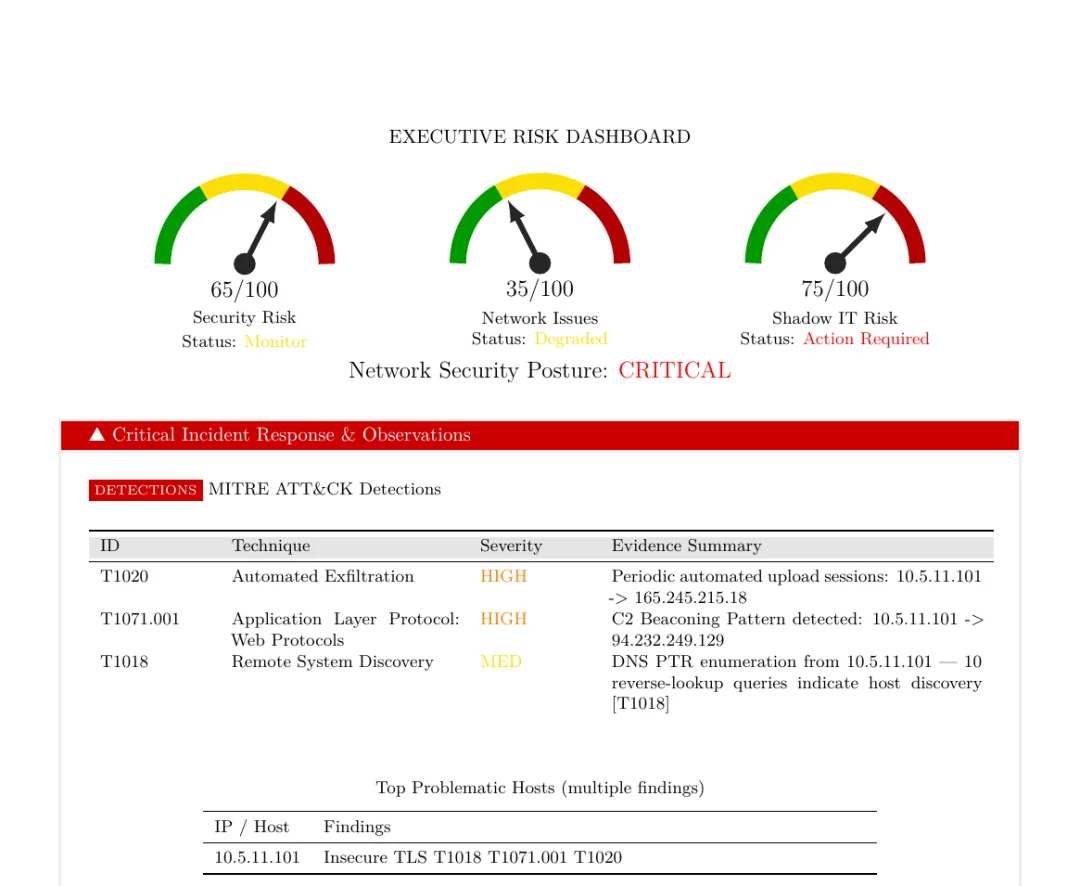
The report’s executive summary for 10.5.11.101: polling to one server, uploads to another, one incident, and two thirds of the bytes in cleartext HTTP.
The remediation writes itself, and the report spells it out: isolate 10.5.11.101 now, add egress blocks for 94.232.249.129 and 165.245.215.18, then image the host for the dropper and assume every credential on it is burned. Those 10-second exfil bursts mean you treat the Keychain and browser logins as already gone — rotate them, do not wait.
Indicators of compromise
From this public sample — treat as historical, since infrastructure rotates quickly:
| Indicator | Type | Notes |
|---|---|---|
| 10.5.11.101 | Victim host | Apple, MAC 1c:f6:4c:57:46:99 |
| 94.232.249.129 | C2 server | NL, Psb Hosting (AS214927) · HTTP/80 polling, ~56s |
| 165.245.215.18 | Exfil server | US · HTTP/80, 11.58 MB outbound |
| suzke.com | Domain | 172.67.165.232 (Cloudflare) · TLS, secondary |
| dedelk.com, culturabia.com, alragaa.com, rapid-craft567.com | Domains | TLS 1.2, staging / secondary |
| curl/8.7.1 | User-Agent | Malware HTTP client (32 requests) |
| /api/tasks/… · /api/metrics/run · /api/tasks/ack · /api/join/ | URI paths | Tasking / check-in API |
| 3f4c4187…ad1ff1ea | SHA-256 | Source PCAP |
Catch it in your own captures
You do not need this exact infrastructure to catch the next one. The behaviors generalize, and each is a one-line hunt:
- curl / wget / python User-Agents to external IPs. Legitimate desktop apps rarely use them.
http.user_agent contains "curl"surfaces this whole class in one filter. - Fixed-interval requests to a bare IP. Group by source/destination and look at the time deltas; a tight cluster around a constant (56s here) is a beacon, whatever the port or protocol.
- Plain HTTP carrying megabytes outbound to an IP with no DNS name. Updates and backups have names and reputations; loot servers usually do not.
- One host that is ~100% of your external bytes. In a compromised-endpoint capture, the victim stands out on volume alone.
Doing this by hand on every capture is the job. Doing it in under five minutes on every capture is the point of automating it — PcapAI runs these checks and 40+ others, maps each hit to its MITRE ATT&CK technique, and hands back a PDF you can attach to the ticket.
Frequently Asked Questions
What is ClickFix?
A social-engineering technique that gets the victim to paste and run a command — usually a curl | bash one-liner on macOS — from a fake “fix this” page. It sidesteps download-time defenses because the user runs the command themselves, but the malware it installs still has to use the network, which is where it gets caught.
Can you detect macOS malware from a PCAP without an endpoint agent?
Yes. A capture does not know or care what OS or EDR is on the host. C2 beaconing, plaintext exfiltration, and suspicious User-Agents are visible in the packets regardless of platform. This capture had no agent and the compromise is unmistakable from the traffic alone.
Why is a curl User-Agent a red flag on macOS?
Native macOS apps use NSURLSession / CFNetwork, which send a Darwin/CFNetwork User-Agent. A curl User-Agent beaconing to an external IP is almost always a script or malware acting as its own HTTP client — exactly what a curl | bash installer leaves behind.
Which MITRE ATT&CK techniques showed up?
T1071.001 (Application Layer Protocol: Web Protocols) for the scripted HTTP polling of the C2 server, and T1048.003 (Exfiltration Over Unencrypted Non-C2 Protocol) for the 11 MB of files uploaded to a second server. The DNS-SD reverse lookups that look like T1018 (Remote System Discovery) are macOS Bonjour traffic, and the report does not raise them.
Real-world detections
Have a Capture You Need to Triage?
Upload your PCAP and get a MITRE-mapped forensic PDF — C2 beaconing, exfiltration, and suspicious User-Agents flagged automatically, in minutes.