The Challenge: Hunting Layer 2 Threats in the Noise
Detecting an Adversary-in-the-Middle (AitM) attack — such as ARP Cache Poisoning — within a large network capture is like finding a needle in a haystack. Address Resolution Protocol (ARP) traffic is inherently noisy, constantly broadcasting legitimate queries across the local subnet to map IP addresses to physical MAC addresses.
Standard firewalls operate at Layer 3 and above, making them completely blind to these Layer 2 deception tactics. When a malicious insider or compromised endpoint begins broadcasting forged ARP replies to intercept internal traffic, incident responders are forced into a highly manual analysis workflow — drastically increasing mean-time-to-respond (MTTR) while the adversary silently exfiltrates data.
Relying on Wireshark filters like arp.duplicate-address-detected often yields false positives from misconfigured DHCP servers, requiring engineers to manually correlate MAC conflicts with the legitimate subnet gateway (e.g., 192.168.1.1) over hours of analysis.
Once a host's traffic flows through the attacker, every cleartext session on it is readable: cookies, search terms, logins. Proving what crossed the interception path means reassembling HTTP streams by hand.
The Solution: Automated ARP Forensics with Evidence
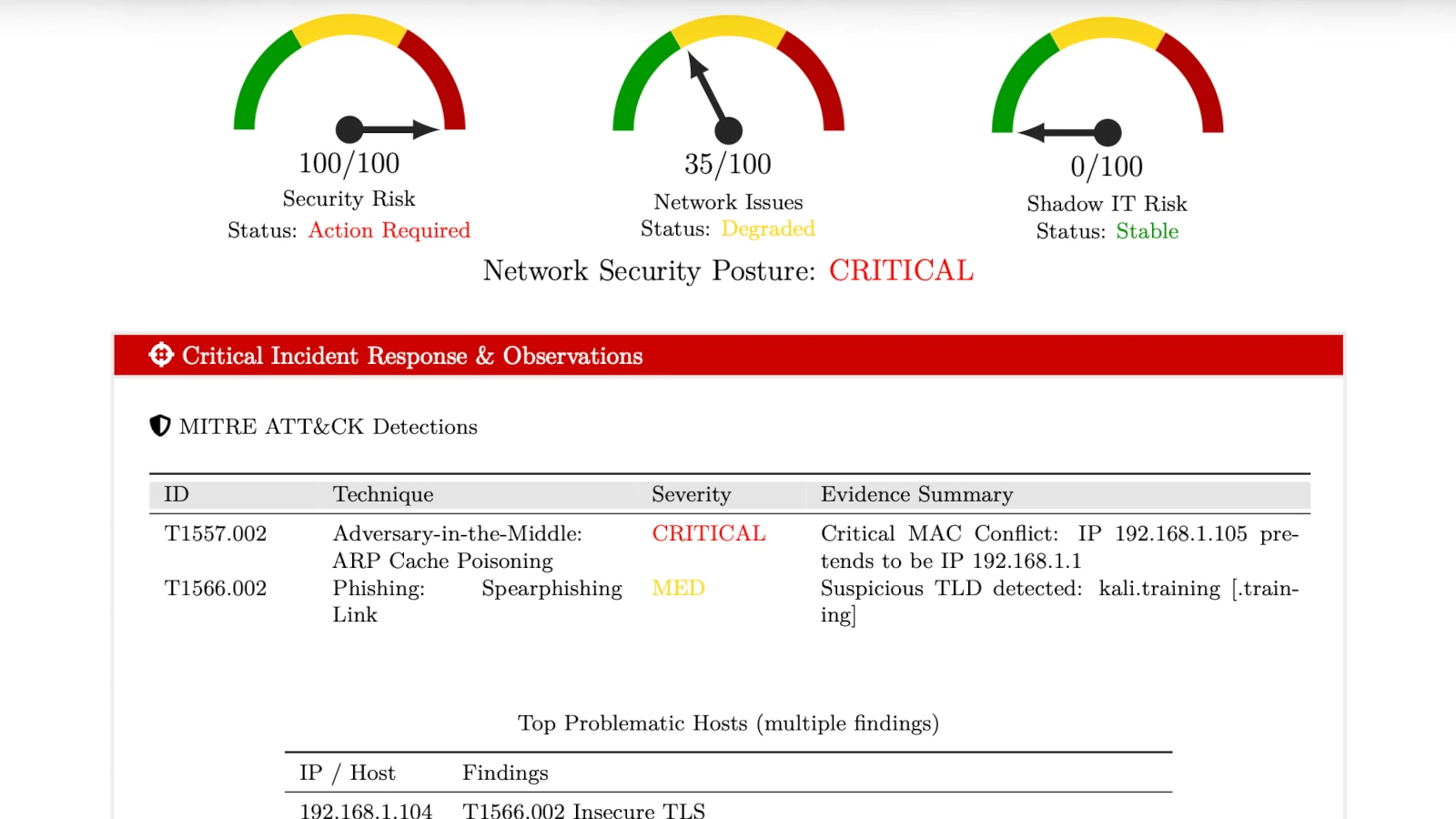
PcapAI removes the manual packet hunt. Instead of single-packet Wireshark filters, the engine tracks ARP across the whole capture: which MAC claims which IP address, when a claim changed, and where each host's traffic went next. The report shows the moment the gateway was impersonated, the hosts whose traffic was redirected and the frames behind each claim — proof of Adversary-in-the-Middle interception you can hand to whoever isolates the port.
-
✦
MITRE T1557.002 (ARP Cache Poisoning): in the sample report, a device with MAC
00:25:b3:bf:91:ee(172.16.0.105) claimed the gateway address172.16.0.1; from that moment host172.16.0.107sent its internet traffic through it instead of the real gateway. -
✦
MITRE T1539 (Steal Web Session Cookie): flagged the cleartext HTTP that crossed the interception path — 12 session tokens and 12 search terms from
172.16.0.107were readable to the device in the middle. - ✦ Immediate Containment Data: the PDF names the rogue MAC and IP, the impersonated gateway and the affected hosts with the frames behind each claim, and orders the response: isolate the switch port, flush ARP caches, turn on DHCP snooping and ARP inspection.
Wireshark Manual Analysis vs. PcapAI
Manual (Wireshark)
Setting arp.duplicate-address-detected display filters, manually exporting endpoint MAC lists to Excel, and correlating traffic across TCP streams. Process takes 30-60 minutes.
PcapAI
ARP claims tracked across the capture, the interception mapped to MITRE ATT&CK and the cleartext sessions on the path listed. Free summary in about two minutes for captures up to 20 MB.
How It Works
Upload Your PCAP
Drop a .pcap or .pcapng file up to 20 MB (50 MB on the Pro and Advanced plans). No installation, no account required.
PcapAI Reconstructs the Network
Our engine tracks the full ARP state machine, maps all endpoints, and flags behavioral anomalies across every packet.
Get Actionable Findings
Receive a full report with rogue MAC/IP, MITRE ATT&CK mappings, and isolation steps — ready to act on immediately.
Frequently Asked Questions
How do you detect ARP spoofing in Wireshark?
To manually detect ARP spoofing in Wireshark, apply the display filter arp.duplicate-address-detected or navigate to Analyze > Expert Information to look for ARP warnings. This method often triggers false positives from IP conflicts or misconfigured DHCP servers, requiring you to manually verify the MAC address against the legitimate default gateway — a process that can take 30-60 minutes on large captures.
What is MITRE ATT&CK T1557.002?
MITRE ATT&CK T1557.002 refers to ARP Cache Poisoning, a specific Adversary-in-the-Middle (AitM) technique. An attacker broadcasts spoofed ARP messages on a local network segment to associate their MAC address with another host's IP — typically the default gateway — allowing them to silently intercept and inspect network traffic.
What is the difference between ARP spoofing and ARP poisoning?
ARP spoofing and ARP poisoning refer to the same attack. "Spoofing" describes the technique — sending forged ARP replies with a fake MAC address. "Poisoning" describes the result — the victim's ARP cache now contains a corrupted mapping. Both terms are used interchangeably in security tooling and MITRE ATT&CK documentation.
Can ARP spoofing be detected on encrypted networks?
Yes. ARP operates at Layer 2, below TLS or any application-layer encryption. Even on networks where all HTTP traffic is encrypted, ARP poisoning is still visible in packet captures because the forged ARP replies appear in plaintext regardless of upper-layer encryption. PcapAI detects the attack at the ARP layer directly, independent of whether the intercepted payload is encrypted.
What tools detect ARP spoofing automatically?
Several tools can help detect ARP spoofing: XArp and arpwatch monitor live network traffic for ARP anomalies, while Wireshark requires manual filter configuration. For post-incident forensics from a PCAP file, PcapAI automates the full analysis — identifying the rogue host, mapping the attack to MITRE ATT&CK, and writing a report with isolation steps, without any manual filtering.
Related Use Cases
Test it on your own traffic
Got a suspicious PCAP from your own network? Upload it now and see exactly what PcapAI finds — or see packs and plans for regular captures.
Sample Report: Executive Summary