The Challenge: The "Sea of Red" in Wireshark
When enterprise users complain that "the application is slow," network engineers and DevOps teams are caught in a stressful blame game. To find the root cause, someone has to pull a massive PCAPNG from the core switch and manually comb through the traffic.
What they find is usually an overwhelming "sea of red" — thousands of TCP Retransmissions, Duplicate ACKs, and Spurious Retransmissions. Proving whether that's caused by a physical link drop, a congested switch buffer, or an overloaded application server is a manual, error-prone process that can devastate your MTTR while the outage continues.
Applying tcp.analysis.retransmission only tells you that packets are dropping, not why. Engineers are left guessing whether the cause is an MTU mismatch, asymmetric routing, or a saturated uplink.
Proving a specific latency bottleneck requires manually plotting tcptrace I/O graphs, calculating average Round Trip Times (RTT) across streams, and comparing sequence and acknowledgment numbers by hand.
The Solution: Automated Performance Diagnostics
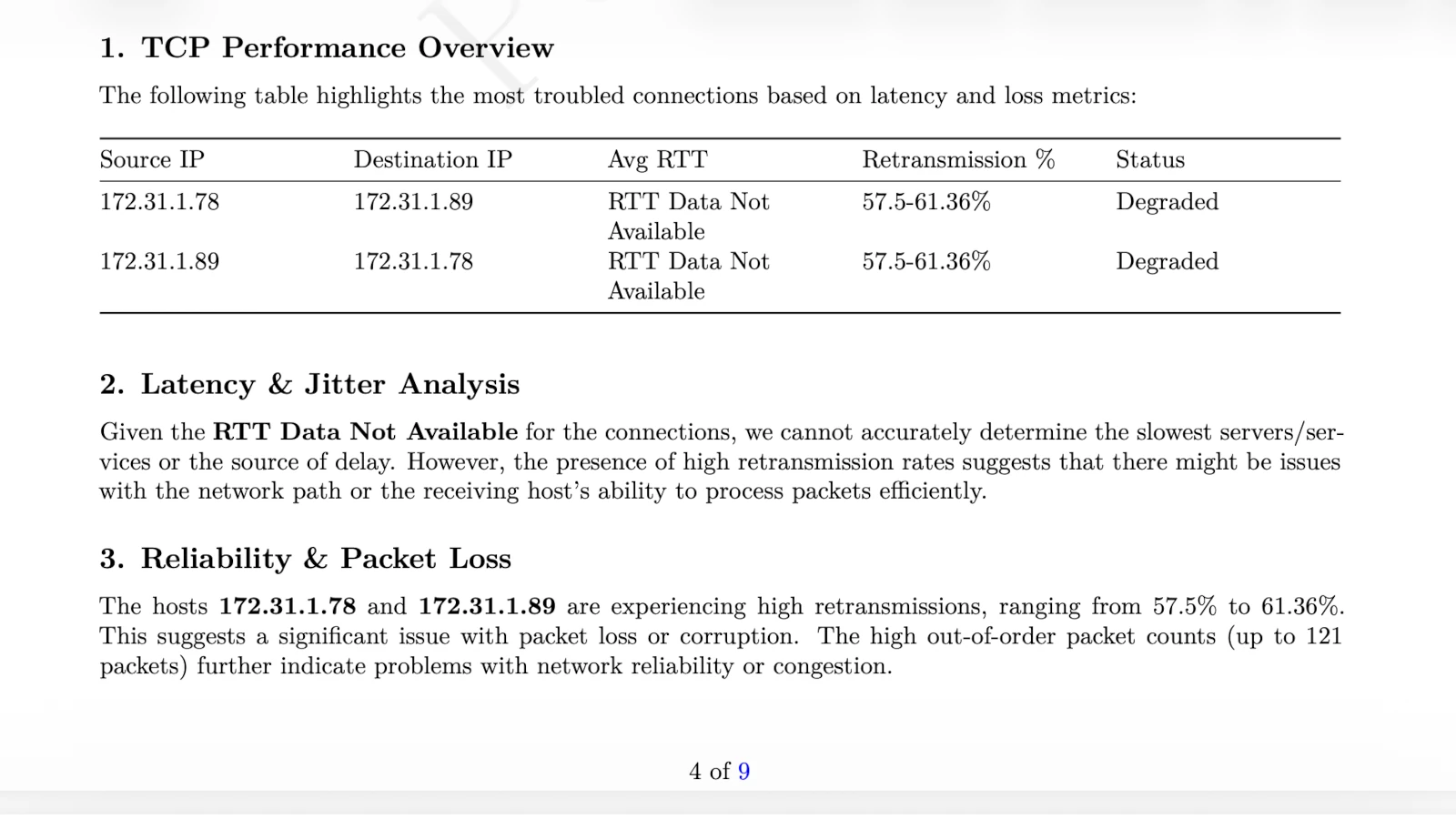
PcapAI removes the manual stream tracking and graphing. Upload the capture and the engine measures loss per server and direction, round-trip times, window problems and DNS answers, then says where the fault lies — client, network path or server — and who owns the fix.
-
✦
Retransmission Scoring per Connection: calculates packet loss per server and direction. In the sample report, 157 of 1,078 data segments (14.6%) on connections to
192.168.88.246:10000were retransmitted, mostly on data the server sent. - ✦ Network vs. Application Latency: separates slow network paths with high round-trip times from overloaded server applications triggering TCP Zero Window or Window Full events — so you know exactly who to call.
- ✦ MTU Black Hole Detection: spots full-size segments retransmitted again and again while small packets get through — the signature of a path that silently drops large packets. In the sample, the report places the fault in the network path and asks you to test the path MTU and allow ICMP fragmentation-needed.
- ✦ A PDF for Whoever Owns the Fix: the report names the fault domain, the affected hosts and times, and fix steps with commands and a verification for each. Send it to your ISP, hosting provider or vendor instead of another "the network is slow" ticket — it ends the finger-pointing between the application team, the network team and outside providers.
Wireshark Manual Analysis vs. PcapAI
Manual (Wireshark)
Configuring tcp.analysis filters across multiple streams, exporting tcptrace graphs to external tools, and manually calculating RTT averages. Process takes 1–3 hours.
PcapAI
Loss per connection and direction, latency split between the network and the server, and the fault domain named. Free summary in about two minutes for captures up to 20 MB (50 MB on Pro).
How It Works
Upload Your PCAP
Drop any .pcap or .pcapng file — captured from a firewall, switch SPAN port, or any network tap. No installation required.
PcapAI Profiles Every TCP Flow
Our engine calculates RTT, retransmission rates, window sizes, and Zero Window events across every connection — not just the top 10.
Know Exactly What to Fix
Get a ranked list of the worst-performing endpoints, root cause classification, and a PDF report you can hand to your vendor or management.
Frequently Asked Questions
How do you find TCP retransmissions in Wireshark?
The standard approach is the display filter tcp.analysis.retransmission or tcp.analysis.fast_retransmission. This highlights individual dropped packets but doesn't calculate the overall retransmission rate or tell you which endpoint is responsible. PcapAI analyzes every flow in bulk, calculates per-endpoint loss percentages, and points directly to the offending IP pair — without any manual filtering.
What causes a TCP retransmission storm?
A TCP retransmission storm occurs when a significant percentage of packets are dropped in transit, forcing the sender to repeatedly retransmit. Common root causes include congested top-of-rack switch buffers, faulty Ethernet cabling, duplex mismatches between interfaces, or an overloaded stateful firewall dropping active connections. Microbursts — sudden traffic spikes lasting just milliseconds — are a particularly common and hard-to-spot cause that standard SNMP monitoring completely misses.
What is a TCP Zero Window and why does it cause slowness?
A TCP Zero Window event occurs when a receiving host advertises a receive window size of zero, signaling to the sender that its buffer is full and it cannot accept more data. This effectively pauses the connection until the receiver processes its backlog. Zero Window events are a server-side problem — they indicate the application or OS cannot consume data fast enough — and are often misdiagnosed as network issues. PcapAI automatically distinguishes Zero Window slowdowns from genuine network packet loss.
What is the difference between a TCP retransmission and a spurious retransmission?
A standard TCP retransmission occurs when the sender doesn't receive an acknowledgment within the timeout window and resends the packet — indicating genuine packet loss. A spurious retransmission occurs when the ACK actually arrived, but the sender's retransmission timer fired too early due to RTT measurement errors or aggressive timeout values. Spurious retransmissions indicate a tuning problem rather than actual packet loss, and confuse standard Wireshark filters that treat both types identically.
How do you calculate packet loss rate from a PCAP file?
Manually calculating packet loss from a PCAP requires counting retransmitted segments per TCP stream, dividing by total segments, and aggregating across all flows — a process that requires scripting or extensive manual work in Wireshark's Statistics menu. PcapAI calculates the global retransmission rate and per-flow packet loss automatically from any PCAP upload, presenting the results as a ranked list of the worst connections.
Related Use Cases
Stop guessing. Start proving.
Upload a capture of the slow application traffic: the free summary shows the problems in about two minutes, and the $9 PDF adds the hosts, the fault domain and the fix. Or see packs and plans for regular captures.
Sample Report: Executive Summary