The Challenge: Hunting for Hidden Secrets
Legacy applications, IoT devices, and misconfigured developer environments routinely transmit sensitive data in plaintext — long after the rest of the network moved to TLS. Finding these leaks during a forensic investigation or zero-trust audit means manually digging through millions of packets hoping to catch a credential before an attacker does.
HTTP Basic Authentication, unencrypted API calls, and session cookies travelling over port 80 are all invisible to standard firewall logs. The only way to find them is at the packet level — and doing that manually is slow enough that the damage is often already done by the time anyone looks.
Even after applying http.authbasic in Wireshark, the credential is still Base64 encoded. You have to copy the string, paste it into a decoder, and manually verify severity — for every single match.
Spotting XSS probes requires manually inspecting URL-encoded GET requests across thousands of HTTP packets to find malicious brackets (><) and evaluate the injection context — with no automated scoring.
"We suspected a legacy app was leaking service account passwords on the internal subnet. Going through a 2GB capture and right-clicking 'Follow TCP Stream' on hundreds of connections just to find one unencrypted HTTP login took our threat hunters several hours."
— Threat Hunter, Financial Services Company
The Solution: Automated Payload Inspection
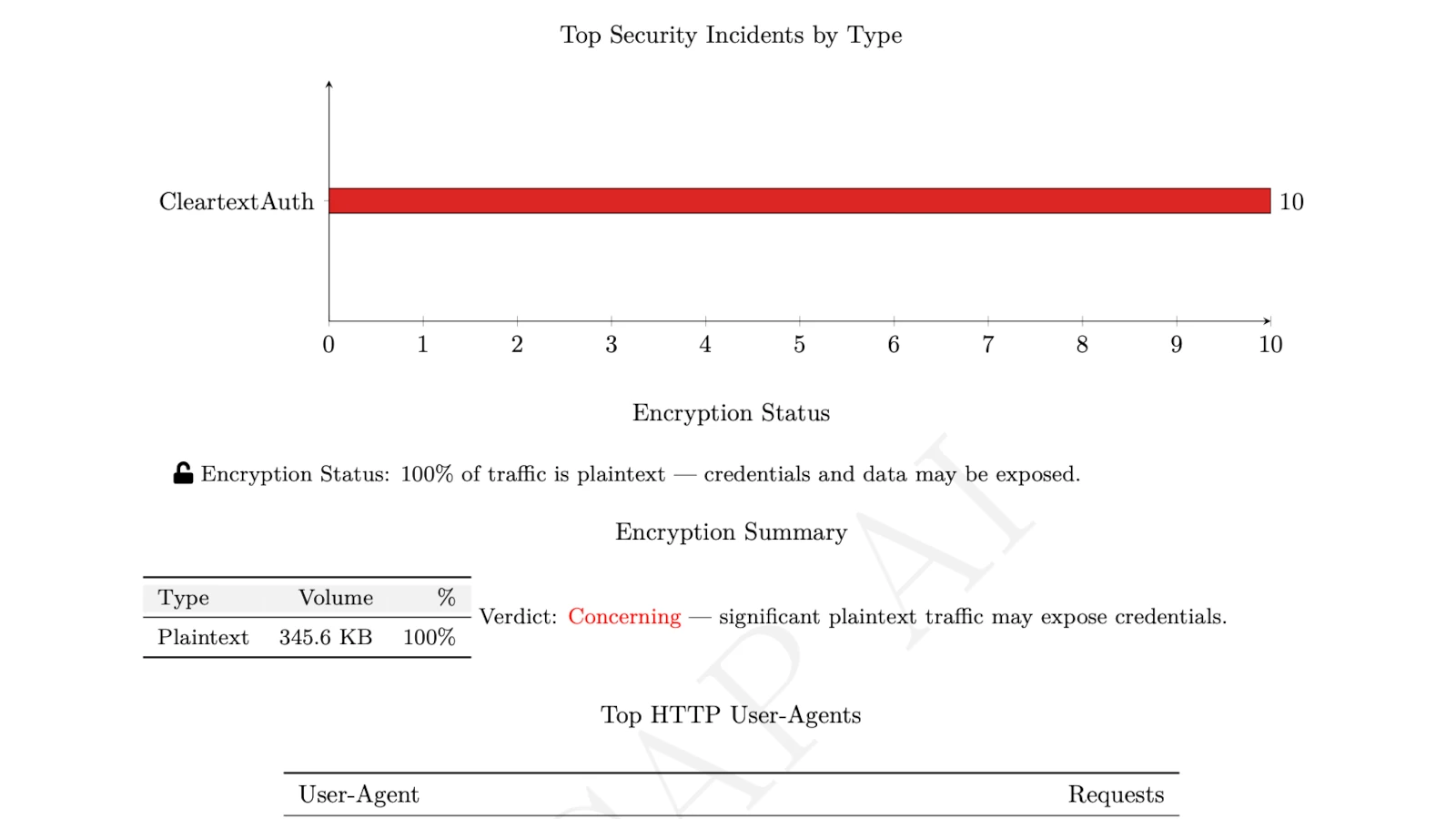
PcapAI eliminates manual payload inspection and TCP stream reassembly entirely. Upload your capture and our deep packet inspection engine automatically calculates encryption ratios, extracts and decodes unencrypted credentials, and maps every finding to the MITRE ATT&CK framework — turning a multi-hour triage into a sub-minute report.
-
✦
MITRE T1040 (Network Sniffing): automatically flags plaintext credentials in HTTP traffic, instantly decoding Base64 strings (e.g.,
admin:password123) and identifying the exact source IP leaking the data — no manual copy-paste required. - ✦ MITRE T1190 (Exploit Public-Facing Application): detects URL-encoded XSS probes and SQL injection payloads without manual string searches or custom regex — flagged and scored automatically across the full capture.
- ✦ Encryption Status Auditing: instantly calculates what percentage of traffic is plaintext versus encrypted, identifying exactly which internal hosts and ports are transmitting sensitive data unprotected.
-
✦
Enterprise-Grade Redaction: all recovered plaintext passwords and session cookies are automatically masked (e.g.,
P********3) in the final forensic report — keeping the finding auditable without exposing live credentials.
Wireshark Manual Analysis vs. PcapAI
Manual (Wireshark) — 1.2GB PCAP
Applying http.authbasic filters, manually following TCP streams, and copying payloads into external Base64 decoders. Process takes 30–60 minutes.
PcapAI — 1.2GB PCAP
Automated encryption ratio calculation, decoded credential extraction, and MITRE ATT&CK mapping with redacted report. Process takes under 20 seconds.
How It Works
Upload Your PCAP
Drop any .pcap or .pcapng file — from an internal switch SPAN port, a firewall mirror, or a developer environment. No account required.
AI Inspects Every Payload
Our engine reassembles TCP streams, decodes Base64 payloads, calculates encryption ratios, and flags XSS and injection probes — across the entire capture at once.
Get a Redacted Report
Receive a compliance-safe PDF with every exposed credential masked, MITRE ATT&CK mappings, and the exact source IPs to patch or isolate.
Frequently Asked Questions
How do you find HTTP Basic Auth credentials in Wireshark?
Apply the display filter http.authbasic to isolate Basic Authentication packets. The credentials are visible in the packet details pane, but remain Base64 encoded — you have to copy the string and decode it manually in an external tool to read the actual username and password. PcapAI automates this entire process: it finds, decodes, and flags every HTTP Basic Auth occurrence as a MITRE T1040 risk in seconds, with credentials masked in the output report.
Why is cleartext traffic dangerous for compliance?
Plaintext traffic — any data transmitted without TLS encryption — can be read by anyone with access to the network path, including a compromised internal host performing passive sniffing. Passwords, session cookies, and API tokens transmitted over HTTP are trivially captured and reused for lateral movement. PCI-DSS 4.0, HIPAA, and SOC2 all mandate encryption in transit; a single cleartext credential finding in a PCAP can constitute a reportable compliance failure.
What protocols can expose plaintext credentials in a PCAP?
The most common sources of plaintext credential exposure in network captures are HTTP Basic Authentication (port 80), FTP (port 21), Telnet (port 23), SMTP without STARTTLS (port 25), and legacy LDAP (port 389). PcapAI automatically inspects all of these protocols in a single pass, flagging any instance where credentials or session tokens are transmitted without encryption — regardless of the port or protocol involved.
Can you recover credentials from an old PCAP file?
Yes — if the traffic was captured before TLS encryption was applied, the credentials are permanently stored in the PCAP and can be extracted at any time. This is why PCAP files containing sensitive traffic must be treated as highly sensitive artifacts. PcapAI can process captures of any age and extract plaintext credentials from historical traffic, which is particularly useful during post-breach forensics to understand what an attacker may have captured.
What tools find cleartext passwords in network traffic automatically?
Tools like Dsniff and Ettercap can extract plaintext credentials from live traffic, but require local installation and root access. For forensic analysis of an existing PCAP file, PcapAI automates the full process — decoding Base64 credentials, auditing encryption ratios, mapping findings to MITRE ATT&CK, and generating a compliance-safe redacted report — in under 60 seconds with no installation required.
Related Use Cases
Are your internal apps leaking credentials?
Upload any PCAP from your internal network and find out in under 60 seconds — before an auditor or an attacker does. Nothing stored after 24 hours. Or view pricing for enterprise SOC integration.
AI Analysis Output (Sample)