When network engineers and security analysts need to examine packet captures, the choice between PcapAI and Wireshark defines two fundamentally different workflows. Wireshark is the open-source, GUI-based packet analyzer that has been the industry standard for interactive protocol inspection for over two decades. PcapAI is an AI-powered platform that converts raw .pcap and .pcapng files into forensic PDF reports with automatic MITRE ATT&CK mapping in under five minutes. This article compares both tools honestly - where each excels, where each falls short, and how to decide which fits your specific investigation.
What Wireshark Does Best
Wireshark is a masterpiece of protocol engineering and it earns its place on every security engineer's workstation. Its dissection engine understands hundreds of protocols out of the box, rendering every bit field in an explorable tree you can navigate frame by frame. Display filter syntax - tcp.flags.syn == 1 && !tcp.flags.ack - is expressive and precise, letting analysts isolate exactly the traffic they care about. The Expert Information panel surfaces TCP retransmissions, window-zero events, and malformed packets as they appear in the capture without any configuration.
Stream following - TCP, UDP, or TLS with pre-loaded decryption keys - reconstructs application-layer conversations interactively, making it possible to read the plaintext content of an HTTP session or trace the byte sequence of a binary protocol. tshark, the command-line companion, enables scriptable extraction: pipe it into jq, feed it to Python, build your own pipeline. For engineers debugging a specific TCP handshake failure, tracing TLS negotiation frame by frame, or reverse-engineering a proprietary protocol, Wireshark has no equal.
The core strength of Wireshark is interactivity: it puts every packet within reach and lets the analyst drive the investigation wherever intuition leads. It is also completely free and runs on every major platform. These qualities have made it the default answer when anyone asks "how do I look at this capture?"
What PcapAI Does Best
PcapAI is built for a different objective: comprehensive, documented findings delivered fast. Upload a .pcap or .pcapng file - up to 25 MB on starter plans, up to 50 MB on pro plans - select an analysis mode (Security, Forensic, Troubleshooting, Compliance, or Shadow), and the AI engine begins working immediately. Full L3 defragmentation and L4 TCP reassembly happen before any detection logic runs, so application-layer content in multi-segment sessions is visible in its complete form rather than as fragmented binary artifacts.
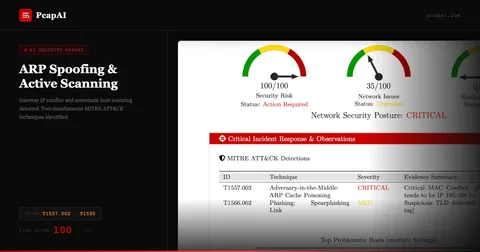
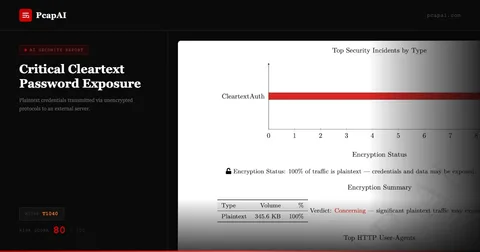
The detection layer runs 40+ behavioral algorithms simultaneously: C2 beaconing by periodic check-in pattern (T1071), cleartext credential extraction across FTP, POP3, SMTP, NTLM, and HTTP Basic Auth (T1040), DGA domain recognition by ML model (T1568.002), payload entropy analysis to flag potential exfiltration (T1048), ARP cache poisoning detection (T1557.002), protocol tunneling over non-standard ports (T1572), and many more. Every triggered finding is mapped to its MITRE ATT&CK technique, explained in plain English, and assigned a risk score.
The output is a professional PDF - an executive summary with a numeric risk score for management, a technical findings section with per-event evidence and T-codes for the analyst, and a remediation checklist. Credentials found in packets are automatically redacted in the report; the finding is documented, but the plaintext secret is never exposed. The entire report is ready to share with stakeholders, attach to a ticket, or archive as audit evidence, within minutes of upload.
Speed - Minutes vs Hours
The time difference between the two approaches is the most immediate operational distinction.
Manual (Wireshark)
A thorough investigation of a 20 MB capture - building display filters, following streams, documenting each finding, formatting screenshots into a report - consumes 2–5 hours of skilled analyst time. In an active incident, this delay is a window of opportunity for lateral movement and data exfiltration.
PcapAI
Upload → AI performs ingestion, L3/L4 reassembly, 40+ behavioral detections, MITRE mapping, and PDF generation in under 5 minutes. The analyst receives a finished, shareable report before a Wireshark session has been set up.
Speed matters most during incident response, where every minute of investigation delay is a minute the attacker retains access. AI-powered analysis enables real-time triage: submit the capture, receive the findings, begin containment - all before the manual analyst has opened the file.
Coverage - 40+ Detections vs Manual Filters
Wireshark surfaces everything - but only what you know to look for. Catching C2 beaconing in Wireshark requires building a filter that accounts for the expected beacon interval, the likely destination port, and the protocol being abused. If an attacker uses a domain generated algorithmically (DGA) and rotates IPs on every check-in, a manually constructed filter will miss it entirely. The effectiveness of a Wireshark investigation scales directly with analyst expertise and knowledge of the specific threat being hunted.
PcapAI's detection engine runs regardless of what the analyst expects to find. Behavioral algorithms identify beaconing by statistical periodicity - not by knowing the destination IP. DGA detection uses a machine learning model to flag algorithmically generated domain names without a pre-seeded blocklist. Payload entropy scoring catches high-randomness content on unexpected ports (a common indicator of exfiltration, T1048) even when the destination domain is unknown and has no threat intelligence entry. GeoIP enrichment flags connections to high-risk jurisdictions automatically.
The practical consequence is that PcapAI frequently surfaces threats that a Wireshark analyst would not think to look for - not because the analyst is unskilled, but because the attacker's technique falls outside the analyst's immediate mental model of the incident. Exhaustive parallel coverage is the structural advantage of automated analysis.
Reporting - Structured PDF vs Manual Assembly
Wireshark generates no reports. An analyst finishes their investigation with screenshots, filter strings, and notes that must be assembled into a document by hand - a process that routinely consumes as much time as the analysis itself, with quality varying by analyst skill and available time.
Wireshark output:
Raw packet view, screenshots, and display filter strings. No report format, no standardized output, no MITRE references. Analyst assembles final document manually, typically in Word or a ticketing system.
PcapAI output:
Structured PDF with executive summary, risk score, per-finding technical evidence, MITRE ATT&CK T-codes, and remediation checklist. Credentials auto-redacted. Delivered in under five minutes, ready to share with management, legal, or the SOC team immediately.
For teams that need to document investigations consistently - MSPs billing client hours, incident responders producing post-mortems, compliance teams building audit trails - the absence of automated reporting in Wireshark is a significant operational gap that PcapAI fills directly.
MITRE ATT&CK Mapping - Automatic vs Expert Knowledge
Mapping a network observation to a MITRE ATT&CK technique manually demands that the analyst know the framework, identify the correct tactic and technique from behavioral evidence, and select the right sub-technique from the hierarchy. Under incident response pressure at 2 AM, few analysts do this rigorously, and the resulting documentation is often incomplete or inconsistent across team members.
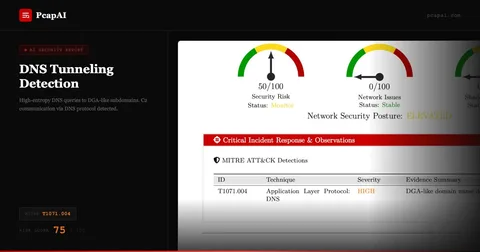
PcapAI embeds MITRE ATT&CK mapping into every detection as a first-class output. Cleartext credentials in an FTP session are cited as T1040 (Network Sniffing) with a plain-English explanation. Periodic DNS queries matching a beaconing pattern reference T1071.004 (Application Layer Protocol: DNS) with the observed query intervals. ARP gratuitous replies that poison the cache are mapped to T1557.002 (ARP Cache Poisoning). This consistent, authoritative mapping makes PcapAI reports immediately useful for threat intelligence correlation, incident response playbooks, and compliance audits — without requiring every analyst on the team to be a MITRE expert. See the full MITRE ATT&CK network detection matrix to explore which network-observable techniques PcapAI covers.
When to Keep Using Wireshark
Wireshark is irreplaceable for interactive, low-level protocol work. Debugging why a specific TCP connection fails to establish, tracing the exact sequence of a TLS handshake, validating the frame format of a new network appliance, or reproducing a latency regression in a development environment - these investigations require the kind of frame-by-frame exploration that Wireshark enables and no automated tool replicates.
Live capture is another Wireshark strength: watching an interface in real time while exercising a specific code path gives engineers immediate feedback on exactly what traffic a change produces. This tight loop between action and observation is central to protocol development, firewall rule validation, and appliance testing.
If your workflow is targeted extraction - scripting tshark to pull specific fields from known captures for a well-defined repeatable operation - Wireshark's toolchain fits well. The two tools are not in competition for this use case; they are complementary.
When to Choose PcapAI
PcapAI is the right tool when the goal is comprehensive security analysis, documentation, or compliance evidence rather than protocol debugging. SOC analysts processing captures from endpoints flagged as suspicious, incident responders triaging a potential breach with a tight SLA, pentesters documenting network evidence for a client deliverable, or compliance teams auditing traffic against PCI-DSS, HIPAA, or SOC2 requirements - all of these workflows benefit directly from automated analysis and structured PDF output.
PcapAI also serves teams without deep packet analysis expertise. A network administrator who suspects a compromised workstation, a DevOps engineer investigating a suspicious outbound connection, or a security generalist onboarding to a new environment can upload a capture and receive actionable findings without mastering Wireshark display filter syntax. The barrier to entry is a file upload.
Privacy and compliance workflows benefit from PcapAI's 1-hour automatic data purge - uploaded files and generated reports are deleted after one hour, satisfying GDPR data-minimization requirements without any administrative policy to maintain. For teams using Claude Desktop, the MCP Server integration enables conversational interaction with capture analysis results directly in the AI assistant interface.
Feature Comparison: PcapAI vs Wireshark
| Capability |
Wireshark |
PcapAI |
| Time to findings | 2–5 hours (analyst-dependent) | < 5 minutes |
| MITRE ATT&CK mapping | Manual - requires framework expertise | Automatic on every upload |
| PDF report output | None - manual assembly required | Structured PDF every time |
| Threat detection coverage | Analyst-driven (hunts for known patterns) | 40+ behavioral algorithms, always on |
| DGA detection | Manual - requires external blocklist | ML-based, no blocklist needed |
| Credential auto-redaction | No - plaintext visible in stream | Detected & redacted in report |
| Compliance reporting | No native compliance output | PCI-DSS, HIPAA, SOC2, GDPR modes |
| Interactive protocol inspection | Best in class | Not designed for this use case |
| Live capture | Yes - real-time interface capture | File upload only |
| Expertise required | High - filter syntax, protocol knowledge | Upload only - no expertise needed |
| Data retention / GDPR | Files retained wherever analyst stores them | Auto-purged after 1 hour |
Protocol-Level Analysis: Interactive Inspection vs Automated Forensics
The distinction between Wireshark and PcapAI comes down to a fundamental difference in workflow model. Wireshark is a microscope: it magnifies individual frames with extreme precision and puts the analyst in direct control of what to examine. This is essential for protocol development, device certification testing, or debugging a race condition in a TCP state machine. The analyst moves through the capture with intent, following a hypothesis, narrowing a filter, reconstructing a session. The workflow is inherently exploratory and non-linear.
PcapAI operates in the opposite direction. Rather than waiting for an analyst to form a hypothesis, it runs every detection algorithm simultaneously against every flow in the capture. Before any detection logic executes, the engine performs full L3 IP defragmentation and L4 TCP stream reassembly - ensuring that application-layer payloads are analyzed in complete form, not as fragmented binary segments. A credential passed in a multi-segment HTTP POST, a command sent over a fragmented TCP session to a C2 server, or a DNS exfiltration payload split across multiple UDP replies: all of these are fully reconstructed and analyzed. Wireshark shows you the fragments individually; PcapAI shows you the complete conversation and tells you what it means.
Payload entropy analysis adds another detection dimension unavailable through Wireshark filters alone. PcapAI calculates Shannon entropy for each flow's payload. High entropy on a connection using an unexpected port or protocol - raw TCP to an unknown IP with maximum payload randomness - is a behavioral signature of exfiltration (T1048) or obfuscated malware communication. A Wireshark filter for packet length or destination IP will not catch this pattern if the destination is unknown and the port appears legitimate. The entropy signal, combined with connection duration, direction ratio, and GeoIP data, produces a high-confidence exfiltration indicator that manual analysis consistently misses.
Compliance Reporting: Where Wireshark Has No Answer
Security compliance frameworks - PCI-DSS, HIPAA, SOC2, NIS2 - increasingly require documented evidence that network traffic is being monitored for specific threat categories. PCI-DSS Requirement 10 mandates audit logs and monitoring of cardholder data network activity. HIPAA Security Rule §164.312(a)(1) requires technical safeguards to prevent unauthorized network access to electronic protected health information. Organizations need to produce evidence that these controls are active and effective.
Wireshark produces no compliance-mapped output. An analyst can examine a capture and document findings, but the compliance mapping, the regulatory language, and the risk classification are all manual additions. PcapAI's Compliance analysis mode produces reports that map each finding directly to relevant framework controls - identifying cleartext protocol usage that violates PCI-DSS data-in-transit requirements, flagging unencrypted authentication that creates HIPAA exposure, or documenting lateral movement indicators relevant to a SOC2 audit scope. These reports are audit-ready artifacts, not raw data that requires further manual formatting before a compliance officer can use them.
For organizations subject to regulatory scrutiny, the ability to upload a capture and receive a compliance-mapped PDF in minutes - rather than spending analyst hours translating packet observations into regulatory language - represents a meaningful operational efficiency. It also produces a consistent evidence trail: every analysis produces the same structured output, regardless of which analyst ran it or when.
Frequently Asked Questions
Does PcapAI replace Wireshark?
No - the tools serve different purposes. Wireshark is best for interactive, frame-level protocol inspection: debugging TCP handshakes, validating protocol implementations, or following a specific conversation interactively. PcapAI is best for comprehensive security analysis, automated threat detection, MITRE ATT&CK mapping, and structured PDF reporting. Many teams use both: Wireshark for protocol debugging and PcapAI for forensic analysis and documentation. If you work inside an AI assistant, you can also analyze PCAPs in Claude Desktop with the PcapAI MCP server - a Wireshark alternative for AI agents.
What file formats does PcapAI accept?
PcapAI accepts .pcap and .pcapng files directly. Compressed archives (ZIP, GZ, BZ2) are not supported - extract the capture file before uploading. File size limits are 25 MB on starter plans and 50 MB on pro plans. Both formats produced by Wireshark, tcpdump, and most network taps are accepted natively.
How does PcapAI detect threats without signatures?
PcapAI uses behavioral analysis, not signature matching. C2 beaconing is detected by statistical periodicity in connection timing - not by matching a known malware IP. DGA domains are identified by an ML model trained on domain name entropy and n-gram patterns. Payload entropy scoring flags high-randomness traffic on unexpected ports without knowing the specific exfiltration tool. This approach catches novel threats that have no existing signature, including zero-day C2 frameworks and attacker-customized tooling.
Can PcapAI generate compliance reports from PCAP files?
Yes. PcapAI includes a dedicated Compliance analysis mode that maps findings to PCI-DSS, HIPAA, SOC2, and other regulatory frameworks. The output PDF identifies specific control gaps - such as cleartext authentication traffic violating PCI-DSS data-in-transit requirements - and documents them in language directly usable as audit evidence. This eliminates the manual step of translating packet observations into compliance language after the analysis.
See What a PCAP Reveals in Minutes
Upload your capture and receive a MITRE-mapped forensic PDF - no Wireshark expertise, no manual formatting, no waiting hours for results.