
Analyze PCAPs in Claude Desktop with the PcapAI MCP Server
The PcapAI MCP (Model Context Protocol) server lets an AI agent like Claude Desktop open a local .pcap or .pcapng file by path and run full AI network forensics on it — deep packet inspection, threat detection, and MITRE ATT&CK mapping — without you touching a browser. Think of it as a Wireshark alternative for AI agents: instead of building display filters by hand, you ask a question in plain language and get back ranked findings and a forensic PDF report. It is open source (MIT) and ships as a single Rust binary.
New to PcapAI? The MCP server shares the same engine as the browser-based PCAP analyzer and the REST API — pick the integration that fits your workflow.
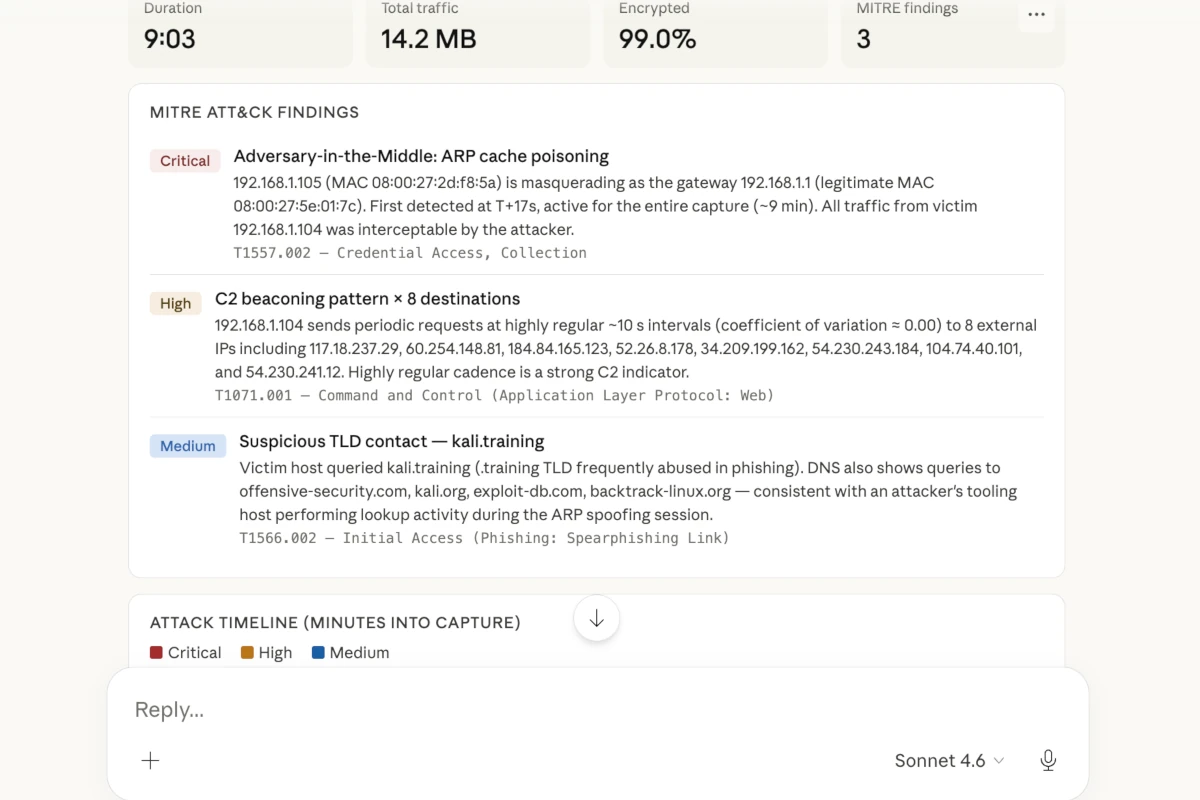
Guest mode vs. the Advanced plan
Guest mode is free and needs no API key — it accepts captures up to 20 MB and returns a high-level summary of what was found. Add a PcapAI API key from the Advanced plan to raise the limit to 100 MB, unlock the full structured JSON findings, and generate downloadable PDF reports.
What the MCP server does
Once connected, your agent can interrogate any local capture in plain language and receive structured, actionable forensics:
Threat detection
Surface C2 beaconing, data exfiltration, port scanning, and credential exposure across TCP and UDP flows — behavioural, not signature-based.
MITRE ATT&CK mapping
Correlate observed behaviour to ATT&CK techniques and sub-techniques, with the supporting packet evidence attached to each finding.
Protocol analysis
Decode DNS, HTTP, TLS, FTP, SMTP, and Kerberos / Active Directory authentication, with anomaly flagging and resolved-domain context.
Forensic PDF reports
Render a MITRE-mapped incident PDF straight from the findings — ready for ticketing, hand-off, or post-incident review.
The two tools your agent calls
The server exposes exactly two tools to the model. Claude decides when to call them based on your request; you rarely invoke them by hand.
analyze_local_pcap
input: file_path
Takes the absolute path to a .pcap / .pcapng file, runs the full analysis, and returns structured JSON findings — detected devices, traffic flows, security anomalies, and the MITRE ATT&CK technique list — along with a job reference used for reporting.
generate_pdf_report
input: job_id
Renders the official MITRE-mapped forensic PDF from a completed analysis and returns a download link. Generating the PDF is free once the analysis has run — the credits are already spent on the analysis step.
Worked example: a suspicious capture, start to finish
Here is a sanitized end-to-end run against a fictional incident capture. All addresses use documentation ranges (RFC 5737) and example.com hostnames.
1. You ask
"Analyze /captures/incident-2026-06.pcap and tell me whether this host is compromised. Map anything suspicious to MITRE ATT&CK."
2. The server returns finding cards
C2 beacon detected
10.20.3.41 calls out to 203.0.113.66 (cdn-sync.example.com) every ~60 seconds over TLS. Low jitter and uniform payload sizes are consistent with an automated command-and-control channel.
Cleartext credentials & FTP exfiltration
A 14 MB archive was pushed to 198.51.100.23 over plaintext FTP. The USER / PASS handshake is fully recoverable from the capture.
Internal port scan
10.20.3.41 swept 10.20.3.0/24 on ports 22, 445, and 3389 — horizontal service discovery typical of lateral-movement preparation.
3. With the supporting MITRE ATT&CK mapping
| Technique | Name | Evidence |
|---|---|---|
| T1071.001 | Application Layer Protocol: Web Protocols | 60 s HTTPS beacons, 10.20.3.41 → 203.0.113.66, jitter < 2 s |
| T1048.003 | Exfiltration Over Unencrypted Non-C2 Protocol | 14 MB archive over plaintext FTP to 198.51.100.23 |
| T1046 | Network Service Discovery | SYN sweep of 10.20.3.0/24 on 22 / 445 / 3389 |
4. The raw JSON your agent reasons over
{
  "pcapFilename": "incident-2026-06.pcap",
  "networkSummary": { "duration_s": 612, "packets": 48213, "talkers": 17 },
  "securityAnomalies": [
    {
      "title": "Periodic C2 beacon",
      "severity": "critical",
      "src": "10.20.3.41",
      "dst": "203.0.113.66",
      "detail": "TLS beacon to cdn-sync.example.com every ~60s, jitter < 2s"
    }
  ],
  "mitreAttackTechniques": [
    { "id": "T1071.001", "name": "Application Layer Protocol: Web Protocols" },
    { "id": "T1048.003", "name": "Exfiltration Over Unencrypted Non-C2 Protocol" },
    { "id": "T1046",     "name": "Network Service Discovery" }
  ],
  "resolvedNames": { "203.0.113.66": "cdn-sync.example.com" }
}
5. And the PDF report it can generate
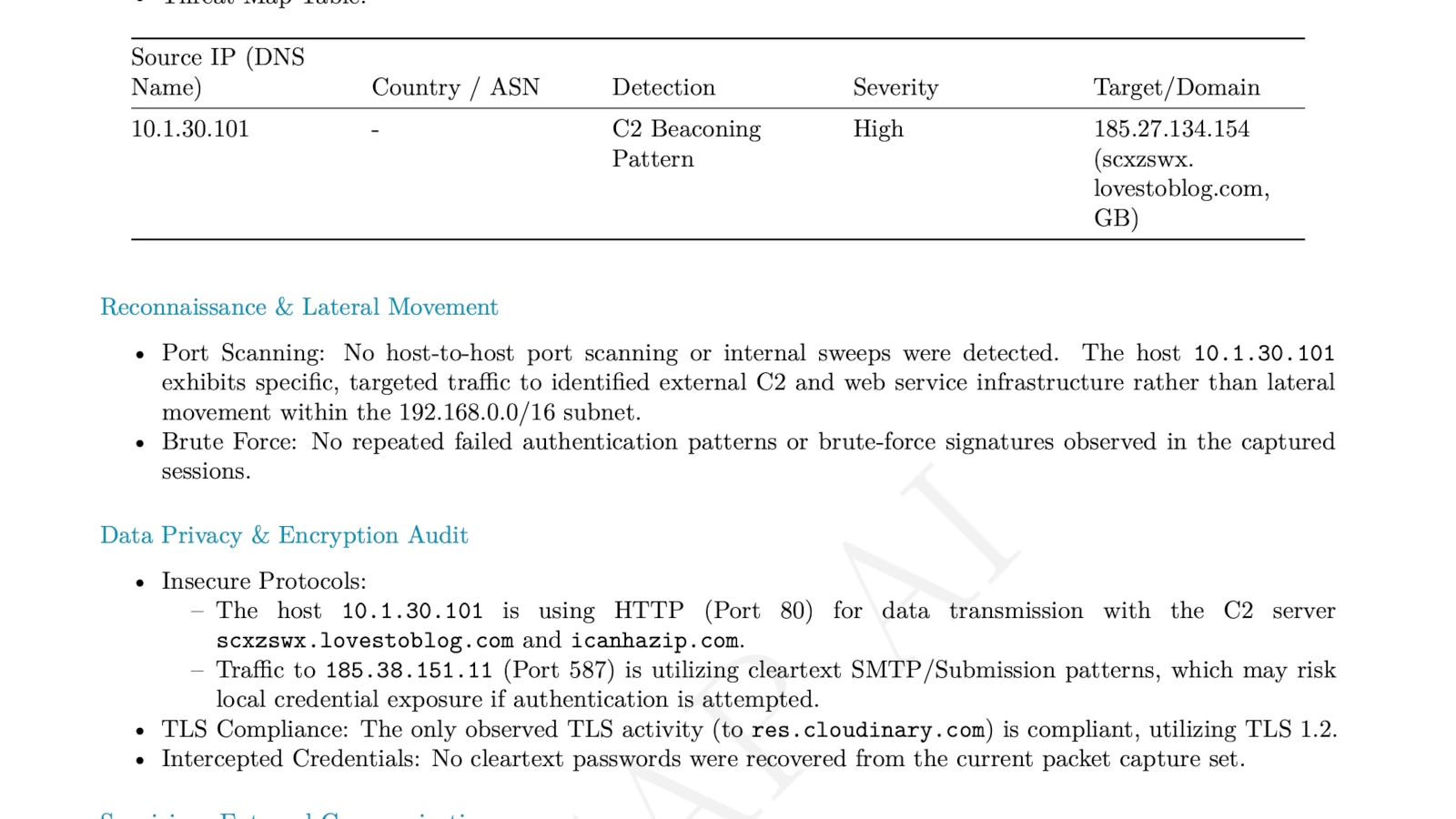
Sample output. See the same detection written up as a full case study: PhantomStealer C2 beacon detection.
MCP server vs. web app vs. manual Wireshark
The MCP server and the web uploader run the same engine; Wireshark is a different kind of tool. Use this to pick the right one for the job.
| PcapAI MCP server | PcapAI web app | Manual Wireshark | |
|---|---|---|---|
| Interface | AI agent (Claude Desktop) | Browser upload | Desktop GUI |
| Best for | Conversational, agent-driven triage | Quick one-off uploads | Frame-level protocol debugging |
| Threat detection | Automated | Automated | Manual, analyst-led |
| Output | Findings, MITRE map & PDF in chat | Report in browser | Whatever you assemble by hand |
| Where analysis runs | PcapAI engine (uploaded) | PcapAI engine (uploaded) | On your machine |
Open source, MIT-licensed
The server is written in Rust and released under the MIT license. Pre-built binaries for every supported platform are on GitHub Releases — no Rust toolchain required unless you want to build from source.
View the source on GitHub: pcap-ai/mcp-server
Install the binary
The server ships as a single self-contained binary named pcap-ai-mcp. Pick whichever method fits your environment.
Option A — download a pre-built binary (recommended)
Grab the archive for your platform from the GitHub Releases page:
| Platform | Release asset |
|---|---|
| macOS (Apple Silicon) | pcap-ai-mcp-macos-arm64 |
| macOS (Intel) | pcap-ai-mcp-macos-amd64 |
| Linux (x86_64) | pcap-ai-mcp-linux-amd64 |
| Linux (ARM64) | pcap-ai-mcp-linux-arm64 |
| Windows (x86_64) | pcap-ai-mcp-windows-amd64.exe |
Rename the downloaded asset to pcap-ai-mcp (the macOS/Linux assets have no extension) and place it on your PATH — for example /usr/local/bin/pcap-ai-mcp. On macOS you may need to clear Gatekeeper quarantine with xattr -d com.apple.quarantine pcap-ai-mcp.
Option B — build from source with Cargo
With the Rust toolchain (1.75+) installed, build the latest version yourself:
git clone https://github.com/pcap-ai/mcp-server.git
cd mcp-server
cargo build --release
The compiled binary lands at target/release/pcap-ai-mcp.
Connect it to Claude Desktop
Register the binary under mcpServers in Claude Desktop's config file, then restart the app.
Step 1 — edit claude_desktop_config.json
The file lives at:
- macOS:
~/Library/Application Support/Claude/claude_desktop_config.json - Linux:
~/.config/Claude/claude_desktop_config.json - Windows:
%APPDATA%\Claude\claude_desktop_config.json
Add an entry pointing command at the binary you installed. Use the env block to pass your API key (recommended), or omit it to stay in guest mode:
{
  "mcpServers": {
    "pcapai": {
      "command": "/usr/local/bin/pcap-ai-mcp",
      "env": {
        "PCAPAI_API_KEY": "your_api_key_here"
      }
    }
  }
}
Step 2 — guest mode or API key
Without PCAPAI_API_KEY, the server runs in guest mode: free, 20 MB cap, summary-level findings. With a key from the Advanced plan, you get the 100 MB cap, full JSON, and PDF reports. You can set the key in the env block above, or export it in your shell instead of editing the config:
export PCAPAI_API_KEY="your_api_key_here"Generate a key from your account settings once you are on the Advanced plan.
Step 3 — restart and verify
Fully quit and relaunch Claude Desktop. The PcapAI tools appear in the tool palette; confirm the connection by asking "What PcapAI tools do you have available?"
Privacy & data handling
Be precise about what happens to your packets. The MCP server reads the capture from your local disk — your agent passes a file path, so there is no manual browser upload — and then transmits it over an encrypted TLS 1.3 connection to the PcapAI engine, which is where the analysis actually runs.
Captures are processed in isolated containers, are not added to your saved report cabinet, and are purged automatically after processing. Because analysis is performed server-side, the server needs outbound network access — it does not run offline or air-gapped. If your captures cannot leave your environment under any circumstances, the MCP server is not the right tool.
Frequently asked questions
Does raw packet data leave my machine when I use the MCP server?
Yes. The server reads the capture from your filesystem and uploads it over an encrypted TLS 1.3 connection to the PcapAI analysis engine — the same engine behind the web app and REST API. Captures run in isolated containers, are not saved to your report cabinet, and are purged after processing. The "local" part is that your agent supplies the path directly, so you never upload through a browser.
What file sizes work in guest mode versus with a PcapAI API key?
Guest mode (no API key) accepts captures up to 20 MB and returns a high-level summary. With a PcapAI API key from the Advanced plan, the limit rises to 100 MB and you get the full JSON findings plus a downloadable PDF. Larger captures return an upload-limit error — contact us about a custom plan for bigger files.
How is the MCP server different from uploading to the PcapAI web app?
Both use the same forensics engine; only the workflow differs. The MCP server lets your agent open a capture by path and run analysis and reporting inside the conversation. The web app is the manual path — drag a file into the browser and read the report there. Use the server for agent-driven investigation, the web app for quick one-offs.
Which network protocols does the MCP server analyze?
It reassembles TCP and UDP flows and decodes DNS, HTTP, TLS, FTP, SMTP, and Kerberos / Active Directory authentication. Output covers protocol anomalies, suspicious flows, resolved domains, TCP connection-performance metrics, and a MITRE ATT&CK technique mapping.
Is the PcapAI MCP server open source, and under what license?
Yes — it is open source under the MIT license. The Rust source, pre-built binaries for macOS, Linux and Windows, and the release notes live on GitHub.
Does the MCP server work offline or in an air-gapped network?
No. The server reads and uploads your capture, but analysis runs on the PcapAI engine, so the binary needs outbound network access to reach the PcapAI API. It does not run fully offline or in an air-gapped environment.
Related guides
See the engine behind the MCP server applied to real captures, or wire it into a pipeline instead of an agent:
- PcapAI REST API reference — automate PCAP uploads and report generation from scripts and CI.
- Detect a PhantomStealer C2 beacon in a PCAP — the worked example above, as a full case study.
- Detect DNS tunnelling in packet captures — covert exfiltration over DNS, mapped to MITRE T1071.004.
- Find cleartext credentials in network traffic — recover exposed logins from FTP, HTTP and SMTP.
- Investigate FTP data exfiltration — reconstruct an exfil transfer and map it to ATT&CK.
- Full MITRE ATT&CK network-detection coverage — every technique the engine maps.