
MCP Server Integration: AI-Powered Network Forensics
Published: March 24, 2026
MCP Server Integration: AI-Powered Network Forensics
The Model Context Protocol (MCP) is changing how AI agents interact with local data. For security engineers and SOC analysts, this means the ability to bring the analytical power of Large Language Models directly to the "source of truth": the PCAP file. Instead of copy-pasting Wireshark output into a chatbot window, you can now point an AI assistant at a raw packet capture and ask it forensic questions in plain language — and get structured, actionable answers in seconds.
We are excited to announce the PcapAI MCP Server, a high-performance Rust implementation that allows AI assistants like Claude Desktop to perform deep packet inspection (DPI) and complex network forensics securely on your local machine. This post walks through what the integration does, how it works under the hood, and why it matters for modern incident response workflows.
What Is the Model Context Protocol?
The Model Context Protocol is an open standard that defines how AI assistants discover and call external tools running on a user's machine or local network. Think of it as a USB interface for LLMs: any conforming "MCP server" can expose capabilities — read a file, query a database, run a script — and any conforming "MCP client" (like Claude Desktop) can invoke those capabilities mid-conversation, with full user control over what gets called.
Before MCP, integrating an AI into a security workflow typically meant either (a) uploading sensitive data to a cloud endpoint or (b) building a bespoke plugin for every tool in your stack. MCP eliminates both problems. The server runs locally, the protocol is standardised, and the AI orchestrates the workflow rather than the human.
For network forensics specifically, this is transformative. PCAP files can contain confidential internal IP schemes, proprietary application payloads, and personally identifiable information. MCP lets the intelligence stay local while the reasoning happens in the model.
Privacy-First: Local Analysis, Global Intelligence
One of the biggest hurdles in using cloud-based AI for network forensics is data privacy. Uploading multi-gigabyte PCAPs containing sensitive internal headers can be a compliance nightmare — and in many regulated industries (finance, healthcare, critical infrastructure) it is outright prohibited. The PcapAI MCP Server was designed from day one to resolve this tension.
Secure Parsing
All packet parsing and metadata extraction happens locally on your machine. Your raw PCAP data never leaves your environment.
Contextual Insights
The MCP server sends only the distilled forensic metadata to the AI — flow summaries, protocol statistics, anomaly flags — enabling it to provide high-level TTP mapping without ever seeing your raw payload data. You control the granularity of what gets shared.
Built with Rust for Speed and Safety
Packet analysis demands extreme performance. Our MCP server is written in Rust, ensuring that even large captures are processed with minimal latency and maximum memory safety.
- Concurrent Processing: Efficiently handles multiple analysis streams simultaneously without blocking the MCP interface.
- Low Memory Footprint: Optimized for desktop environments like Claude Desktop.
- Direct Integration: Communicates via standard MCP protocols for broad client compatibility.
- Cross-Platform Binaries: Pre-built releases are available for macOS, Linux, and Windows — no Rust toolchain required to get started.
What the Server Can Analyse
The PcapAI MCP Server exposes a rich set of analysis tools that the AI can call on demand. Current capabilities include:
Flow Reconstruction
TCP session reassembly with byte-level statistics, RTT measurements, and retransmission ratios per five-tuple.
DNS Analysis
Query/response pairing, NXDOMAIN rate tracking, subdomain entropy scoring for DGA and DNS tunneling detection.
TLS Fingerprinting
Certificate chain parsing, cipher suite enumeration, and expired certificate alerting.
Beaconing Detection
Statistical periodicity analysis on outbound flows to identify C2 beaconing, including jittered intervals.
Protocol Anomalies
Detection of protocol violations, unexpected port usage, non-standard encapsulation, and covert channel indicators.
MITRE ATT&CK Mapping
Automatic correlation of observed network behaviours to ATT&CK techniques under the Network-based sub-technique taxonomy.
Empowering the Modern SOC
The MCP integration transforms your AI assistant from a simple chatbot into an autonomous forensics partner. Instead of querying the AI for general knowledge about network threats, you can ask it to investigate your specific traffic. For example:
"Analyze this PCAP and summarize any DNS-over-HTTPS beaconing patterns."
"Extract the TLS certificate chain from this flow and check for expired roots."
"Map the observed network traffic to MITRE ATT&CK techniques."
"Which hosts are communicating on non-standard ports, and what protocols does the traffic resemble?"
"Give me a timeline of events in this capture, grouped by attacker-controlled IPs."
This direct interaction reduces the mean-time-to-insight by eliminating the need to manually export CSVs or screenshots from Wireshark for the AI to "read". The model has structured, machine-readable forensic data to work with, which dramatically improves the quality of its analysis compared to parsing human-formatted output.
For tier-1 analysts, this means spending less time on mechanical triage and more time on adversary reasoning. For senior responders and threat hunters, it means a force-multiplier that can process a corpus of PCAPs from multiple sensors in parallel and surface anomalies that might be buried in gigabytes of baseline noise.
Getting Started in Five Minutes
Setting up the PcapAI MCP Server requires no prior Rust experience. Download the pre-built binary for your platform, add a single JSON stanza to your Claude Desktop configuration file, and restart the application. The server registers itself as an available tool and Claude will automatically offer to use it when you mention a PCAP file in conversation.
- Download the binary from the GitHub Releases page for your OS and architecture.
-
Edit
claude_desktop_config.jsonto add thepcapai-mcpserver entry under themcpServerskey. - Restart Claude Desktop — you should see the PcapAI tools listed in the model's tool palette.
- Drop a PCAP path into the chat and ask your first forensic question.
Full step-by-step instructions, including how to configure path permissions, are available in the Integration Guide linked below.
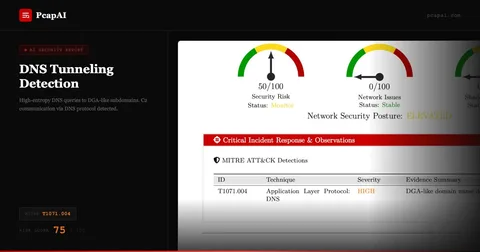
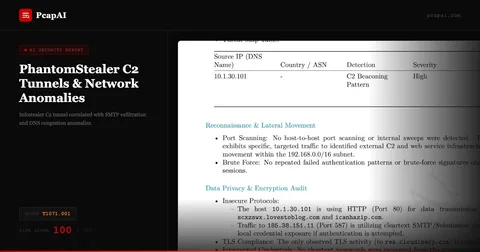
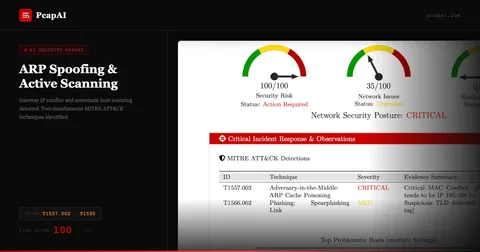
Real-world detections
Frequently Asked Questions
What is the PcapAI MCP Server?
The PcapAI MCP Server is a Rust-based Model Context Protocol server that lets AI assistants like Claude Desktop perform deep packet inspection (DPI) and network forensics on local .pcap and .pcapng files. It exposes PCAP analysis capabilities — beaconing detection, MITRE ATT&CK mapping, credential harvesting detection — as MCP tools that AI agents can invoke mid-conversation without sending data to the cloud.
Is my PCAP data sent to the cloud when using the MCP Server?
No. The PcapAI MCP Server runs entirely on your local machine. PCAP files are parsed locally by the Rust binary — no packet data leaves your environment. Only the structured analysis results (detected techniques, flow summaries, severity scores) are passed to the AI model as context, and you control exactly which tools the AI can invoke.
What AI assistants are compatible with the PcapAI MCP Server?
Any MCP-compatible AI client can use the server, including Claude Desktop, Cursor, and other tools built on the open Model Context Protocol standard. Claude is the recommended client because its extended context window handles large analysis results well and its reasoning capabilities produce high-quality forensic interpretations from raw packet metadata.
How does the MCP Server compare to uploading PCAP files to PcapAI directly?
The web platform generates structured PDF reports — ideal for sharing with clients and leadership. The MCP Server enables interactive forensic conversations: ask follow-up questions, pivot between techniques, run targeted queries against specific hosts or time windows. Both use the same detection engine; the MCP Server adds an interactive investigation layer on top.
Ready to Supercharge Your AI Assistant?
The PcapAI MCP Server is open-source and ready for testing. Read our full integration guide to get started, or star the repo to follow development.