
Coruna iOS Exploit Kit PCAP Analysis Without Decryption
Published: November 1, 2026
On 16 October 2026, malware-traffic-analysis.net published a 98-second capture of an iPad on iPadOS 15.8.2 being served a Coruna-like iOS exploit kit from a Chinese-language lure site. Every exploit stage travels inside TLS, so the payloads are unreadable. The chain is not: Safari opens the landing name, 13.6 seconds later a second TLS client that is not Safari downloads 685 kB from the same name, and 7.4 seconds after that a program with no User-Agent asks ip-api.com where the device is. This Coruna iOS exploit kit PCAP analysis walks through 2026-10-16-Coruna-like-iOS-exploit-traffic.pcap frame by frame, shows what the PcapAI report flags, and ends with what to do when a phone or tablet on a client’s network does the same.
Coruna and DarkSword: iPhone exploit kits gone second-hand
Google Threat Intelligence Group (GTIG) disclosed Coruna on 3 March 2026: an iOS exploit kit with five full exploit chains and 23 exploits for iPhones running iOS 13.0 to 17.2.1. GTIG first saw parts of it with a customer of a commercial surveillance vendor in February 2025, then in watering-hole attacks on Ukrainian websites by UNC6353, a suspected Russian espionage group, and finally on a large set of fake Chinese finance and crypto sites run by UNC6691, a financially motivated actor. The implant GTIG recovered from those sites, PlasmaLoader, hunts for cryptocurrency wallets and seed phrases. Two weeks later GTIG described DarkSword, a chain for iOS 18.4 to 18.7, and in April Jamf analysed its leaked source code.
Apple fixed the Coruna vulnerabilities in releases from 2023 and 2024, and in March 2026 back-ported the fixes to older devices as iOS 15.8.7 and 16.7.15. The kits are loose now. Unit 42 reported on 16 October 2026 that Coruna-like and DarkSword kits were being served through injected iframes on Chinese-language video and adult sites, aimed at iOS 13 to 17.2.1 and 18.4 to 18.7. Current iOS is not affected. The devices at risk are the ones nobody updates: the old iPad on the guest Wi-Fi, the family iPhone that stopped at iOS 15.
Why it matters to the network owner
GTIG writes that Coruna fingerprints the device before it fires and gives up when Lockdown Mode or private browsing is on. An update or Lockdown Mode stops it; a firewall rule on yesterday’s domains does not. The capture tells you which device needs one.
The capture at a glance
Capture
98.4 seconds · 3,686 frames · one device. SHA-256 2b5e98b8…defd26da46.
The device
10.10.16.217, MAC ce:e5:2f:bf:98:8d (a private Wi-Fi address) · gateway and resolver 10.10.16.1 · Safari on iPadOS 15.8.2.
Everything that carries exploit code is encrypted: 31 of the 33 TLS handshakes negotiate TLS 1.3, and the exploit-kit address, 35.175.177.113 on Amazon’s network, sends about 1.9 MB to the iPad. The background is ordinary Apple traffic — configuration.apple.com, mesu.apple.com and a 547 kB fetch from updates.cdn-apple.com — and a report that calls those suspicious is wrong. What stays readable is metadata: names, TLS ClientHellos, one certificate and four cleartext HTTP exchanges. Here is the whole chain on one clock:
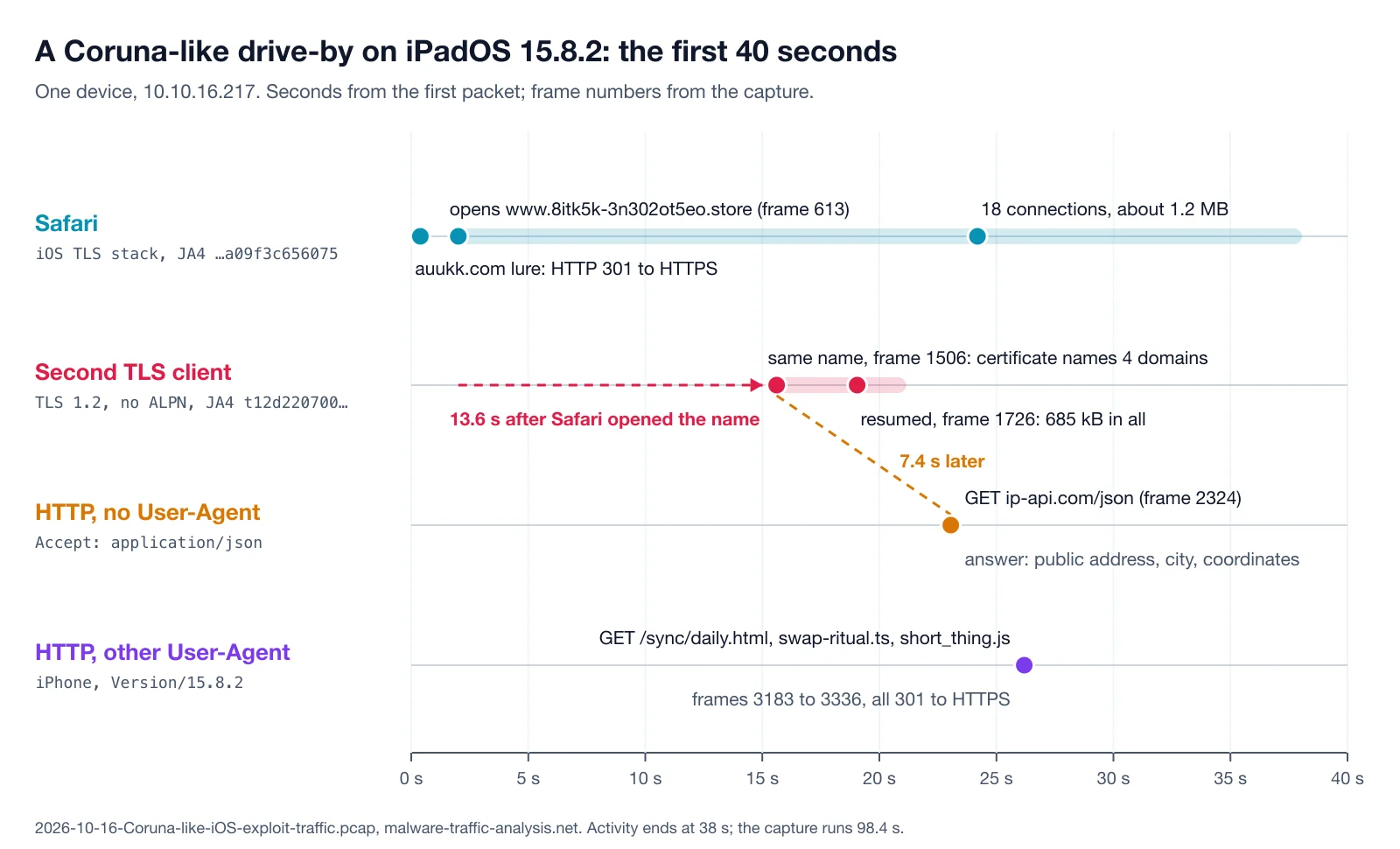
The first 40 seconds of the capture by client: Safari, the second TLS client, and two kinds of cleartext HTTP.
t+0.4 s — the lure and the landing name
The iPad starts with a plain HTTP request for auukk.com (27.124.9.57), which answers with a 301 to HTTPS. The request carries Safari’s real User-Agent, iPad; CPU OS 15_8_2 … Version/15.6.6; remember that string. Unit 42 lists auukk.com among the pages with the injected iframe, and its content is encrypted, but 1.5 seconds later the iPad resolves www.8itk5k-3n302ot5eo.store to 35.175.177.113 and Safari opens it (frame 613).
Over the next 22 seconds three more names resolve to the same address: www.c2uge9o8jb9b8dk1ty84q56.org, www.abn3l8febkskxmce0tat6ide.store and www.0cure4ajgjpmljc4sv.site. Safari opens 18 TLS connections to them and receives about 1.2 MB. That is consistent with the GTIG write-up, in which the kit fetches its exploits as separate encrypted resources after fingerprinting the device, but in this capture it is only volume: nothing here says what ran.
t+15.6 s — a TLS client that is not Safari
Every TLS client announces itself in its ClientHello, and JA4 turns that announcement into a fingerprint. 31 of the 33 ClientHellos in this capture share one implementation, the cipher and extension hashes a09f3c656075_14788d8d241b of the iOS system TLS stack that Safari and Apple’s own services use. Two do not. In frames 1506 and 1726, a client with JA4 t12d220700_0d4ca5d4ec72_3304d8368043 connects to www.8itk5k-3n302ot5eo.store, the name Safari opened 13.6 seconds earlier. It offers TLS 1.2 at most, no ALPN at all and 22 cipher suites down to 3DES: the profile of a legacy TLS library, not of Safari 15. Its source ports are 49155 and 49160, while Safari’s run from 55846 upwards.
tshark -r 2026-10-16-Coruna-like-iOS-exploit-traffic.pcap \
  -Y 'tls.handshake.type == 1 && !tls.handshake.extensions_alpn_str' \
  -T fields -e frame.number -e tcp.srcport \
  -e tls.handshake.extensions_server_name -e tls.handshake.ja4

1506  49155  www.8itk5k-3n302ot5eo.store  t12d220700_0d4ca5d4ec72_3304d8368043
1726  49160  www.8itk5k-3n302ot5eo.store  t12d220700_0d4ca5d4ec72_3304d8368043
The second connection resumes the first session and pulls 575 kB in 2.2 seconds; together the two receive 685 kB. A browser does not switch TLS libraries halfway through a page. A program that the page just started does, and the MITRE ATT&CK name for pulling a payload in from outside is T1105, Ingress Tool Transfer.
One certificate, four exploit-kit domains
The second client’s choice of TLS 1.2 has a side effect: unlike TLS 1.3, it sends the server certificate in clear. Frame 1512 carries a Let’s Encrypt certificate (intermediate YR2), valid from 1 September 2026, six weeks before the capture, for www.abn3l8febkskxmce0tat6ide.store, and its subject alternative names list all four exploit-kit domains:
tshark -r 2026-10-16-Coruna-like-iOS-exploit-traffic.pcap \
  -Y 'tls.handshake.type == 11' -T fields -e frame.number -e x509ce.dNSName

1512  www.0cure4ajgjpmljc4sv.site,www.8itk5k-3n302ot5eo.store,
      www.abn3l8febkskxmce0tat6ide.store,www.c2uge9o8jb9b8dk1ty84q56.org
One of them, www.0cure4ajgjpmljc4sv.site, is not in Unit 42’s indicator list. That is the kind of pivot a capture gives for free: one certificate, one operator, four names to block, and a validity date that dates the infrastructure.
t+23.1 s — a geolocation lookup with no User-Agent
Frame 2324 is the most telling packet in the capture: GET /json to ip-api.com over plain HTTP, with three headers — Host, Connection: close and Accept: application/json — and no User-Agent. Safari never sends a request without one, and Apple’s URL loading system adds one by default. The request leaves from port 49165, the same low range as the second TLS client. The answer (frame 2344) is a JSON record of the network’s public address, ISP, city and coordinates.
tshark -r 2026-10-16-Coruna-like-iOS-exploit-traffic.pcap \
  -Y 'http.request && !http.user_agent' \
  -T fields -e frame.number -e tcp.srcport -e http.host -e http.request.uri

2324  49165  ip-api.com  /json
Implants make this call to learn which country they are in, whether to continue, or whether they run in a sandbox; AgentTesla asks the same service whether its address belongs to a hosting provider. ATT&CK files it as T1614, System Location Discovery. Legitimate software looks up its location too, which is why the lookup alone is only an indicator. Seven seconds after a payload download from a lure, it is corroboration.
t+26.2 s — a User-Agent the browser never sent
Three seconds later the iPad sends three cleartext GETs to www.8itk5k-3n302ot5eo.store — /sync/daily.html, /sync/swap-ritual.ts and /sync/short_thing.js — and gets 301 redirects to HTTPS. Their User-Agent claims an iPhone with Safari 15.8.2. The browser that opened the lure introduced itself as an iPad with Safari 15.6.6, the version string this OS release reports. Same device, same OS version, two identities: these requests were built by code, not by the browser.
What the PcapAI report shows
I ran the capture through PcapAI’s Security mode. The executive summary leads with the second client: High severity, high confidence, T1105, and an overall risk of 75/100, Severe.
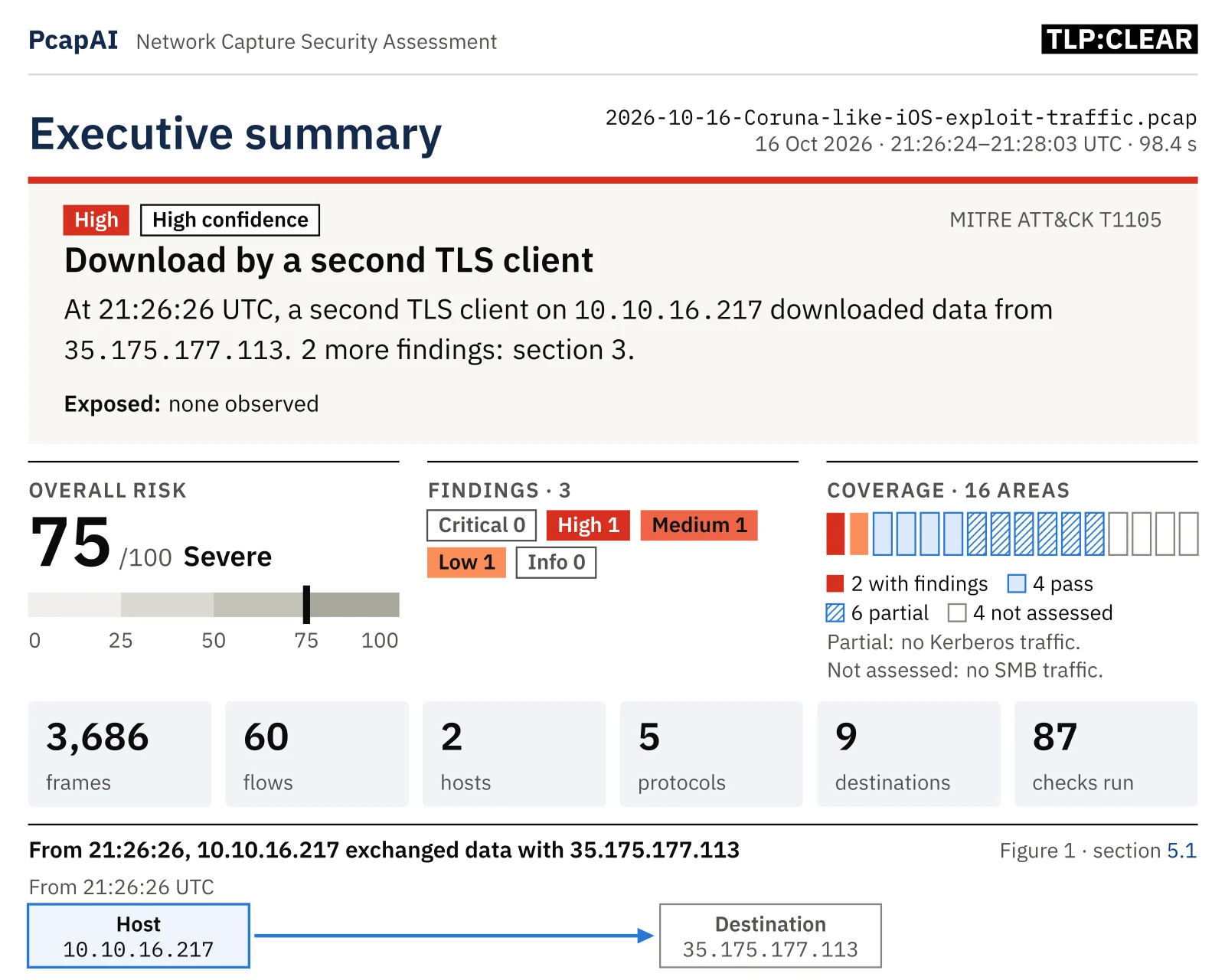
The executive summary: the download by a second TLS client is the lead finding.
Three findings back it. F01 is the download by the second TLS client, raised to High because the same host looked up its public address 7.4 seconds later. F02, Medium, flags the .store and .site names as high-abuse TLDs. F03, Low, is the ip-api.com lookup. Each finding lists the frames it rests on and a Wireshark display filter that selects them, so the reader can check every claim in the capture:
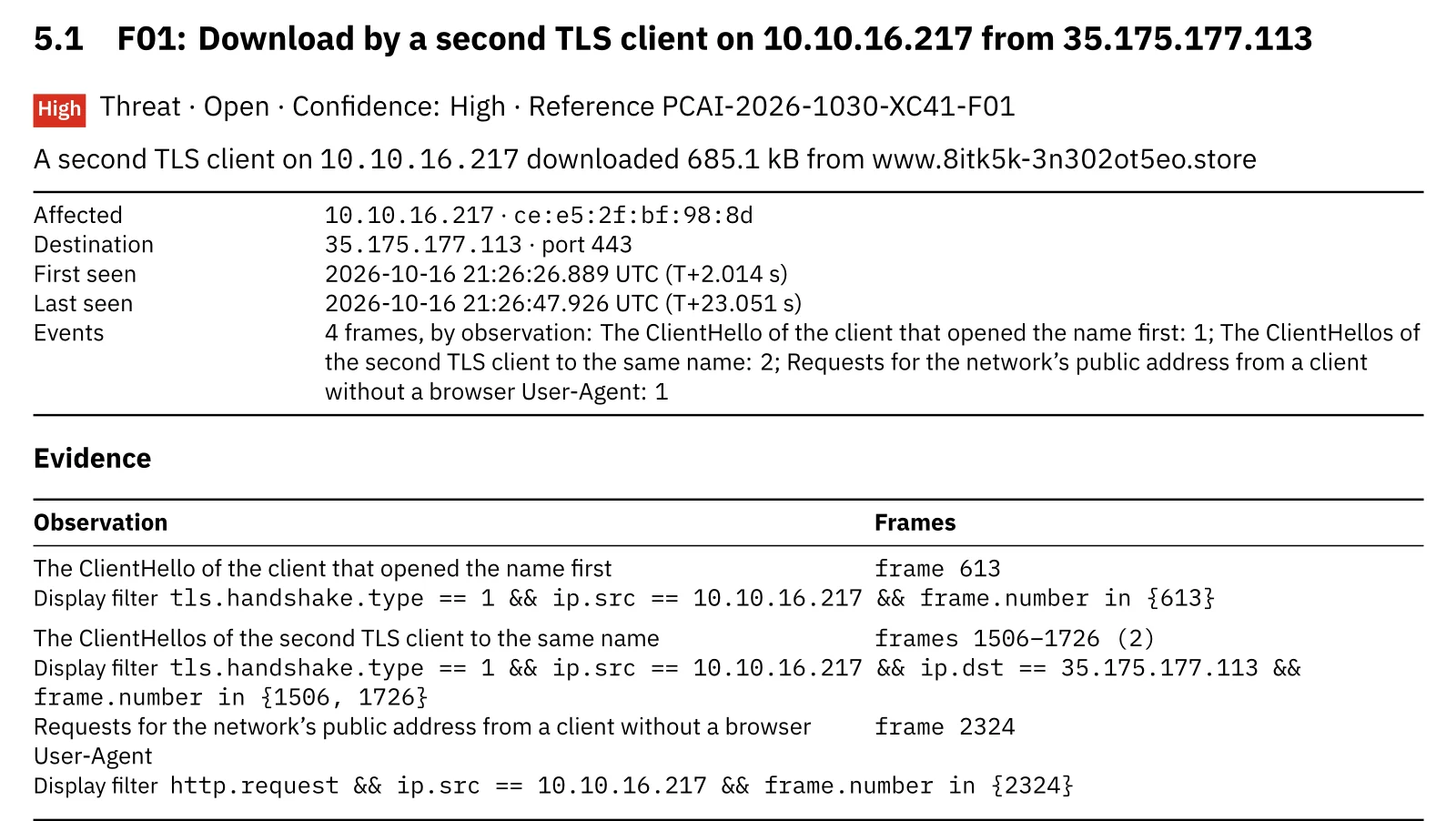
F01: the first client’s ClientHello, the second client’s two ClientHellos and the lookup, each with its filter.
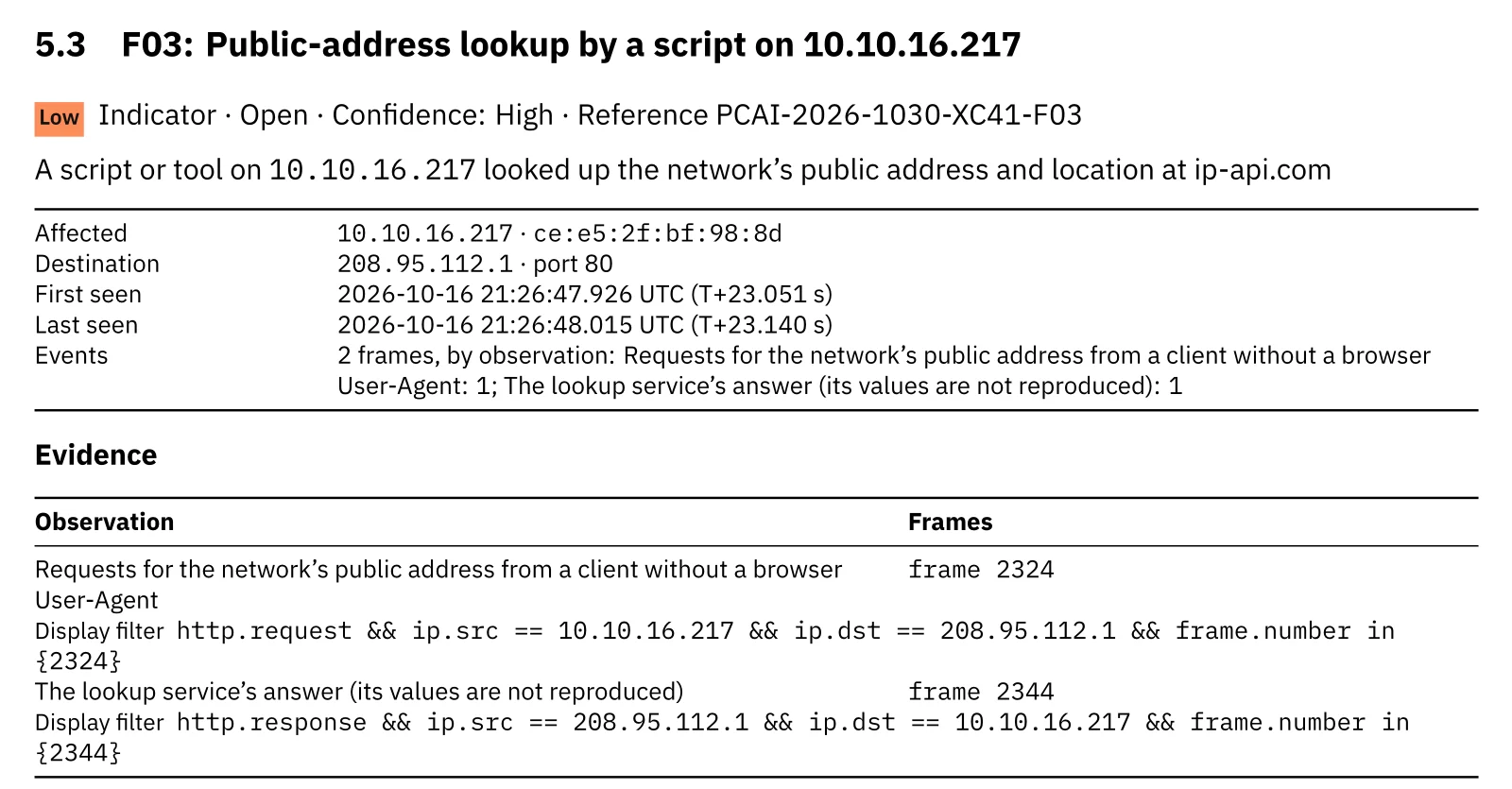
F03: the lookup and its answer; the answer’s values are never reproduced in the report.
Below the TLS inventory, the report names the domains of the one certificate the capture shows, because a finding points at its server:
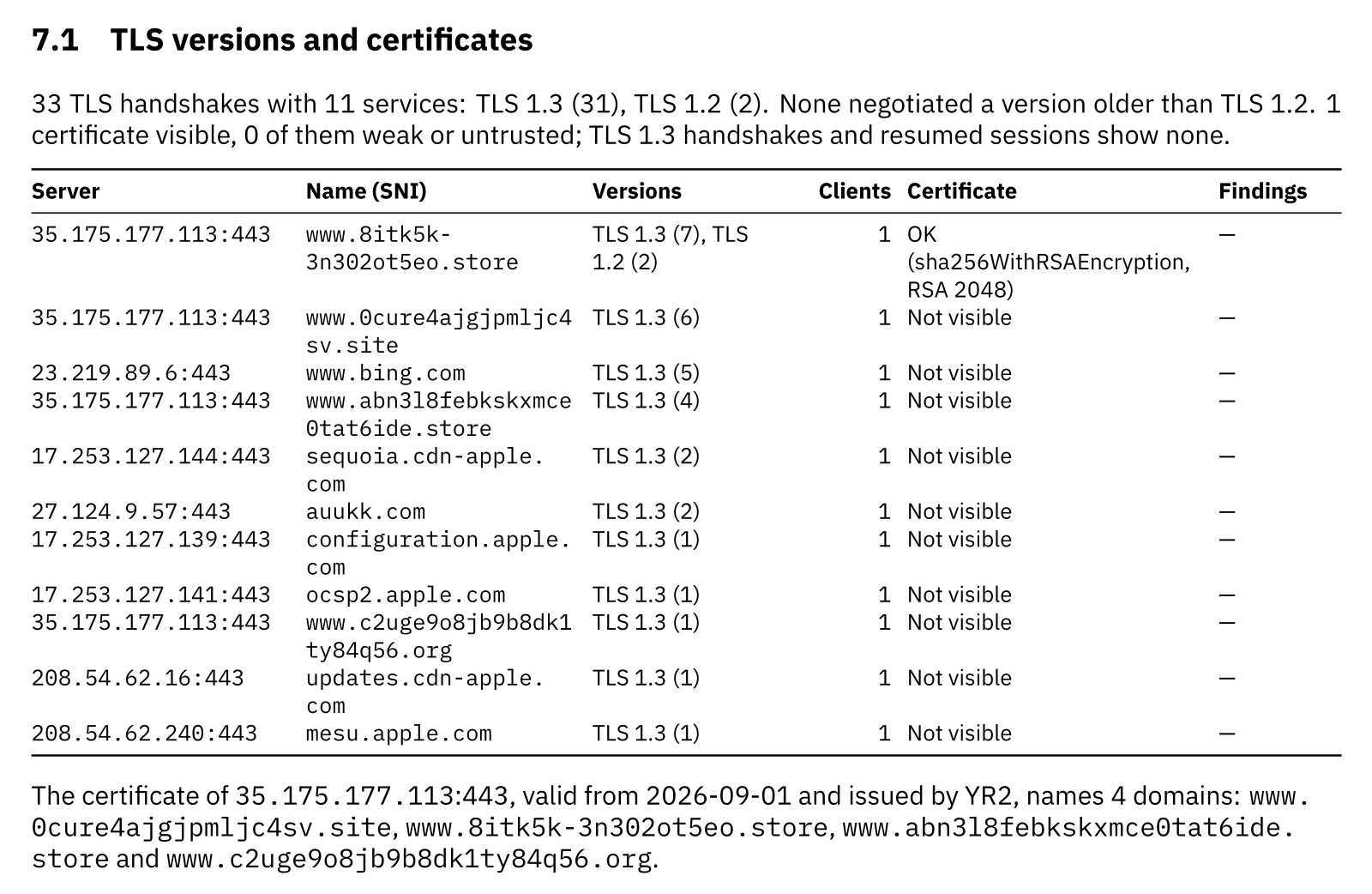
The TLS section: versions per service, and the four names on the exploit-kit certificate.
Full disclosure: two of these rules are new. Our first run over this capture found only the high-abuse TLDs. We added the second-client rule and the public-address lookup rule, then ran them over the 148 captures of our regression corpus and 89 other local captures. Neither fired on a clean capture, and the lookup rule also caught the AgentTesla hosting check. The strict conditions matter: without the test for “no TLS 1.3 or no ALPN”, Edge and WebView2 on one Windows laptop already look like two clients of one site. The full rule set is on the MITRE ATT&CK coverage page.
Wireshark vs PcapAI on this capture
Manual (Wireshark)
Add JA4 and SNI columns, sort the ClientHellos by fingerprint and notice that two of 33 differ, follow both streams for byte counts, open the TLS 1.2 certificate for its SAN list, then filter for HTTP without a User-Agent and compare the User-Agents that remain. An analyst who knows what to look for needs 30–60 minutes; one who does not stops at “all TLS 1.3, looks clean”.
PcapAI
Upload the PCAP. The free summary takes about two minutes and lists the findings by severity; the full PDF carries the timeline, frame ranges, display filters, certificate names and a remediation plan you can hand to a client.
*Based on this 3.1 MB capture.
What to do when a phone or tablet on your network does this
The capture proves a download and a location check. It cannot prove what ran, so treat the device as compromised until it is rebuilt. The report’s summary page already puts the download on the traffic chart and orders the first steps by owner:
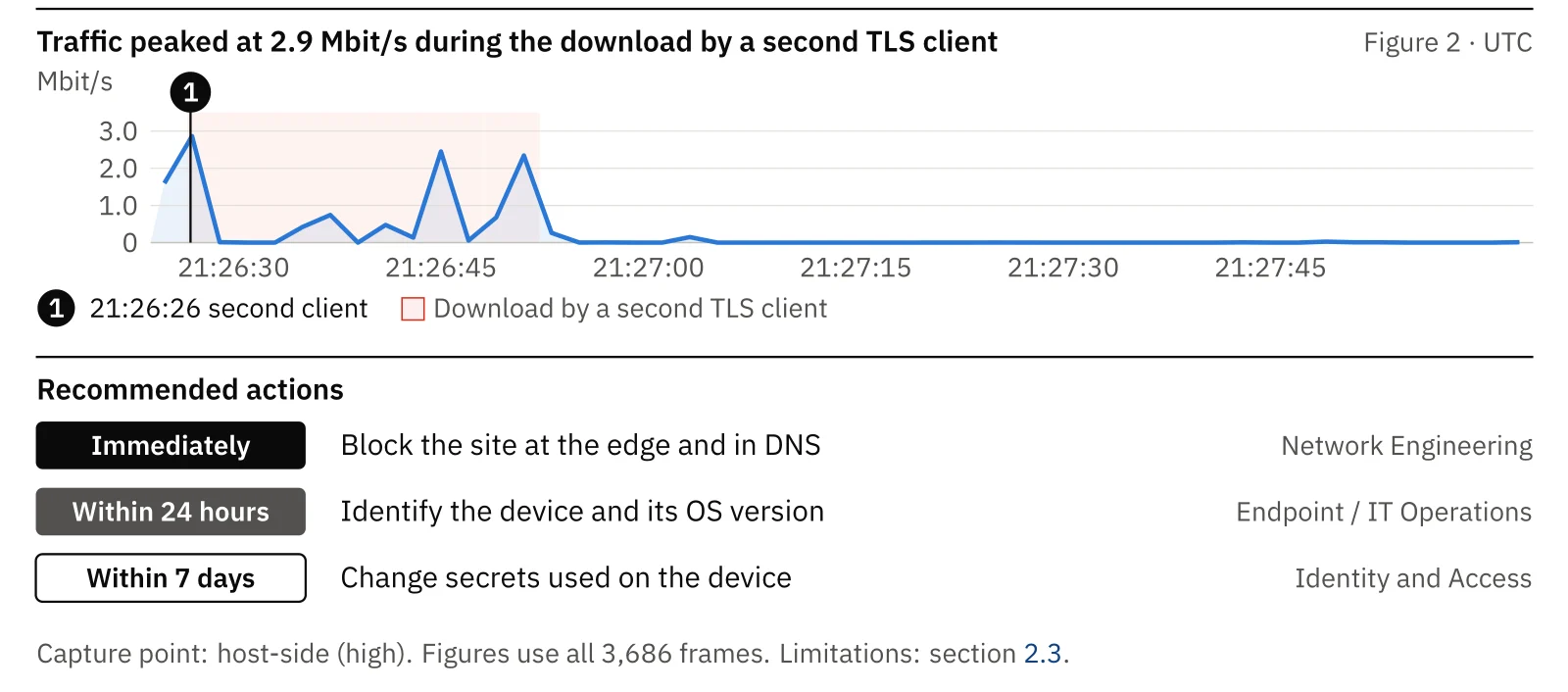
The lower half of the summary page: the download on the traffic chart and the first three actions.
In more detail:
- Find the device. A private Wi-Fi address like
ce:e5:2f:bf:98:8dchanges per network, so map the IP to a device through DHCP leases, the wireless controller or MDM rather than the vendor prefix. - Read the OS version off the wire.
CPU OS 15_8_2in the User-Agent means iPadOS 15.8.2, below 15.8.7, the March 2026 release that fixed Coruna’s flaws on older devices. - Update it, lock it down or take it off the network. Apple’s fixes stop the kit. A device that cannot update should run Lockdown Mode, which GTIG reports makes Coruna give up, or move to a guest network with nothing to reach.
- Block the infrastructure for everyone. Block the four exploit-kit names,
35.175.177.113and the lure in DNS and at the edge, then search resolver logs for other clients that asked for them. - Rotate what the device held. Coruna’s known implant targets crypto wallets and seed phrases: change passwords and move wallet funds before restoring the device from a clean backup or a factory reset.
Capture again afterwards: a clean re-run is the evidence you file with the client. The sample report shows what that PDF looks like, and the SHub Stealer walkthrough reads another fully encrypted infection the same way.
Indicators of compromise
From this public sample; treat the addresses as historical, because exploit-kit infrastructure rotates:
| Indicator | Type | Notes |
|---|---|---|
| 10.10.16.217 | Victim device | iPadOS 15.8.2 · MAC ce:e5:2f:bf:98:8d (private address) |
| auukk.com · 27.124.9.57 | Lure | HTTP 301 to HTTPS · Unit 42 indicator |
| www.8itk5k-3n302ot5eo.store | Exploit-kit landing | 35.175.177.113 (Amazon) · opened by Safari and by the second client |
| www.c2uge9o8jb9b8dk1ty84q56.org · www.abn3l8febkskxmce0tat6ide.store | Exploit kit | Same address · Unit 42 indicators |
| www.0cure4ajgjpmljc4sv.site | Exploit kit | Same address and certificate · not in Unit 42’s list |
| 700aa027…70809253 | Certificate SHA-256 | Let’s Encrypt YR2, valid 2026-09-01 to 2026-11-30, names the four domains |
| t12d220700_0d4ca5d4ec72_3304d8368043 | JA4, second client | TLS 1.2, no ALPN · JA3 e4d448cdfe06dc1243c1eb026c74ac9a |
| GET ip-api.com/json, no User-Agent | Location lookup | Frame 2324, source port 49165 |
Frequently Asked Questions
Can you detect an iOS exploit kit without decrypting TLS?
Often, yes. TLS hides content, not behaviour. The names a device resolves, the TLS fingerprint of each client, certificates sent in TLS 1.2, transfer sizes and timing, and cleartext side requests remain visible. In this capture they show a second TLS client downloading from the lure’s landing name and a location lookup without a User-Agent, without reading a single payload byte.
What does a second JA4 fingerprint on one device mean?
Two TLS implementations, which is normal: browsers, apps and system services differ. It becomes suspicious when the second client offers no TLS 1.3 or no ALPN, connects to a name the browser opened seconds earlier, downloads a payload-sized amount of data, and reaches nothing else. Download managers and installers can match that pattern, so the report asks you to rule them out.
Is my iPhone vulnerable to Coruna?
Coruna targets iOS 13.0 to 17.2.1. Apple fixed its vulnerabilities in later releases and, in March 2026, in iOS 15.8.7 and 16.7.15 for older devices. DarkSword targets iOS 18.4 to 18.7 and is fixed in current iOS. An up-to-date device is not affected; a device that cannot update should run Lockdown Mode.
Why does malware query ip-api.com?
A public-address lookup tells a program its country, ISP and whether it runs on a hosting network, which implants use to decide whether to continue or to avoid sandboxes. Legitimate apps query such services too, usually with their own User-Agent. A lookup without one, seconds after a download from a lure page, is the pattern worth flagging.
Real-world detections
Got a Capture From a Device You Don’t Trust?
Upload the PCAP: the free summary takes about two minutes, and the full report lists every finding with its frames, Wireshark filters and a remediation plan for your client.