
IDN Homograph Attacks: Spot Look-Alike Domains in a PCAP
Published: November 3, 2026
An email says your Amazon order is on hold. The link reads amazon.com and the sign-in page looks right, but the link is not what it seems: its first letter is a Cyrillic “а” (U+0430), not a Latin “a”. That is an IDN homograph attack, and a packet capture of the click shows it plainly: the browser looks up and connects to xn--mazon-3ve.com. This post shows what the victim sees, what an investigator finds in the PCAP, how to spot these names in Wireshark, and how PcapAI reports now flag them.
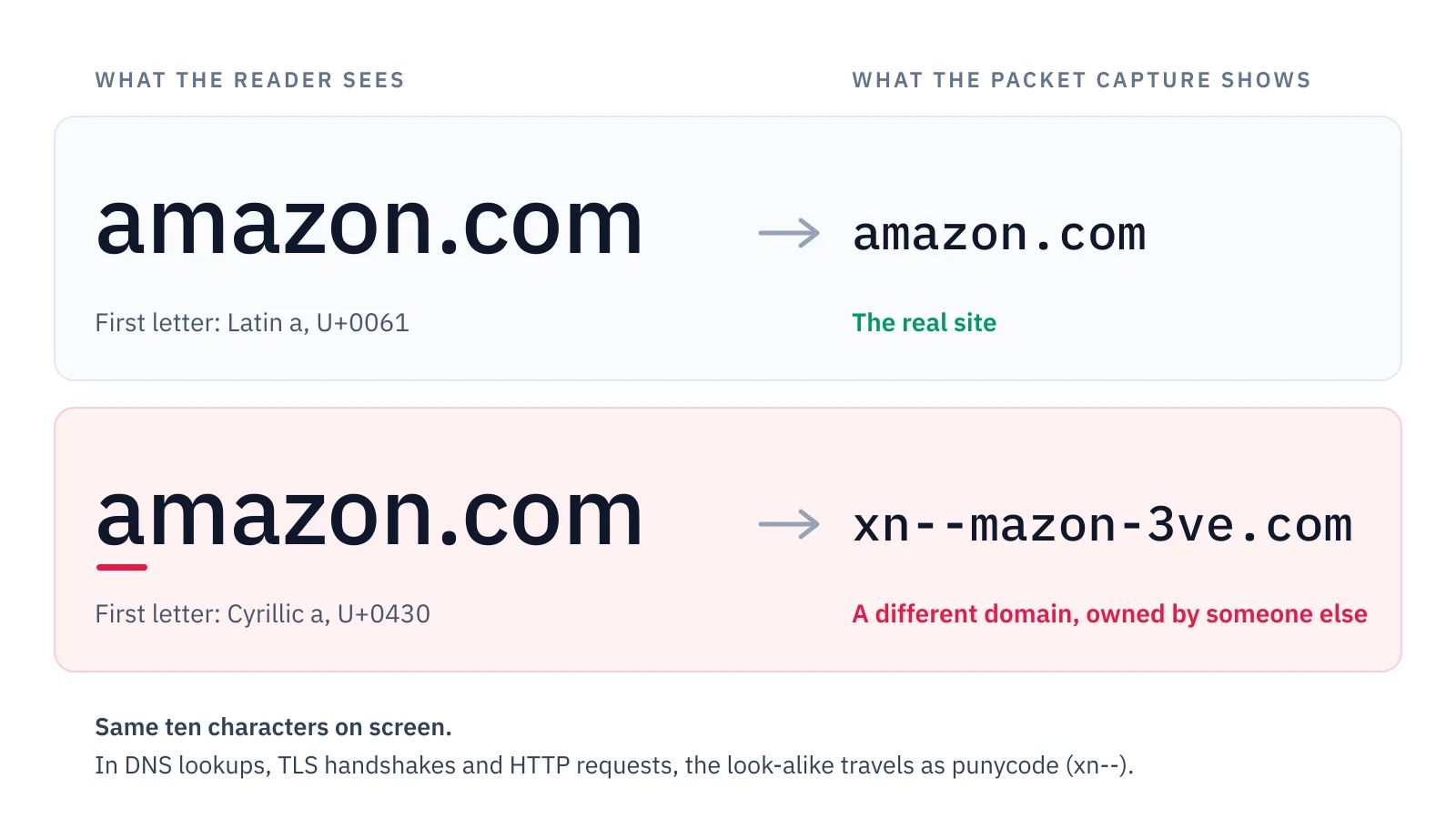
One letter from another alphabet: identical on screen, a different domain on the wire.
How an IDN homograph attack fools the person who clicks
Internationalized domain names (IDNs) let a domain use the letters of almost any alphabet: сайт.рф in Russian, münchen.de in German. Browsers, mail clients and phones show these names in their own letters, but on the network every IDN travels in an ASCII form called punycode, which starts with xn--. A homograph attack abuses the display side. Cyrillic, Greek and Armenian all have letters drawn exactly like Latin ones; Cyrillic alone has seven that pass for a, e, o, p, c, y and x. Swap one of them into a brand name and you get a domain that reads as amazon.com, paypal.com or microsoft.com in almost any font, yet belongs to whoever registered it.
For the victim, nothing looks wrong. The link sits in an email, a chat message or a search ad, and its text and its target read the same. The page copies the real sign-in screen, and the padlock is there, because the attacker owns the domain and can get a certificate for it like anybody else. Nobody types such a name by accident either: a Latin keyboard cannot produce a Cyrillic а without switching layouts. A device that contacted a homograph domain has almost always followed a link.
Browsers have pushed back. In 2017 security researcher Xudong Zheng registered xn--80ak6aa92e.com, apple.com spelled entirely in Cyrillic look-alikes, and Chrome and Firefox displayed it as apple.com. Chrome changed its display rules within weeks, and today’s browsers show many such names in their xn-- form. The address bar then reads xn--mazon-3ve.com, which is easy to take for a tracking redirect. The protection is uneven across apps, too, and the message that carries the link shows whatever text the sender chose.
A quick check for anyone who clicked
A password manager offers a saved password only on the domain it was saved for. If yours stayed silent on a sign-in page you use every week, close the tab and open the site from a bookmark. If you already typed the password, change it on the real site now and tell whoever runs your IT.
Why homograph domains slip past DNS logs and PCAP reviews
The investigator’s view is the mirror image. Proxies, firewalls, DNS logs and packet captures all record the ASCII form, so the lookup that started the incident reads www.xn--mazon-3ve.com. Search the logs for “amazon” and you find the real Amazon traffic and nothing else; the look-alike hides among CDN names and telemetry hosts that look just as random.
Reputation does not help much either. A phishing domain is often only days old when it is used, too new for most block lists. It can also sit behind a mainstream CDN or cloud provider, so its address raises no flag. A search or alert for names that resemble a brand misses it as well: xn--mazon-3ve has nothing in common with amazon until someone decodes it.
For an MSP or IT consultant handed a capture after a client clicked, that means the decisive packet is easy to scroll past. The capture holds the answer, but someone has to decode every xn-- name in it and compare what it displays as with the sites the client actually uses.
How to find punycode domains in a PCAP with Wireshark
A browser names the site it wants in three places: the DNS query, the TLS handshake and, for plain HTTP, the Host header. In the TLS handshake the name sits in the Server Name Indication, readable unless the browser uses Encrypted Client Hello. One Wireshark display filter covers all three, and its TLS part also matches HTTP/3 (QUIC) handshakes:
dns.qry.name contains "xn--" || tls.handshake.extensions_server_name contains "xn--" || http.host contains "xn--"The same search in tshark lists the frame, the time, the host and the name. In the lab capture behind this post’s screenshots, the laptop at 192.168.1.23 looks up the look-alike 31.4 seconds in, opens it, and comes back to it 17.5 seconds later:
tshark -r idn-homograph-lab.pcap \
  -Y '(dns.qry.name contains "xn--" && dns.flags.response == 0) || tls.handshake.extensions_server_name contains "xn--"' \
  -T fields -e frame.number -e frame.time_relative -e ip.src \
  -e dns.qry.name -e tls.handshake.extensions_server_name

190  31.400000000  192.168.1.23  www.xn--mazon-3ve.com
191  31.400400000  192.168.1.23  www.xn--mazon-3ve.com
197  31.471400000  192.168.1.23                         www.xn--mazon-3ve.com
250  48.971400000  192.168.1.23                         www.xn--mazon-3ve.com
Frames 190 and 191 are the IPv4 (A) and IPv6 (AAAA) lookups; 197 and 250 are the two TLS handshakes. Wireshark shows the name as it travels, in punycode. To see what it displays as, decode it. This Python one-liner prints the decoded label and every character in it that is not plain ASCII, with its position, code point and Unicode name:
python3 -c 'import unicodedata as u; n = b"xn--mazon-3ve".decode("idna"); print(n); [print(i + 1, f"U+{ord(c):04X}", u.name(c)) for i, c in enumerate(n) if not c.isascii()]'

аmazon
1 U+0430 CYRILLIC SMALL LETTER A
Not every xn-- name is an attack. A name written entirely in one language’s letters, such as сайт.рф or münchen.de, is an ordinary international domain. Two patterns deserve a closer look: a decoded name that reads exactly like a brand you know, and a single name that mixes Latin letters with Cyrillic, Greek or Armenian ones. Words in a real language almost never mix alphabets, so a name that does was built that way on purpose.
What the PcapAI report shows for an IDN homograph domain
PcapAI reports now decode the international names a capture shows in DNS lookups, HTTP requests and TLS handshakes, and flag the ones built to deceive. To show the result, we built a 52-second lab capture of the scenario above. A laptop opens Outlook on the web, Google and the real www.amazon.com, then follows an emailed link to www.xn--mazon-3ve.com. It returns 17.5 seconds later with a small upload, the traffic pattern of a submitted sign-in form. Every server address comes from the ranges reserved for documentation, and the capture holds no real credentials. The screenshots below come from the PDF report PcapAI produced for it; a full sample report shows every section of the format.
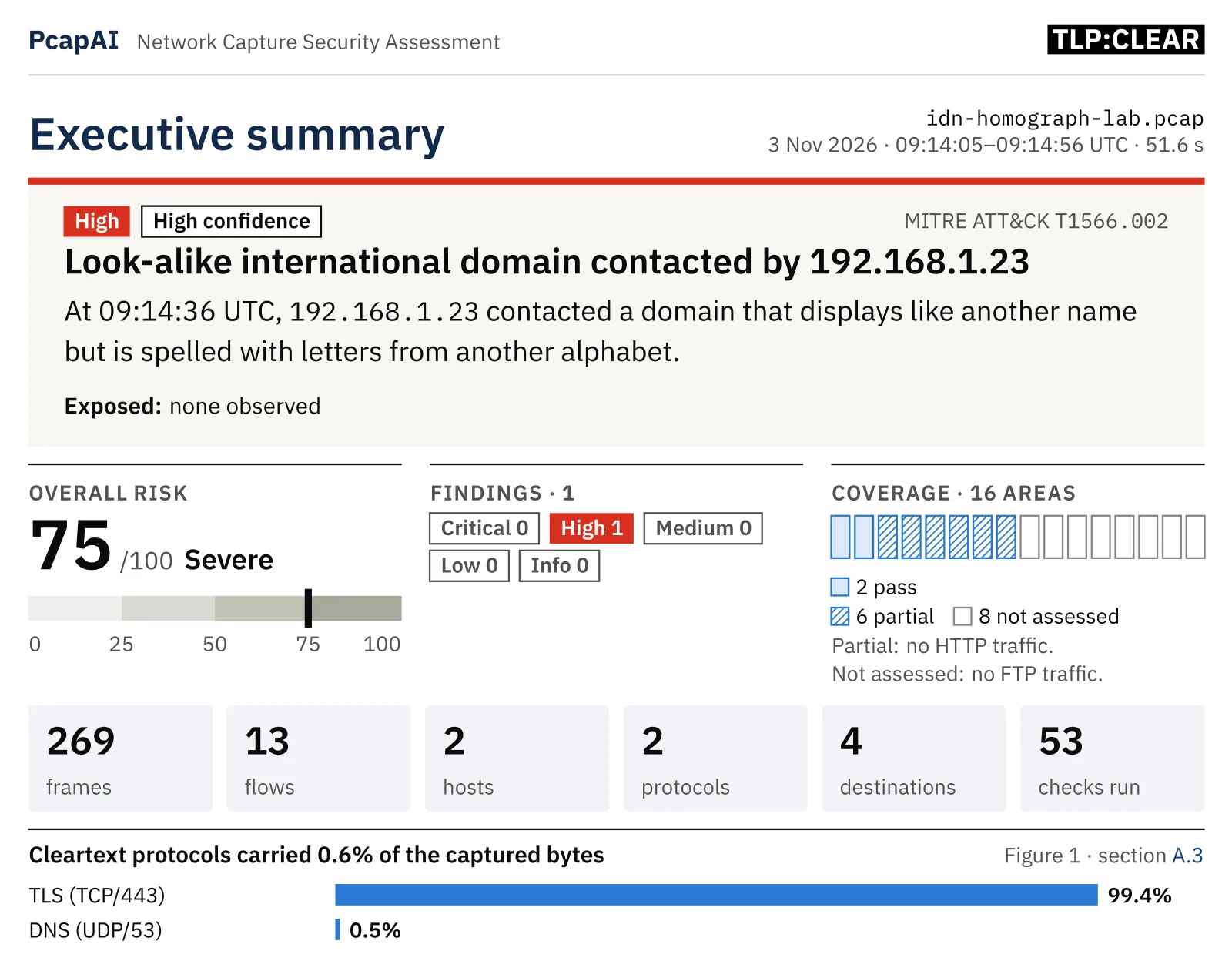
The executive summary: the look-alike domain is the lead finding.
One finding is enough: High severity with high confidence, mapped to MITRE ATT&CK T1566.002, Phishing: Spearphishing Link (sending a victim a link to a malicious site). It alone puts the overall risk at 75/100, Severe; the 53 checks that ran found nothing else in this capture.
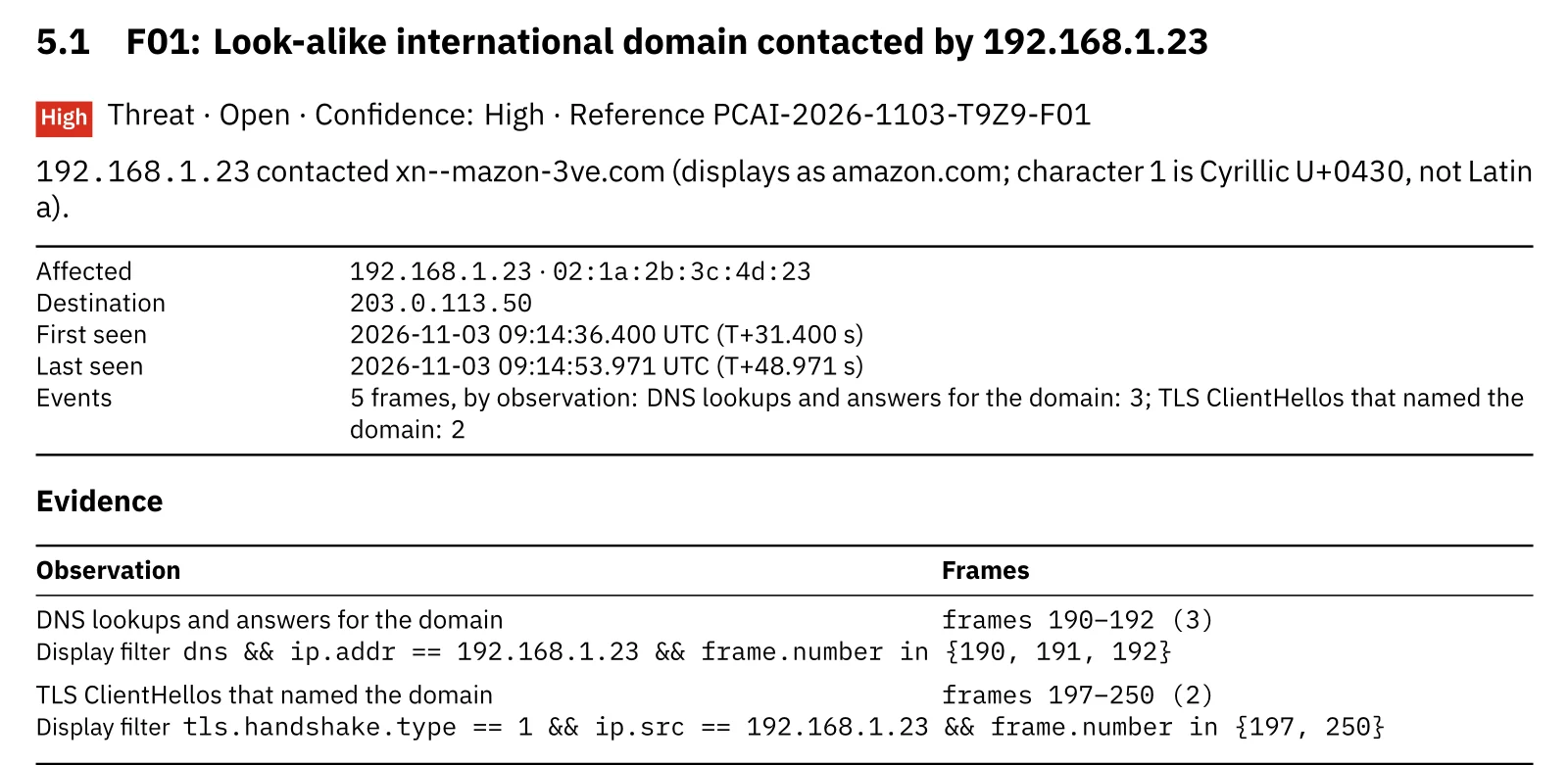
The finding: the punycode name, what it displays as, and the frames with their Wireshark filters.
The finding card says it in one sentence: 192.168.1.23 contacted xn--mazon-3ve.com, which displays as amazon.com because character 1 is Cyrillic U+0430, not Latin a. Below it are the destination address and the first and last time the laptop touched the domain. The evidence lists three DNS frames and the two TLS handshakes (ClientHello messages) that named the domain, each with a Wireshark display filter that selects exactly those frames. Anyone with the capture can open it and check every line.

The indicators appendix lists each flagged name with what it imitates, ready for a resolver or proxy block list.
A name that displays as a popular site is a High threat. A name that mixes Latin with another alphabet but resembles no well-known site is Medium: the brand it copies may be a small one, such as your client’s own supplier. Ordinary international domains are not flagged.
The report reads names from DNS lookups, plain-HTTP requests and TLS handshakes over TCP. A laptop that resolves names over DNS over HTTPS therefore still gives the look-alike away when it opens the site. Each finding also lists the steps to close the incident, with an owner for each, and names its ATT&CK mitigations; the MITRE ATT&CK coverage page lists every technique PcapAI reports on.
Hunting homographs by hand vs. a PcapAI report
The manual method above works, but it stops at the evidence: the client still needs a document that says which device, which domain, what to do and who does it.
Manual (Wireshark)
Filter for xn--, decode every name, compare each with the sites the client uses, note which host asked and when, then write it up with frames and filters for the client. Expect 20–40 minutes for a short capture when you know to look, and no finding at all when you don’t.
PcapAI
Upload the capture. The free summary takes about two minutes and already names the finding and the device. The full report adds what the name displays as, the frames, the Wireshark filters and the remediation steps, ready to send to the client.
*Our estimate for a capture the size of the 52-second, 269-frame lab capture in this post.
What to do after a device contacted a homograph domain
The capture shows that a device reached the domain, not what the user did there. Work from the assumption that whatever they typed is gone, and close the incident in this order:
- Find the message that carried the link. Search the mail gateway, chat history or browser history for the punycode name; the message tells you who else received it.
- Treat any password typed there as stolen. Reset it on the real site, opened from a bookmark, and on every other account that uses the same password. End the account’s active sessions, and check its sign-in log and multi-factor (MFA) prompts.
- Check the device. If the page offered a download, or the device contacted other new domains right after, scan it before it goes back on the network.
- Block the domain and look for other victims. Block it at the resolver or web proxy, then search DNS logs for every host that looked it up.
- Report it. Registrars and the brand being imitated both run abuse desks that act on look-alike domains.
When the device is a mail gateway
Mail security gateways and link scanners resolve the links in incoming mail by design. If the device that looked up the homograph is one of them, the lookup tells you the message arrived: find who received it before someone clicks.
If nobody was capturing at the moment of the click, start now. A capture from a mirror port on the office switch, or the firewall’s packet capture, shows whether this device or any other still talks to the domain; a few minutes is often enough. If the file is too large to upload, trim the PCAP without losing the lookups and handshakes the report needs.
Frequently Asked Questions
What is an IDN homograph attack?
A phishing technique that registers an internationalized domain name using letters from another alphabet that look identical to Latin ones, such as a Cyrillic а in place of a Latin a. The name displays like a trusted brand, amazon.com for example, but it is a different domain under the attacker’s control. On the network it travels as punycode: xn--mazon-3ve.com.
How do I find punycode domains in Wireshark?
Apply the display filter dns.qry.name contains "xn--" || tls.handshake.extensions_server_name contains "xn--" || http.host contains "xn--". It lists the DNS lookups, TLS handshakes and HTTP requests that name an international domain. Decode each name to see what it displays as, then compare it with the sites the user meant to visit.
Are all xn-- domains malicious?
No. Many legitimate sites use international names in their own language, such as сайт.рф or münchen.de. Two patterns are suspicious: a decoded name that reads exactly like a well-known brand, and a single name that mixes Latin letters with Cyrillic, Greek or Armenian ones. PcapAI flags only those two.
Can a packet capture show the domain if the browser uses DNS over HTTPS?
Usually, yes. DNS over HTTPS hides the lookup, but the browser still names the site in the TLS handshake (the Server Name Indication). PcapAI reads it from TLS over TCP; when the browser opened the site over HTTP/3 (QUIC), Wireshark still shows the name with the filter above. Only Encrypted Client Hello removes the name from the capture; then check the browser history on the device.
Does a lookup prove that the user entered a password?
No. A capture shows that the device contacted the domain, when, and how much data went each way; HTTPS hides what was typed. A second connection that uploads a few kilobytes, as in our lab capture, fits a submitted form but does not prove one. Reset the password anyway: it costs less than finding out later.
Real-world detections
Got a Capture From a Client Who Clicked?
Upload the PCAP: the free summary takes about two minutes, and the full report names each look-alike domain with what it imitates, the device that contacted it, the frames, Wireshark filters and the steps to close the incident.