Why Devices End Up With a 169.254 Address
A device that shows a 169.254.x.x address asked for an IP address and got no answer. Windows and macOS assign themselves an address from 169.254.0.0/16 when DHCP fails, and with it they can only talk to other self-assigned devices: no gateway, no internet, no servers. The real problem is the DHCP request that went unanswered.
A capture on the same network segment shows that request directly, because DHCP DISCOVER messages are broadcast. If no OFFER comes back, the DHCP server is down, its address pool is exhausted, or the relay that forwards requests from this network to the server is missing or points to the wrong place.
"No internet" or "limited connectivity" on new or rebooted devices, while devices that kept their lease still work.
Repeated DHCP DISCOVER broadcasts with no OFFER, then traffic from 169.254.x.x addresses.
What the PcapAI Report Shows
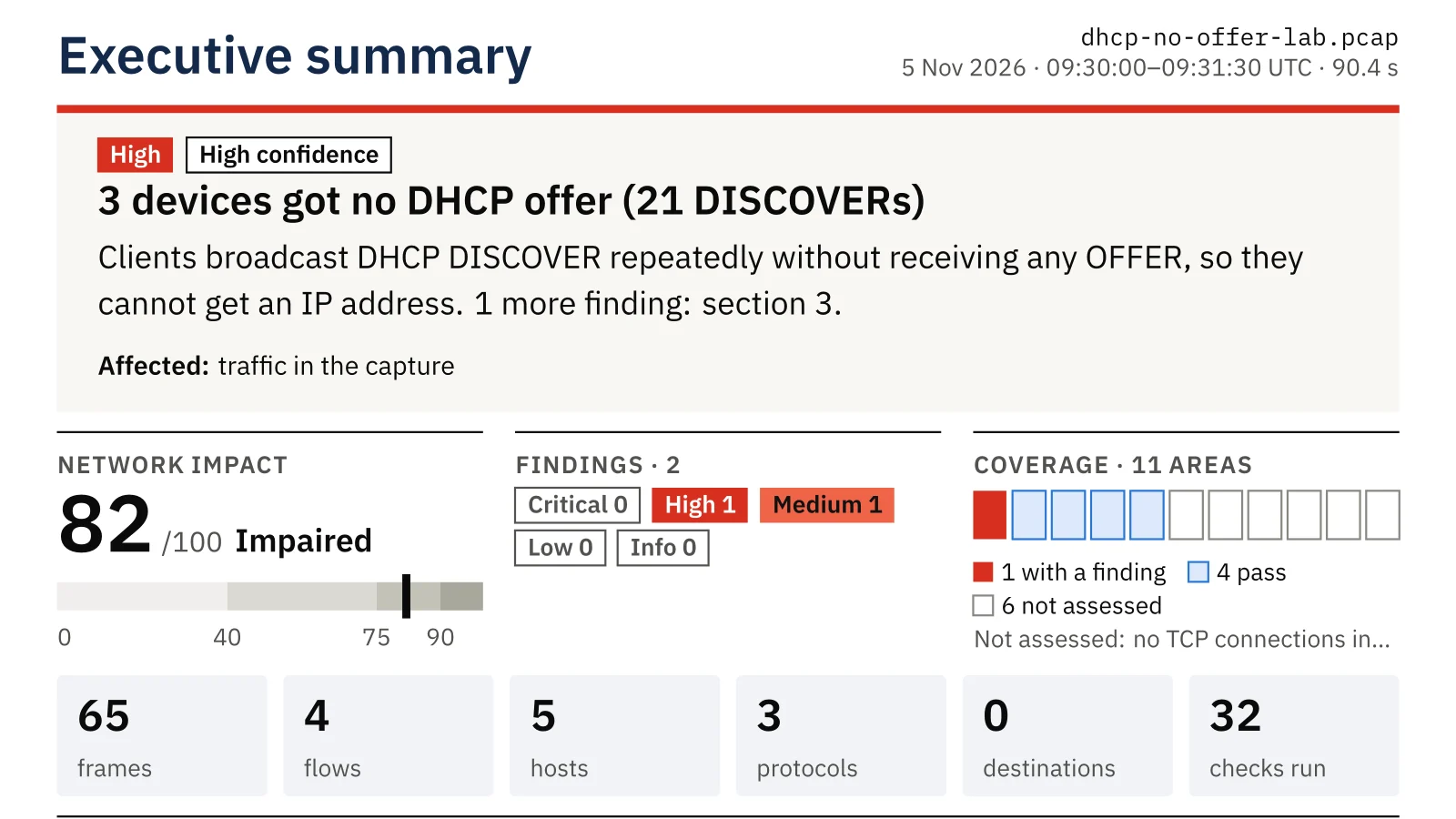
In the sample capture, three office devices start up on a network where the router and a printer keep working but nobody hands out addresses. PcapAI reports two problems:
- ✦Devices get no answer from DHCP: 3 devices broadcast 21 DHCP DISCOVER messages and received no OFFER, so they could not get an IP address.
- ✦Devices fell back to self-assigned addresses: 3 hosts gave themselves 169.254.x.x addresses and are cut off from other networks.
- ✦Why: no OFFER means the DHCP server is down, its pool is exhausted, or the relay for this network segment is missing or wrong.
- ✦Who fixes it: whoever runs the DHCP server and the network segment. The report asks them to check that the server is up and has free leases, and that the DHCP relay on this VLAN points to it; desktop IT then renews the leases on the affected devices.
The sample capture behind this page was built in a lab: every server uses a documentation address (RFC 5737) and a documentation name (RFC 2606), and the PDF is the unedited report PcapAI wrote for it.
How It Looks in a Capture (Check It Yourself)
In Wireshark, the first filter shows DHCP DISCOVER messages, the second any OFFER, the third traffic from self-assigned addresses:
dhcp.option.dhcp == 1
dhcp.option.dhcp == 2
ip.src == 169.254.0.0/16
From the command line, how many DISCOVER messages each device sent:
tshark -r capture.pcap -Y "dhcp.option.dhcp == 1" -T fields -e eth.src | sort | uniq -c
Other DHCP Problems the Report Checks
| Problem | What it means |
|---|---|
| The server refuses renewals (NAK) | The DHCP server rejects address requests, often after a scope change |
| An assigned address is already in use | A device declines the address it was given because another device has it |
| More than one DHCP server | A second device hands out addresses, often a rogue or misconfigured router |
| DHCP is slow | Getting an address takes several seconds |
| Very short leases | Devices renew constantly |
Common Causes of DHCP Failures
- ✦The DHCP scope is full, often after a guest network or a batch of new devices.
- ✦A new VLAN has no DHCP relay, or its relay still points to an old server.
- ✦The DHCP service stopped, or the server lost its path to this network.
- ✦A switch drops DHCP answers on ports it does not trust.
- ✦A second DHCP server answers first with the wrong settings; the report checks for that too.
Which one applies depends on the server and the switches, so the report hands the checks to whoever runs them.
From Capture to Fix
- Capture on the affected device's network segment, or on the device itself, while it starts up or reconnects.
- Upload the capture: the free summary shows whether DHCP requests go unanswered and which devices self-assigned.
- On an affected Windows device,
ipconfig /allshows the 169.254 address and whether a DHCP server was ever recorded; on macOS,ipconfig getpacket en0shows the last DHCP answer. Neither changes anything. - After the DHCP server or relay is fixed, capture a renewal: the report's own check is an OFFER within one second.
Frequently Asked Questions
What does a 169.254 address mean?
It is a link-local address the device gave itself because it did not get one from DHCP. With it, the device can only reach other devices that also self-assigned; it has no gateway, so internet and servers are unreachable.
Why does a DHCP server not answer?
The server may be down or out of free addresses, or the DHCP relay on the router or switch for this network segment may be missing or point to the wrong server. A switch feature that filters DHCP answers on untrusted ports can also drop the OFFER.
Where should I capture a DHCP problem?
On the same network segment as the affected device, or on the device itself, from the moment it connects. DHCP DISCOVER messages are broadcast, so any port that sees the segment's broadcast traffic also sees them.
Related Pages
Check your own capture
Capture a device while it tries to connect and upload it: the free summary shows in about two minutes whether DHCP requests go unanswered, and the $9 PDF adds the devices, the counts and the fix.
Sample Report: Executive Summary