When DNS Is the Slow Part
Before an application can connect, it has to resolve a name, and two DNS failures stall it in different ways. An unanswered query makes the client wait for its timeout, a second or more each time, then retry or try another resolver. A SERVFAIL answer comes back quickly but says the resolver could not complete the lookup, because its forwarders or the authoritative servers are unreachable, or DNSSEC validation failed.
Users rarely see the word DNS. They see some sites or internal systems that open after a pause, or not at all, while others work. Because the network carries the queries and the answers fine, the fault sits with the DNS server, and a capture shows which names fail and how.
The first click on a site or an internal system hangs for seconds, or fails with "server not found", then sometimes works.
Queries to the resolver that never get an answer, and answers with the SERVFAIL code for specific names.
What the PcapAI Report Shows
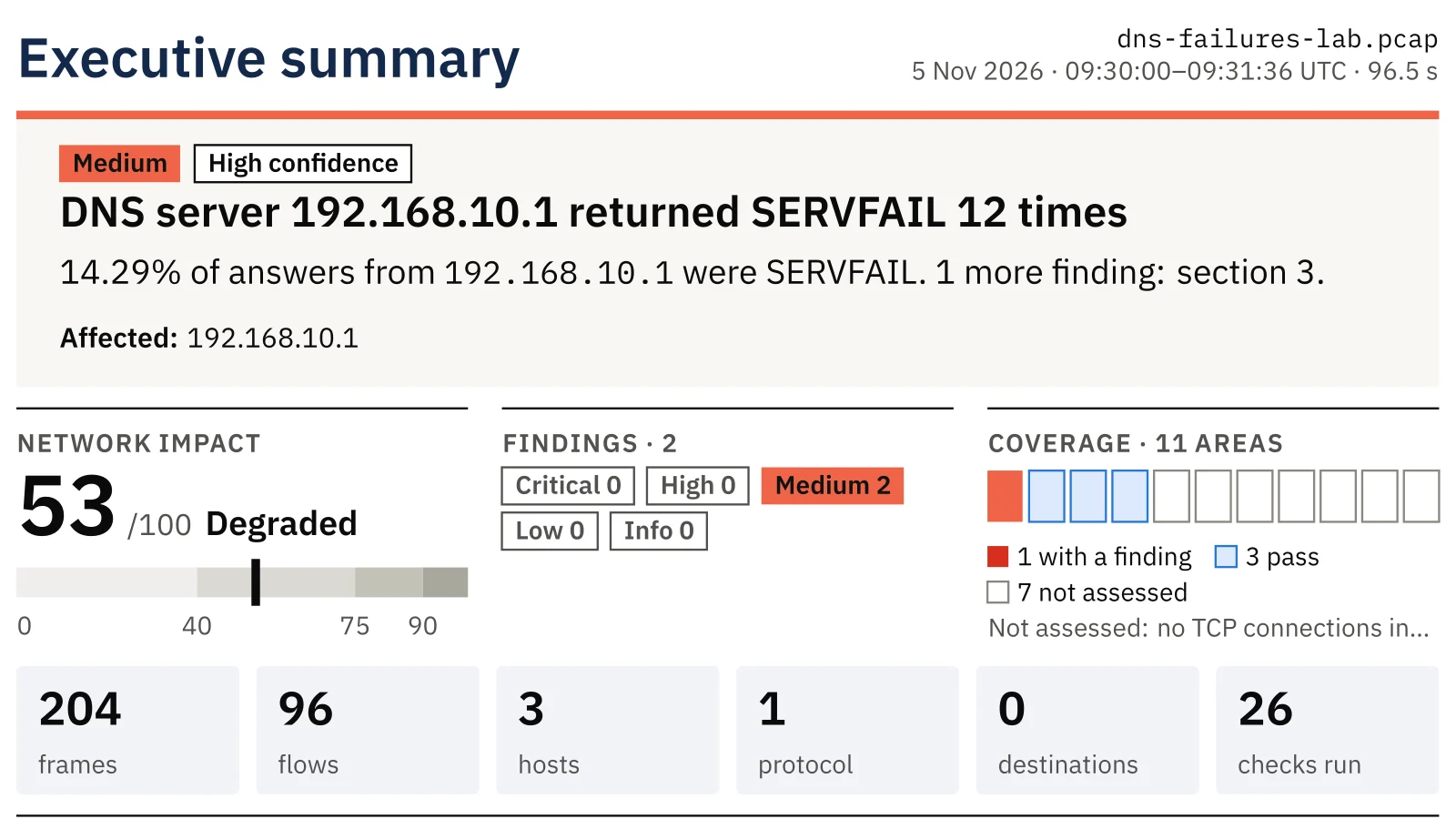
In the sample capture, two office laptops use the router at 192.168.10.1 as their DNS server. Most lookups are answered
in milliseconds; a few names are not. PcapAI reports two problems and places both on the DNS server:
- ✦A DNS server leaves queries unanswered: 12 of 120 queries got no answer, and the clients retried them 24 times. Each unanswered lookup costs the application a timeout of a second or more.
- ✦A DNS server fails lookups (SERVFAIL): 12 of 84 answers were SERVFAIL, for two names, from both laptops.
- ✦Why: unanswered queries stall every application that needs a name; SERVFAIL means the resolver could not complete the lookup, because its forwarders or the authoritative servers are unreachable, or DNSSEC validation failed.
- ✦Who fixes it: the DNS administrator. The report asks them to check that the resolver is reachable on UDP and TCP port 53, its forwarders and its DNSSEC validation logs, and to give clients a second resolver.
The sample capture behind this page was built in a lab: every server uses a documentation address (RFC 5737) and a documentation name (RFC 2606), and the PDF is the unedited report PcapAI wrote for it.
How It Looks in a Capture (Check It Yourself)
In Wireshark, the first filter shows SERVFAIL answers, the second shows queries that never got a response, the third slow answers:
dns.flags.rcode == 2
dns.flags.response == 0 && !dns.response_in
dns.time > 0.5
From the command line, the names that fail with SERVFAIL and how often:
tshark -r capture.pcap -Y "dns.flags.rcode == 2" -T fields -e dns.qry.name | sort | uniq -c
When DNS Failures Count as a Problem
| Problem | Reported when | High when |
|---|---|---|
| Unanswered queries | At least 3 unanswered, and at least 5% of 10 or more queries to one server | 20% or more go unanswered, or the server never answers |
| SERVFAIL answers | At least 3, and at least 2% of the server's answers | 20% or more of its answers |
Common Causes of DNS Failures
- ✦The resolver is overloaded or restarting, and drops queries.
- ✦Its forwarders, or the path to them, are down, so it answers SERVFAIL or nothing.
- ✦A firewall blocks DNS over TCP, so large answers fail.
- ✦DNSSEC validation fails for a zone with broken signatures.
- ✦Internal zones are missing on the resolver clients use, for example after a VPN or split-DNS change.
The report names the failing names and the resolver, which narrows these down to one or two.
From Capture to Fix
- Capture on a client while the slow or failing names are used, including the first lookup of each.
- Upload the capture: the free summary shows which DNS server fails and how.
- From a host you control, repeat the lookups read-only:
dig @192.168.10.1 example.com, and for a SERVFAIL name,dig @192.168.10.1 name +cd. A name that resolves only with checking disabled fails DNSSEC validation. - After the fix, capture again: the report's own check is that the failing names resolve with NOERROR and no queries go unanswered.
Frequently Asked Questions
What does SERVFAIL mean?
SERVFAIL is the answer a resolver sends when it could not complete a lookup: its forwarders or the authoritative servers did not answer, or the answer failed DNSSEC validation. The name may exist; this resolver could not get it.
Why are some DNS queries never answered?
The resolver may be overloaded or down, a firewall may drop UDP or TCP port 53 on the way, or the resolver may itself wait on an upstream server that never answers. The capture shows the queries leaving and nothing coming back, which separates this from a client problem.
Can the client side cause DNS failures too?
Yes, and the report checks for it: a client that sends internal names to a public DNS server, tries many search suffixes for one short name, or floods the resolver with queries. Those problems point at the client's settings instead of the DNS server.
Related Pages
Check your own capture
Capture the slow or failing lookups and upload them: the free summary shows in about two minutes which DNS server fails and how, and the $9 PDF adds the names, the counts and the fix for the DNS administrator.
Sample Report: Executive Summary