What a TCP Zero Window Means
A TCP zero window is a receiver telling the sender to stop: its receive buffer is full because the application on that host is not reading the data fast enough. The sender pauses and probes until the window opens again. The network is not the bottleneck; the receiving host is, whether that is a client or a server.
That makes zero windows easy to misread. A transfer that freezes for seconds looks like a network outage to the user and often to the first person on the ticket. In the capture, though, every packet arrives and is acknowledged; the receiver simply advertises a window of zero bytes.
Downloads, file copies or reports that stop and start, or hang on one machine while others work.
The receiver's acknowledgements carry a window of 0, and the sender's segments stop until the window reopens.
What the PcapAI Report Shows
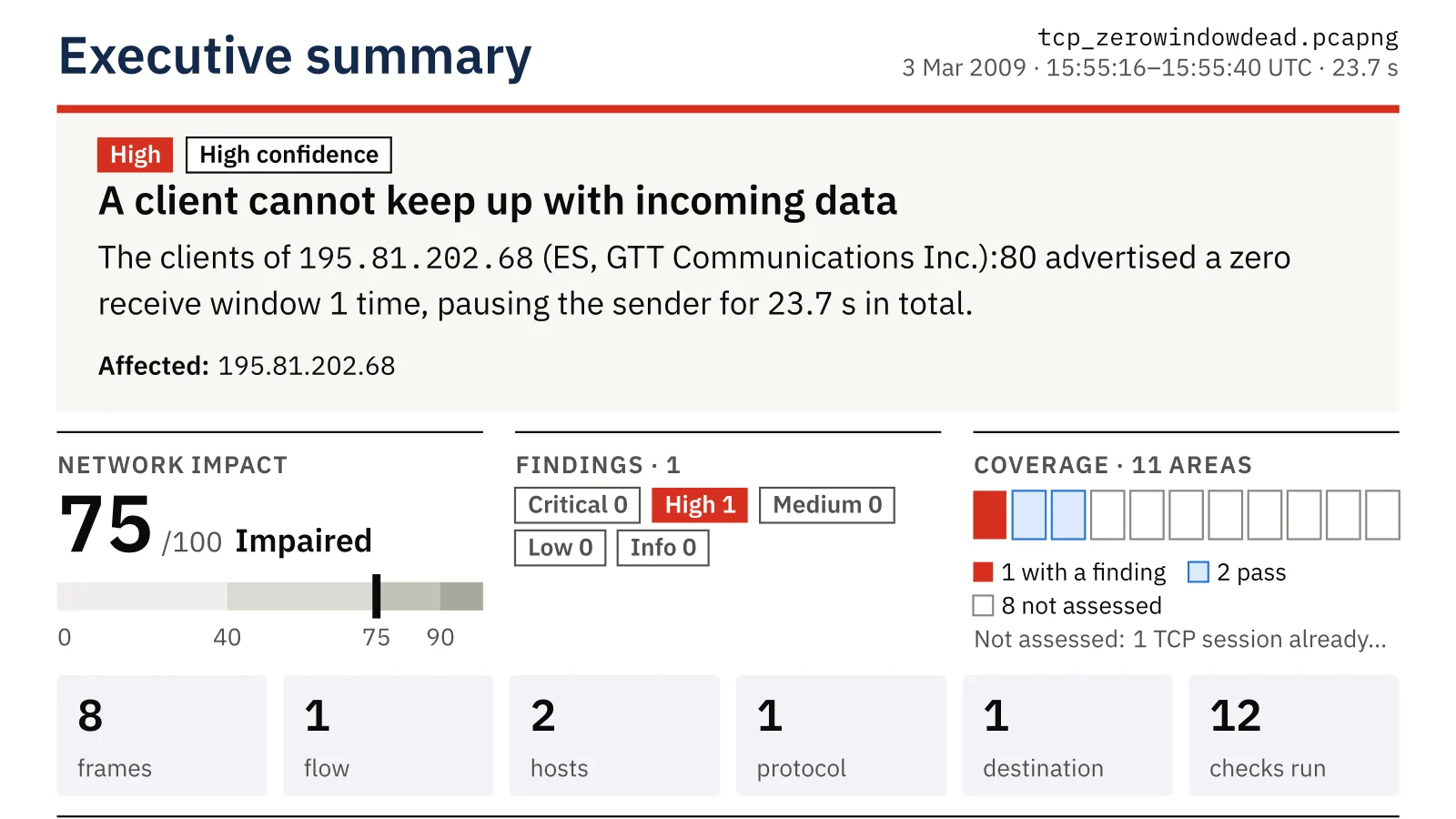
The sample is a public capture from the Practical Packet Analysis book: a client downloads from a web server and stops reading. PcapAI reports one problem, with high confidence, and places it on the client:
- ✦A client cannot keep up with incoming data: the clients of the web server advertised a zero receive window, pausing the sender for 23.7 seconds in total.
- ✦Why: the receiving application is not reading from its socket, because of CPU, disk or a blocked thread; the network is not the bottleneck here.
- ✦Who fixes it: desktop or end-user IT. The report asks them to check CPU, disk and the application's threads on that host, then its socket receive buffers and any antivirus or DLP inspection.
- ✦How to confirm the fix: no zero-window advertisements in a new capture under the same workload.
How It Looks in a Capture (Check It Yourself)
Wireshark flags both sides of the stall; the first filter marks the receiver's zero-window acknowledgements, the second the sender filling the last open window:
tcp.analysis.zero_window
tcp.analysis.window_full
From the command line, when and from where the zero windows were sent:
tshark -r capture.pcap -Y tcp.analysis.zero_window -T fields -e frame.time_relative -e ip.src -e tcp.srcport
Zero Window, Window Full or Packet Loss?
| What you see | What it means | Usually fixed by |
|---|---|---|
| Zero window from the receiver | The receiving application is not reading | Owner of the receiving host |
| Window full from the sender | The sender used the whole window the receiver offered | Owner of the receiving host, or TCP buffer settings |
| Retransmissions and duplicate ACKs | Packets are lost on the way | Network team or ISP |
PcapAI checks receive windows and packet loss as separate areas, so a zero window is not mistaken for a network fault.
Where to Capture a Zero Window
- ✦On the receiving host, or as close to it as you can, while the stall happens.
- ✦On the sender's side if the receiver is out of reach: the zero-window acknowledgements are visible there too.
- ✦For the whole stall, not only its start: the report counts every episode and the total time the sender was paused.
A capture in the middle of a busy path can miss packets; the report says so when it does, with the reason.
From Capture to Fix
- Capture on or next to the host that receives the data, while the transfer stalls.
- Upload the capture: the free summary names the side that advertised the zero window.
- On that host, look at CPU, disk and the application at the capture time. On Linux,
ss -tmishows the receive queue of each connection without changing anything. - Capture again under the same workload: no zero windows means the receiver keeps up.
Frequently Asked Questions
Is a TCP zero window a network problem?
No. The receiver advertises a zero window because its own application has not read the data it already received. The packets arrived; the host could not keep up. The fix belongs to whoever owns that host, a client or a server.
What is the difference between a zero window and a window full?
Wireshark marks a zero window on the receiver's acknowledgement that announces a window of 0 bytes. It marks window full on the sender's segment that uses up the last of the window the receiver offered. Both mean the receiver is the limit; only a zero window stops the transfer completely.
What usually causes a client to stop reading?
A busy CPU, a slow disk, an application thread that blocks, or security software that inspects data before the application sees it. The PcapAI report lists these checks for the host that advertised the zero window.
Related Pages
Check your own capture
Capture a stalled transfer and upload it: the free summary shows in about two minutes which side advertised the zero window, and the $9 PDF adds the times, the evidence and the checks for its owner.
Sample Report: Executive Summary